


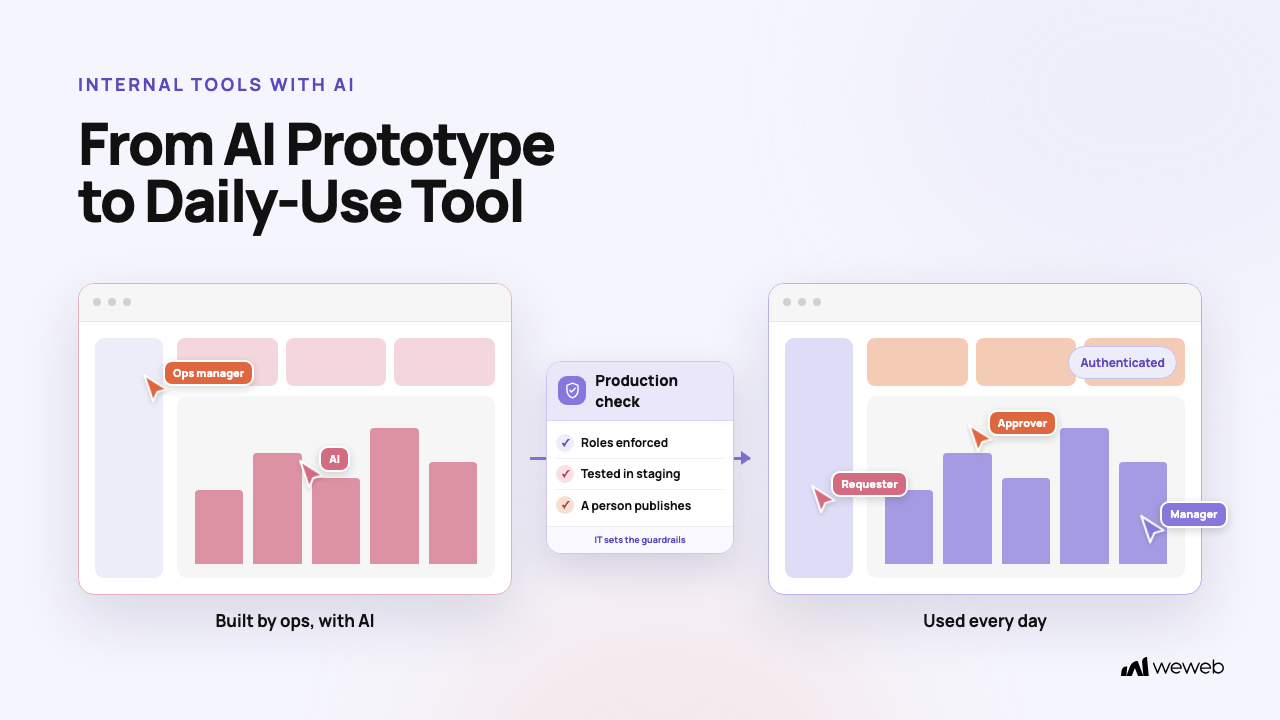
Yes. A non-technical operations manager can build an internal tool with AI that the company uses every day. Operations managers are often better placed than developers to decide what the tool should do because they know the real workflow, the exceptions, the bottlenecks and what frustrates the team.
There is one distinction to keep in mind from the start. Building a tool that works is now relatively easy, but building one that is safe, reliable, maintainable and fit for the business to depend on every day is harder.
AI has lowered the barrier to building software. It has not removed the need for security, testing and someone who owns the tool once it is live.
The model that works:
- the operations manager owns the problem, the workflow and the requirements,
- AI speeds up the build, and
- a technical partner reviews security and production readiness.
This guide covers what to build first, which tools to use, the safeguards that matter, the five most common failures and a rollout path from prototype to daily use.
What an operations manager can realistically build with AI
Start with a tool that fixes one process your team runs every day.
These are good candidates, from easiest to most demanding:
Every one of these needs sign-in and roles from day one. The requester, the approver and the manager should not see or change the same things.
Be more cautious with payroll, financial transactions, sensitive employee records, regulatory reporting and anything customer-facing. In those areas a wrong calculation or an unauthorized action can do real harm. You can still build them, but only with the technical oversight described later in this guide.
If you are still deciding whether to build at all, our guide to buying vs. building internal tools walks through that choice.
Which AI tools make this possible
Several types of tools can help you build an internal tool with AI. They are not interchangeable. The main differences are who the tool is built for, what you can change without code and what governance comes with it.
Competitor details below were last checked on November 5th, 2026.
Retool
Best for: operational tools in teams that have, or can borrow, some developer time. Dashboards, approval tools, internal databases and employee-facing apps.
Retool offers permissions, audit logs, source control and separate deployment environments. It is built with developers in mind, so expect to write some JavaScript and SQL as the tool grows.
💡 Nobody on your team writes code? If people outside your dev team will build and maintain the tool, compare WeWeb and Retool before you decide.
Microsoft Power Apps
Best for: companies already standardized on Microsoft 365, SharePoint, Teams and Dataverse.
Power Apps is a low-code environment with the governance controls Microsoft customers already use. If your data and your IT policies live in Microsoft, it is the path of least resistance.
WeWeb
Best for: an operations manager who wants to describe the tool in plain language, then open it and change it without code, inside guardrails IT can easily set up or approve.
WeWeb is an AI app builder. You describe the tool to WeWeb AI in the editor, or you build with the AI agent you already use (Claude Code, Cursor, ChatGPT) through the WeWeb MCP. Either way, the result is a visual app: pages, workflows and data you can open and edit without reading code.
What matters for daily business use:
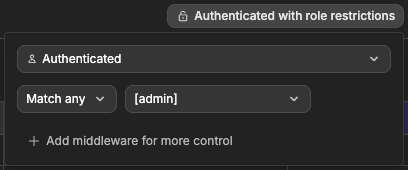
- Roles enforced in the backend. Roles apply to table views, API endpoints and private pages. Hiding a button is only a convenience; the security rules run on the server.
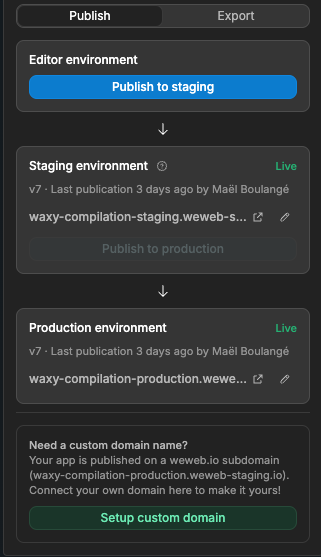
- Editor, Staging and Production. Each environment keeps its own data, users, secrets and integration connections. Staging is available on plans that include it.
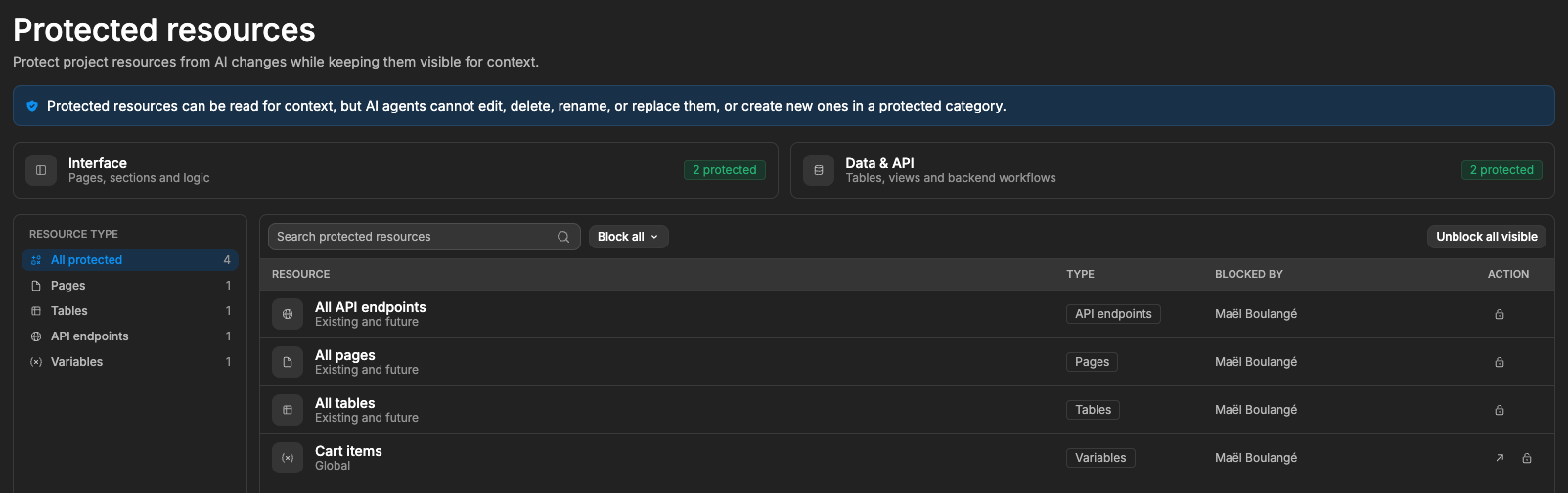
- Rules AI can't break. Once a page, workflow or table works, you can protect it from AI changes. AI will be able to read it for context but won't be able to change it.
- A person publishes. AI never publishes on its own, and database schema changes need your approval before they go live.
- Your data stays where it belongs. Use WeWeb's own backend, Supabase, Xano, or a mix. AI never has access to your production data.
WeWeb starts at $20/month, billed annually (see pricing). See how operations teams use it for internal tools.
Lovable
Best for: turning a plain-English description into a working web app fast, when speed of prototyping matters most.
Lovable generates a code-based web app from a prompt. It supports publishing controls, security scanning and role-based access on the appropriate plans. Small visual edits are possible, but deeper changes to logic, data or access rules usually mean prompting again or editing code.
💡 Will a non-technical colleague maintain it after you? See how Lovable and WeWeb differ once the prototype has to become a tool the business runs on.
Replit
Best for: more customized applications built through conversation with an AI coding agent.
Replit includes version history, security scanning, deployment controls and enterprise access management. The output is code, so plan for someone who can read it.
💡 Not planning to work in code? Compare WeWeb and Replit to see the trade-off between an AI coding environment and a visual builder.
How to choose
- Choose Power Apps if you're already deep in the Microsoft ecosystem and IT owns app governance.
- Choose Retool if developers are involved in building and maintaining internal tools.
- Choose WeWeb if you want the operations team to build and maintain their own tools with the governance IT needs.
- Choose Lovable or Replit if you want to prototype quickly and have a plan to manage it in production.
What makes an AI-built internal tool safe
The most important rule: security cannot depend on the AI remembering to write secure code. The safeguards should be built into the platform you choose and into your company's process.
One distinction catches many teams out: a secure platform does not make every app built on it secure. A platform can hold a security certification while an app built on it has permissions configured wrongly. The platform gives you the controls. Someone still has to set them up correctly for your tool.
How this list maps to WeWeb
If you are evaluating WeWeb, here is how each safeguard is covered today, including where you need to plan around a gap:
- SSO: WeWeb Auth supports 30+ sign-in providers, including Microsoft and Google. Auth0 and OpenID Connect cover Okta, Azure AD and other identity providers.
- Roles: set in WeWeb Auth and enforced on table views, API endpoints and private pages (managing roles). For an internal tool, you can turn off public sign-up so only people an admin invites can get in.
- Database permissions: filter rows on the signed-in user so each person only gets their own records. With Supabase as your backend, its row-level security applies.
- Testing and production: separate environments, each with its own data, files, logs and secret values.
- Data backups: point-in-time restore of any environment.
- App history: deployment history shows what is live, who published it and when. Editor backups let you restore an earlier state, and backend workflows can be reverted to their last deployed version.
- Monitoring: logs record every backend request with inputs, outputs, status and timing, per environment.
- Secrets: secure environment variables are only readable on the server, with a different value per environment.
- Audit logs: WeWeb does not keep a native audit trail of who changed which page or workflow in the editor. If your IT team requires change-level audit logs, raise it during the technical review and decide together how to cover it.
💡 Pro tip: on the Enterprise plan, IT can connect your company directory (Google Workspace or Microsoft Entra ID) to WeWeb. Your team signs in with their work accounts, and directory groups like Sales or Finance sync to WeWeb with their access to projects and data. WeWeb checks the directory every few minutes, so when IT suspends someone's account, they lose access to WeWeb too. You can also make an internal app company-only: it stays out of search engines, and only people in your organization can open it, with no sign-in logic for you to build.
Five ways AI-built internal tools go wrong
These are the failures to plan for. Each one has a known prevention.
1. The tool works, but it isn't secure
An employee opens another department's records by changing an ID in a URL or in a request to the API. The interface hid the data, but nothing on the server stopped the request.
Prevention: enforce permissions on the server and in the database, not by hiding buttons in the interface. Then test it: sign in as a low-permission user and try to reach data you shouldn't see.
2. A small change breaks the whole workflow
You ask AI to rename a field. Suddenly the approval flow stops routing, or the weekly totals are wrong.
Prevention: keep version history, test changes in a staging environment, and have a person approve before anything goes live. Once a part of the tool works, lock it so AI can't touch it while you change something else.
3. The tool depends on one person
The operations manager who built it leaves. Nobody else knows how it works or where the logins are.
Prevention: build on company-owned accounts, document the workflow, name a technical owner, and choose a tool a non-technical colleague can open and understand. A visual app that someone else can read is easier to hand over than generated code only its author understands.
4. The tool quietly produces wrong numbers
An AI-written formula miscalculates inventory, commissions or financial totals. Nobody notices for weeks.
Prevention: check every calculation against a handful of known examples before launch, and reconcile the tool's outputs against the source system on a schedule.
5. The tool stops when a vendor or integration changes
An API changes, an automation hits its limit, or a subscription lapses. The tool fails without warning.
Prevention: monitor failures, document every dependency, write down how to recover, and keep a manual fallback for the process.
A safer path from prototype to daily use
Use a five-stage rollout. It adds a few weeks, and it is what separates a prototype from a tool the business can rely on.
Stage 1: Build a prototype. Use sample data, not real customer or employee information. Solve one specific operational problem.
Stage 2: Test with real-world scenarios. Try wrong inputs, missing information, duplicate submissions, unusual cases and several people using the tool at the same time.
Stage 3: Get a technical review. Ask IT or a developer to review sign-in, database permissions, integrations, secrets and recovery. Bring the safeguards table above as your checklist.
Stage 4: Run a controlled pilot. Start with a small group. Keep the old process available as a fallback, and compare the new tool's outputs against it.
Stage 5: Approve production use. Confirm an owner, monitoring, backups, documentation, a change-approval step and a plan for incidents.
A useful rule: don't make the new tool the only way to complete an essential business process until it has proven reliable under real operating conditions.
When to bring in a developer
The operations manager doesn't need to become a software engineer. They do need a technical partner who can check the parts AI might get wrong. How much oversight depends on what the tool does:
For anything rated high, involve the technical partner from Stage 1, not only at the review.
The bottom line
Operations managers can now build the internal tools their teams need. The biggest opportunity isn't replacing developers. It is letting the people closest to an operational problem fix it without waiting months in an engineering backlog.
The biggest danger is mistaking a working prototype for production-ready software.
A principle that works for most companies:
Business teams build. IT sets the guardrails. Technical owners approve production.
That gives teams autonomy without turning the company into a collection of undocumented, unmaintained AI apps.
If your operations team will build and maintain the tool itself, WeWeb is built for that setup: AI builds it, you stay in control, and your data stays where it belongs. Start building for free.
Frequently asked questions
Can someone with no coding experience build an internal tool with AI?
Yes. AI app builders let you describe the tool in plain language and generate a working first version. Choose a tool whose output you can open and change without code, and get a technical review before the tool handles real business data.
Is an AI-built internal tool secure?
It can be, but security has to come from the platform and the setup, not from the AI. Check that permissions are enforced on the server and in the database, that testing and production are separate, and that secrets, backups and monitoring are in place.
Do I still need IT if AI builds the tool?
Yes. IT's role shifts from building the tool to setting the guardrails: who can sign in, which data sources the tool can reach, and what has to be reviewed before it goes live.
What should my first AI-built internal tool be?
A request and approval tool or an operations tracker. Both fix a daily process, touch a limited amount of sensitive data and are easy to test against the process they replace.
