Lovable vs WeWeb: Which AI app builder fits your team?
Updated on
October 27, 2026
Lovable and WeWeb both build apps from a prompt. The difference shows up once your team depends on that app, and you need to understand what AI built, change how it works and protect what your team relies on.
Lovable offers limited visual editing, so to understand and update your app's logic, you depend 95% on AI. And asking it to fix one thing can break something else.
In WeWeb, everything AI builds sits in a visual editor, including complex business workflows and security rules, so you can see it, understand it and step in when needed. Work with AI or make changes yourself. Once a page, workflow or component works the way you want, protect it so AI can't edit it anymore. You decide what AI can change, and your production data never reaches AI.
Choose WeWeb if a business team will build and keep improving the app with AI, and it runs on data you can't afford to break.
Choose Lovable if engineers will own the code, or you're launching a consumer app or marketing site and need help finding your first users.
Here's why business teams choose WeWeb over Lovable.
Your production data never reaches AI
Both tools let AI build your backend. In Lovable, AI works on your production database. In WeWeb, your production data never reaches AI.
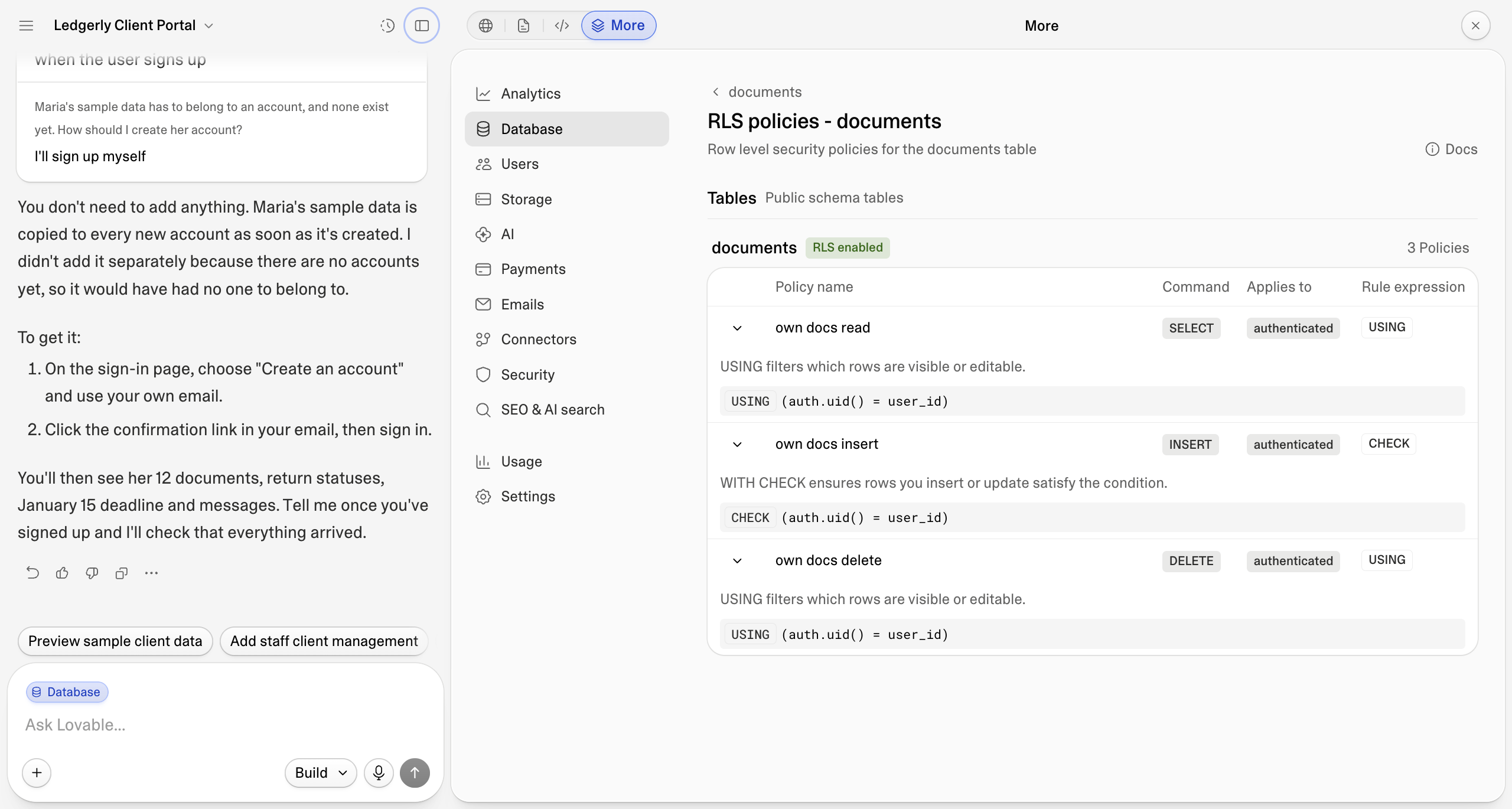
Lovable's agent works on the database your customers use. Unless you change its permissions, it can read, add, change and delete those records. On Free and Pro plans, what you share with Lovable can also be used to train its AI models unless you opt out.
In WeWeb, AI builds on separate editor data, including your own agent through MCP. It can set up your tables and workflows, but it never sees or changes your real customer records.
You test changes on that editor data too, and nothing goes live until you publish. Our AI providers aren't allowed to train their models on your data. All of this is on by default: no action needed from your end.
AI can't break what already works
Both tools let you keep improving your app with AI. In Lovable, you hope AI won't break what already works. In WeWeb, it can't.
In Lovable, every change goes through a prompt to your codebase. You can review a plan first, and add workspace knowledge or skills telling AI what to leave alone. But those are instructions AI interprets, not rules it has to follow, so a new prompt can still change a part that was working.
"For me, it's important to understand what's happening under the hood. If a customer asks, 'why did this break?', I want to be able to answer that." ~ Aby Abraham, a non-developer who built three revenue-generating apps with WeWeb
Once a page, workflow, table or component works the way you want, protect it in WeWeb. AI, including your own agent through MCP, can read it to understand how your app fits together, but it can't edit, rename or delete it. Your team can still change protected parts by hand.
Here's how to set up your guardrails:
Understand everything AI builds, without reading code
Both tools show you what AI built. In Lovable, understanding the underlying logic means reading code. In WeWeb, you can follow that logic visually.
In Lovable, each request ends with a summary in the chat and the result in the preview. Underneath, everything AI builds is code. That works well if you or a developer read and write code. If you're a non-developer, you're relying on AI's summary of what it did.
In WeWeb, everything AI builds is visual/no-code so anyone on the team can follow it. Here's what that looks like in the parts of your app that matter most.
Check who can see each record, without deciphering SQL policies
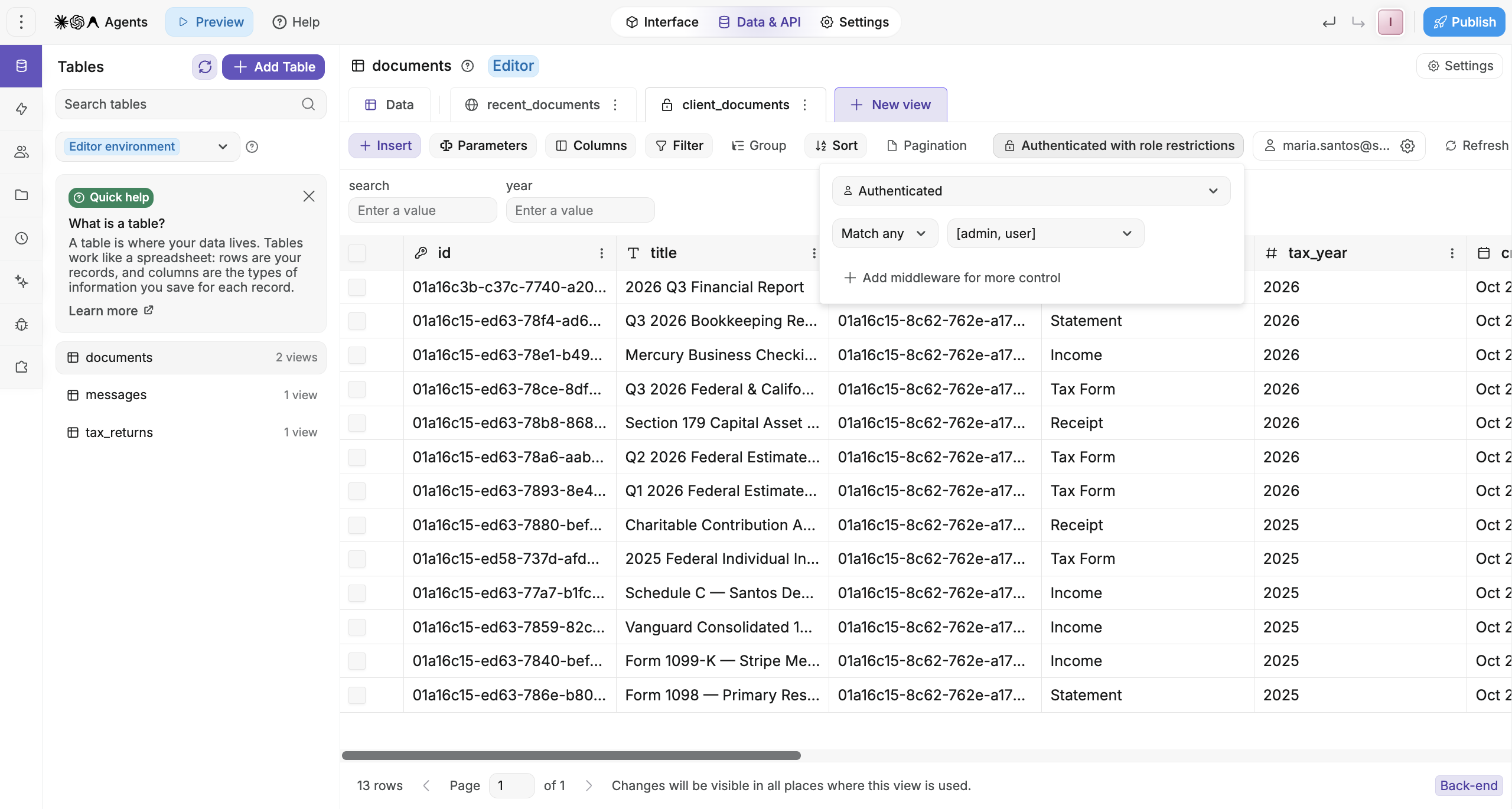
WeWeb lets you set the same access visually on each table, endpoint, and page: signed-in users, specific roles, or only the records a user owns. Anyone on the team can open the rules and check who sees what before you publish.
See where each screen gets its data, without digging through components
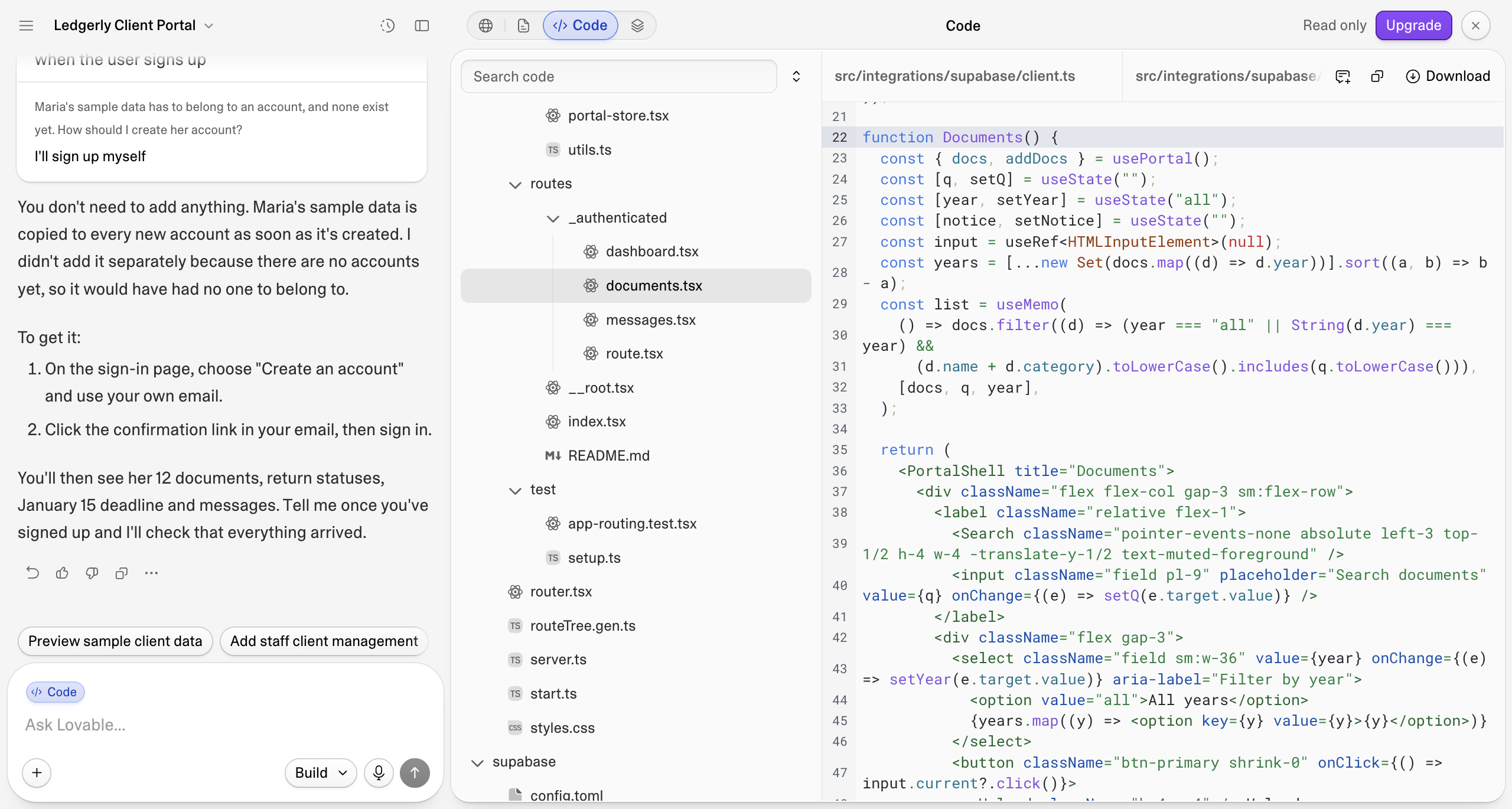
When a list shows the wrong records, you first need to know where its data comes from. In a Lovable app, that's spread across the code: a shared data file that queries the database, and the screen's own code that filters it. So unless you read code, you're relying on AI to track down the problem.
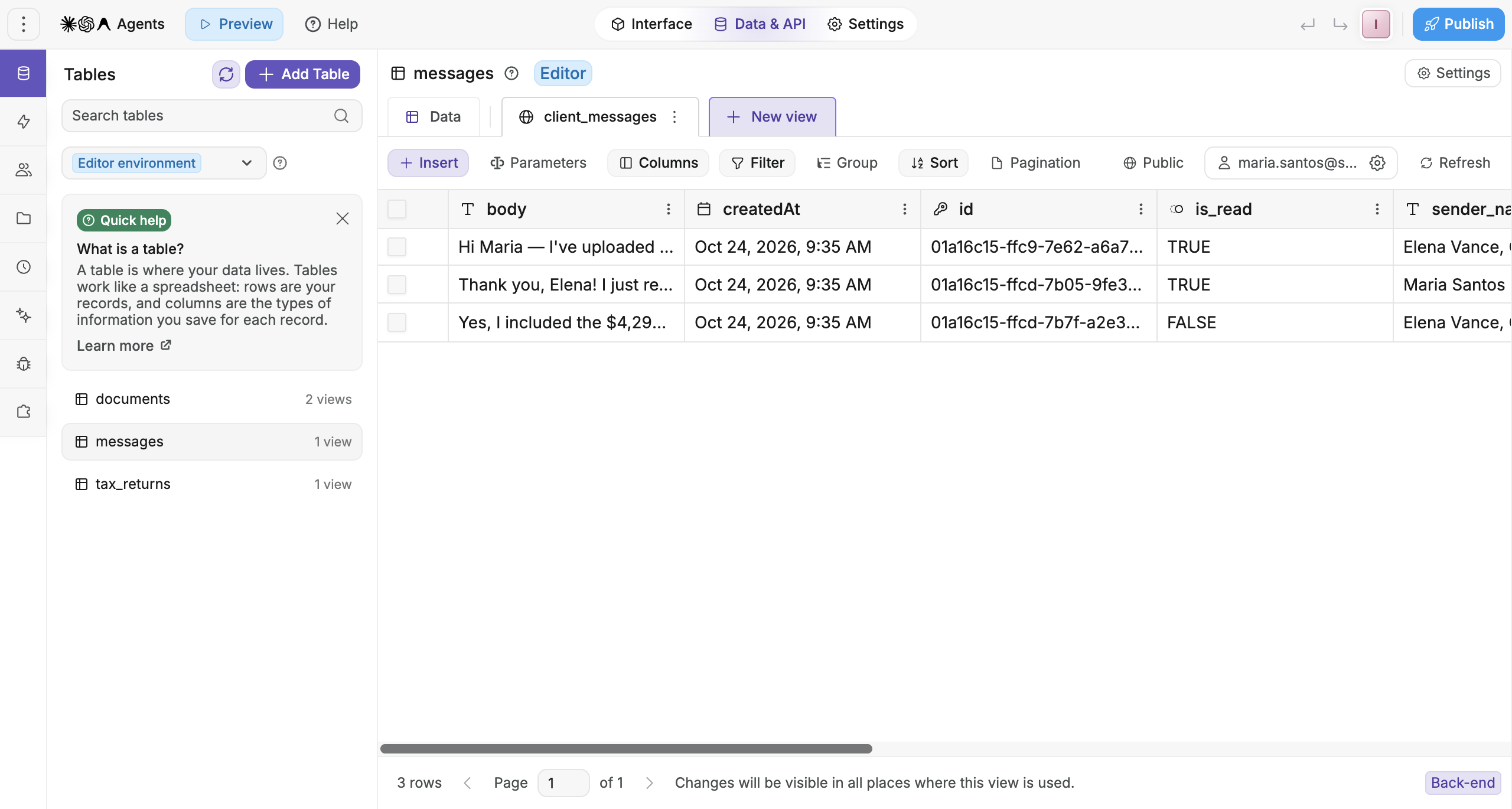
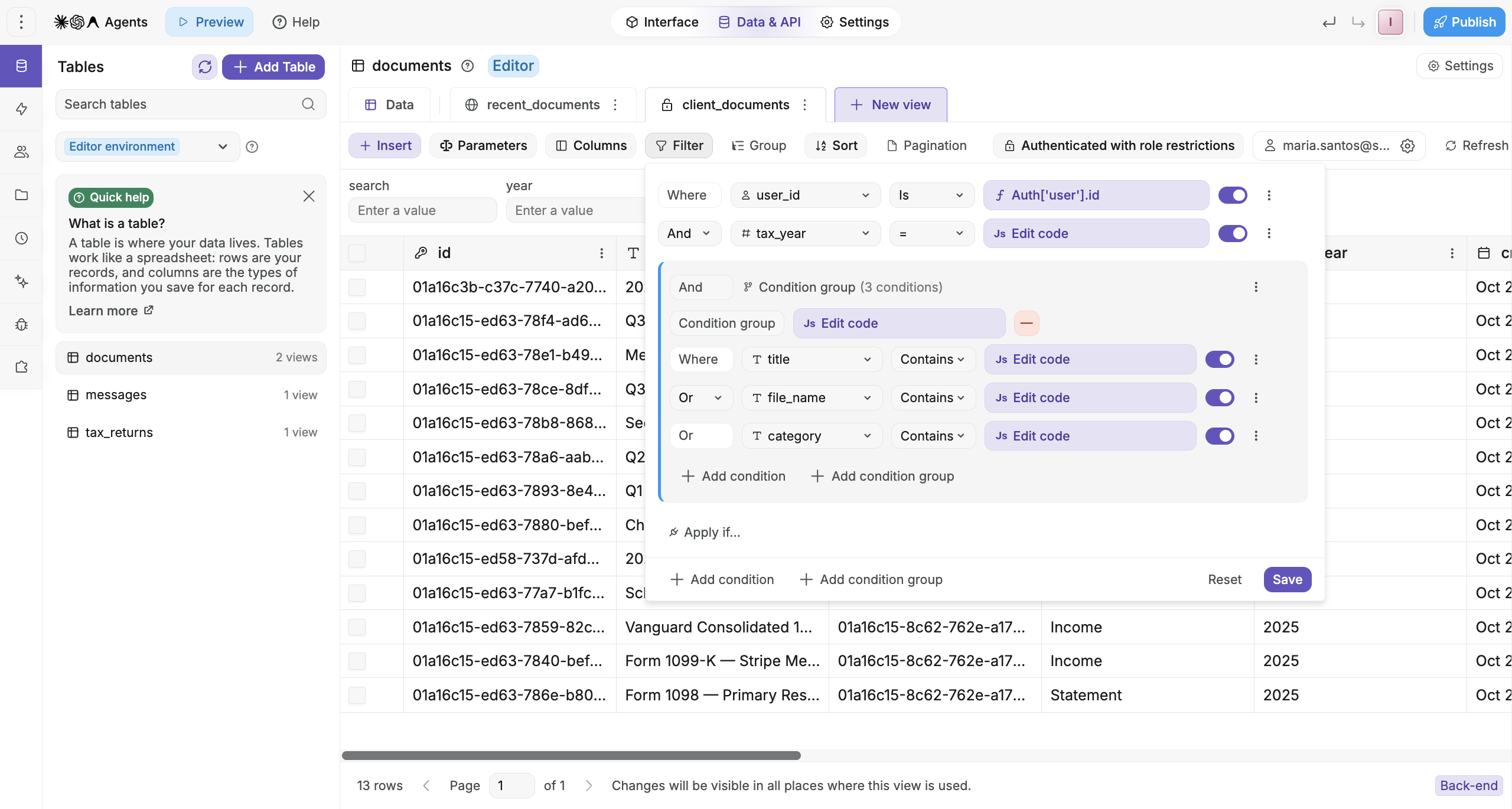
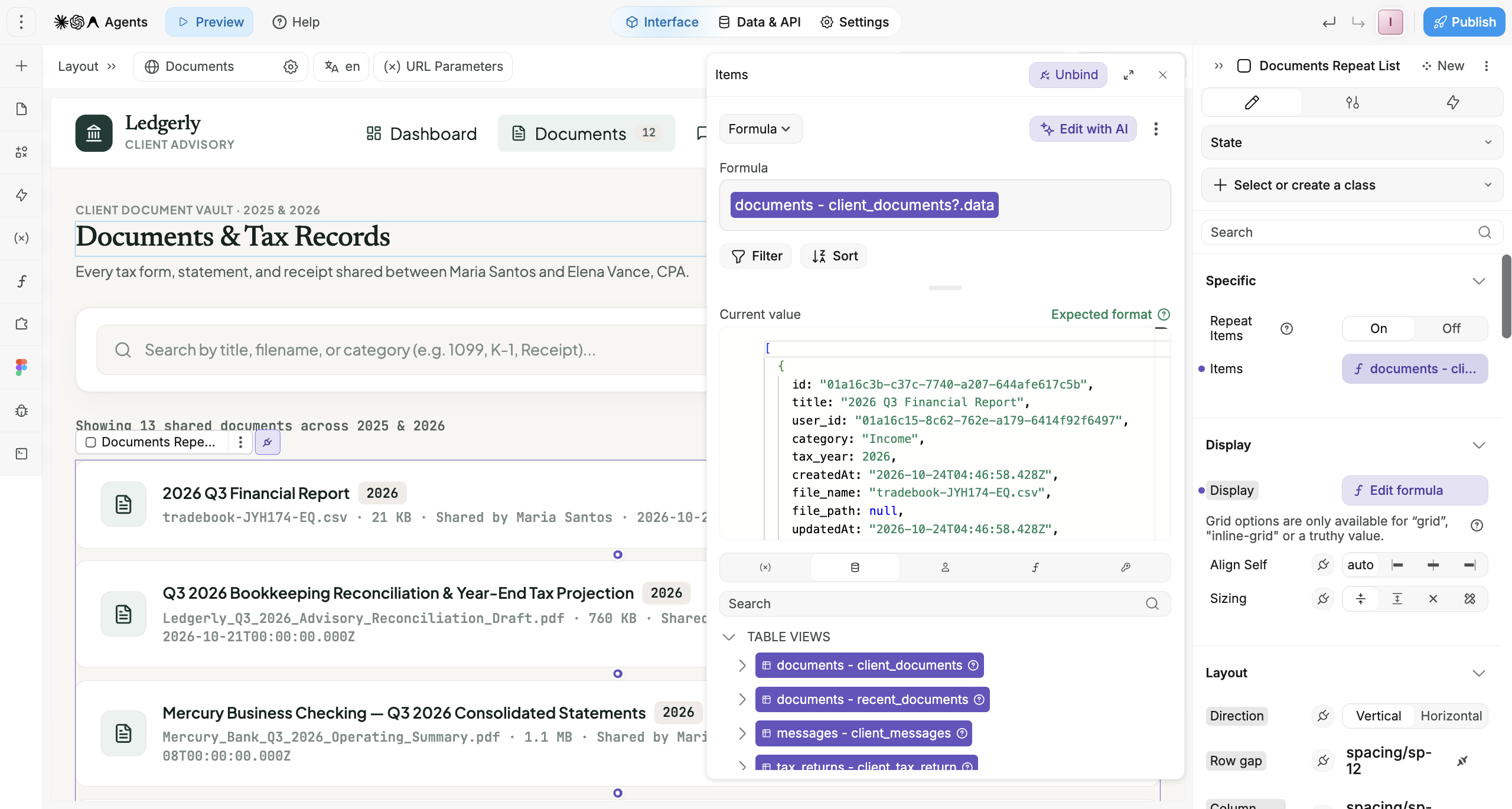
Select any list in WeWeb and you see which table view it's bound to. Open that view to go deeper: its filters, its sorting and who's allowed to access it. If a client's documents show the wrong year, you can spot the filter and fix it yourself.
Follow what happens behind every button, step by step
Behind every button is logic. Some of it runs in your users' browsers, where they can see the code and any data it loads, and some runs on the server, where they can't. Lovable writes that logic as code, so to know what runs where, in what order and which records it changes, you read the code.
Every interaction in a WeWeb app, from a button click to a form submit, has its logic laid out in a drag-and-drop workflow. It shows what triggers it, each step in order, the data it uses, and which steps run on the server. Test any workflow before you publish, and the logs show how the data changed at each step and what it passed on to the next.
"As a no-code agency, we chose WeWeb because the Editor is simple enough to enable our clients to maintain the product by themselves, and flexible enough that we can add custom CSS or Vue.js components if we need to." ~ Frédéric Marianne, Co-founder and CTO, Gaspach.io
Connect your tools with ready-made actions, not custom API code
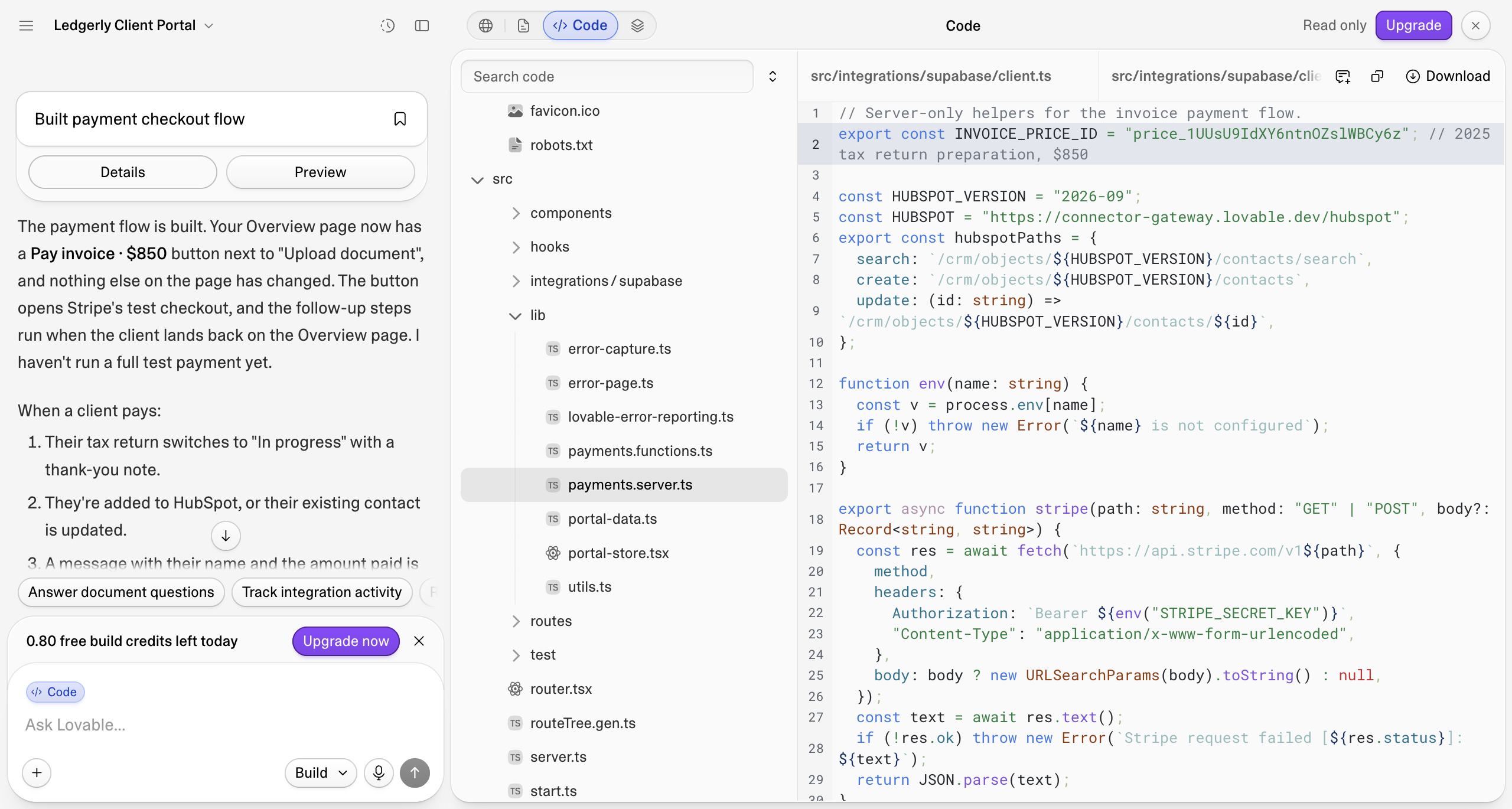
Lovable has an impressive catalog of more than 100 connectors, and it handles the sign-in and credentials for each one. What your app does with a tool, like creating a contact or sending a message, is still code AI writes into your app, so changing, fixing or extending it means another prompt or editing the code. For tools outside the catalog, AI writes the whole integration.
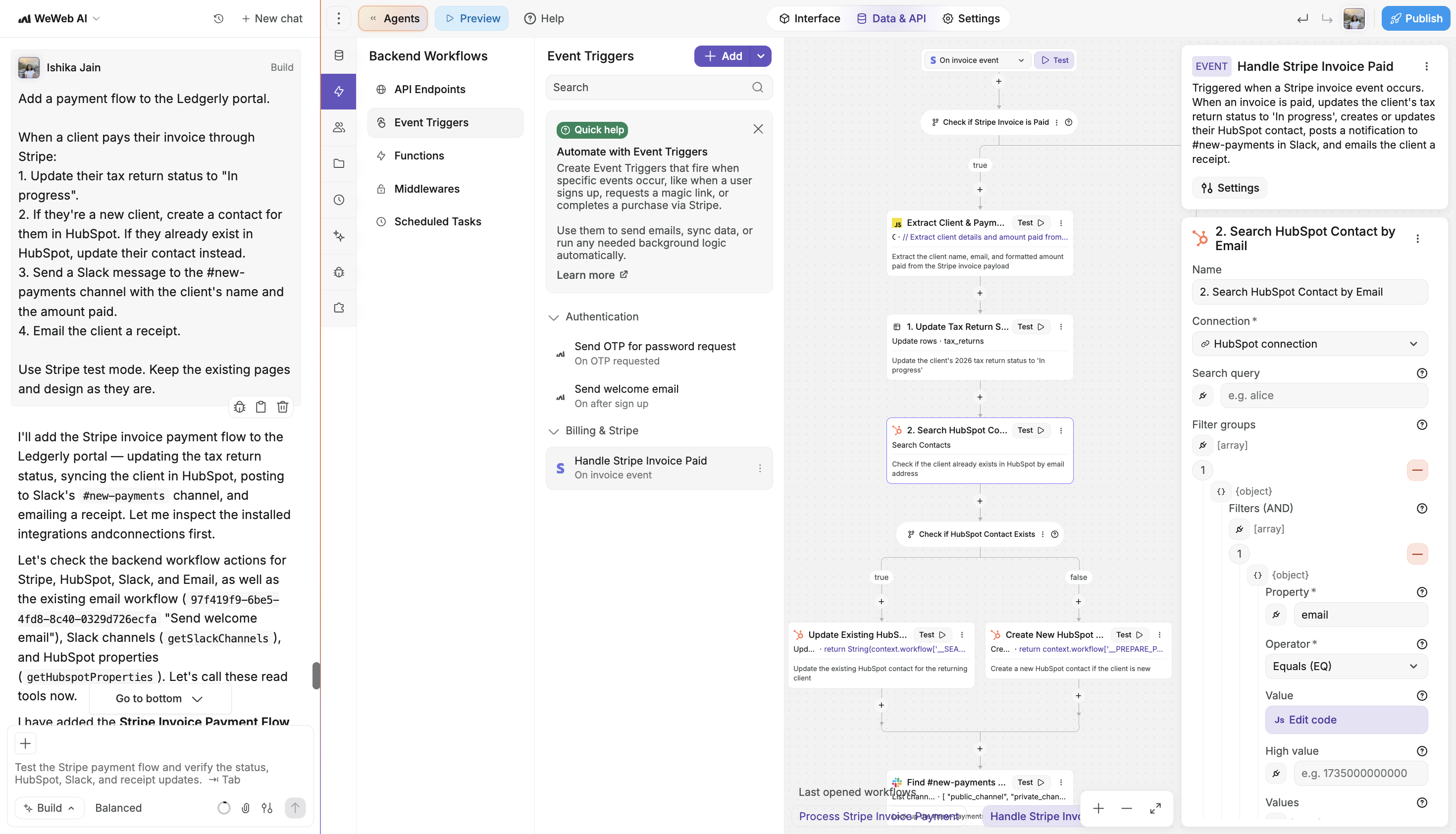
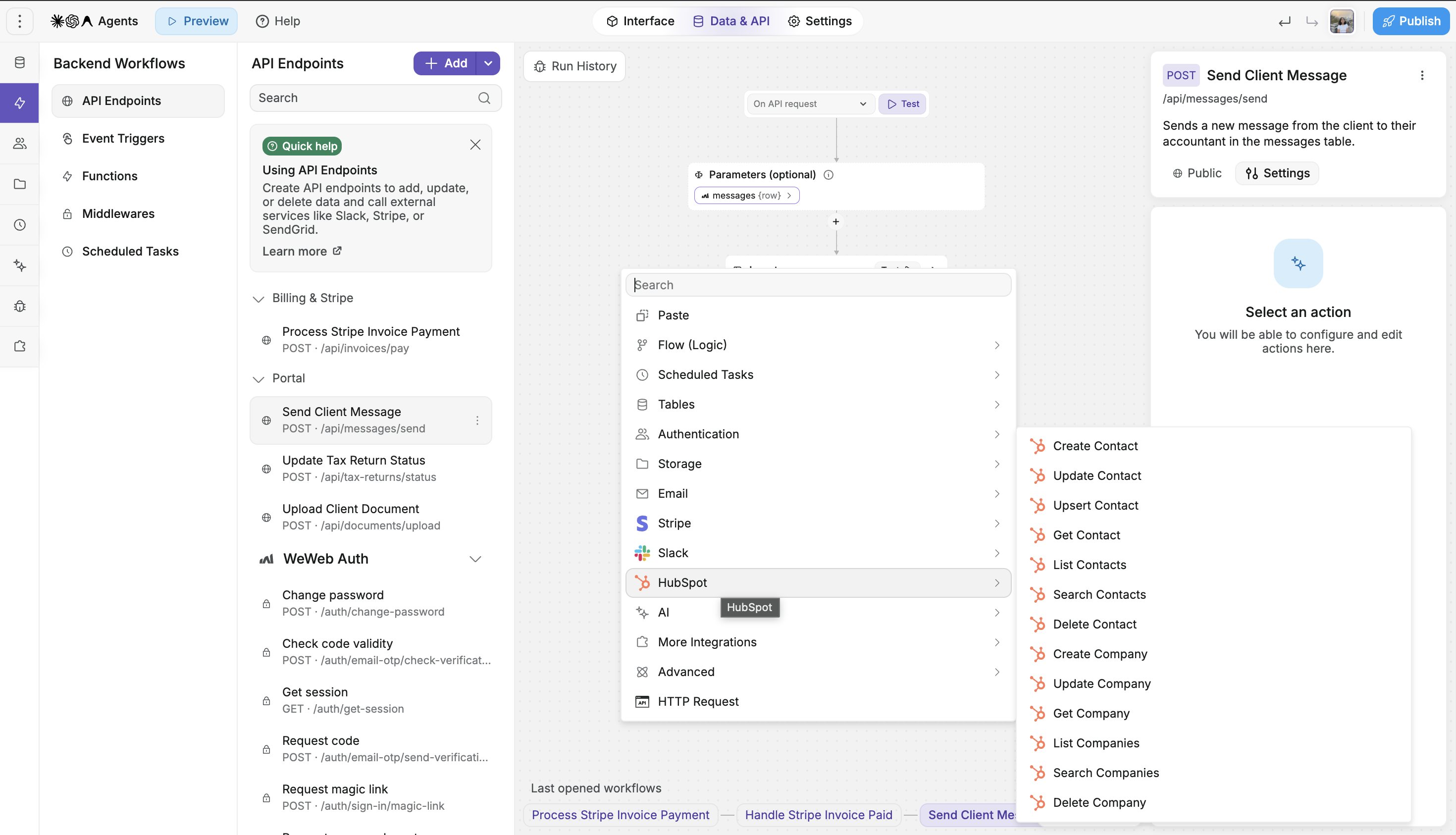
In WeWeb, each integration comes with ready-made actions you drop into a workflow, like creating a HubSpot contact or sending a Slack message, and you fill in the fields. We build and maintain these integrations. When a tool changes its API, our team fixes the integration for you. WeWeb AI uses the same actions, so it doesn't have to work out each tool's API from scratch.
For anything else, you can connect any REST API, with your API keys stored as secrets on the server, where users can't see them. We're adding new integrations regularly, so if one you rely on is missing, let us know.
When AI loops on a fix, see where it breaks before prompting again
AI now tests and fixes much of its own work, in both tools, but it can still get stuck on a problem it can't see past. In Lovable, working out why means reading error messages and code. In WeWeb, the logs point to the exact workflow step that failed, so your next prompt can name it, or you can fix it yourself.
"With WeWeb's logs, you instantly see what went wrong. That's why we could move so fast on this project." ~ Daniel Levis, Soraia, which rebuilt a recruitment company's internal tools with WeWeb
It also means the app doesn't depend on whoever wrote the prompts. A teammate, or IT, can open the same workflows and understand how the app works.
"WeWeb offers me a structured place to build. I know where everything is defined if I need to put my hands in it." ~ Jean-Philippe Trinh, who built Carrousl with Claude Code through WeWeb MCP
Keep AI costs predictable as your app grows
Both tools include AI in every plan. In Lovable, AI spend grows as your app grows. In WeWeb, you decide whether it does: build with WeWeb AI, your own agent at a flat cost, or no AI at all.
Your first version is the cheapest part of an app. The real cost is everything after: the new filter, the revised onboarding, the bugs customers find.
Every change you prompt in Lovable, small or big, uses Lovable credits. That's true even when you build with your own ChatGPT or Claude agent, so you end up paying for AI twice. And that's not all: beyond a free monthly allowance, hosting your app, running its backend, the AI features your live app uses and some connectors all draw from the same balance. You can cap spending and set alerts on paid plans, but every change still comes out of that one balance.
More changes in WeWeb don't have to mean more AI spend. You choose how each one gets made:
With your own AI agent. Connect Claude Code, ChatGPT, Cursor or Codex through MCP, and it runs on the subscription you already pay for, not on WeWeb AI tokens, so you pay for AI once.
With WeWeb AI. Every plan includes a fixed monthly allowance of WeWeb AI tokens. When you run out, you can top up whenever you need to.
Without AI. Building by hand in the visual editor costs nothing.
That same flexibility carries through to hosting as well. Run your app on WeWeb at a set monthly price, or export it and host it yourself if that suits your budget better. Whether you do everything with us or mix in your own tools, you'll know what you're paying each month.
Stuck? Chat with a real person, for free
Both tools have docs, tutorials and an active community. Stuck in Lovable? You figure it out with AI. Stuck in WeWeb? Chat with our team, for free.
Lovable gatekeeps human help behind paid plans: email support starts with Pro, priority support comes with Business, and a dedicated team is reserved for Enterprise. On the Free plan, there's no one to email.
In WeWeb, our team is a message away, on every plan, Free included. You'll hear back from a real person who helps you get unstuck. Flo, our CPO, also runs office hours every week, where you can bring your build and work through it live.
Lovable vs WeWeb in action: one prompt, two apps
Both tools turn a prompt into a polished first version. From the same prompt, Lovable builds a prototype. WeWeb builds a working app.
We gave both tools the same prompt for a client portal, on free plans, with default settings and no manual edits.
Lovable built the three screens in about 3 minutes, but without a backend: the login isn't real yet, and uploads and messages disappear on reload, as Lovable noted in its own summary. WeWeb took about 11 minutes, because it also set up the database, login and backend logic, so uploads and replies are saved.
The first screens look good in both. What matters next is whether the same design principles carry over as you add pages, so page twenty still matches page one:
Start from your brand. Give WeWeb AI a screenshot of your UI or your DESIGN.md, or import from Figma, and it sets up your design system.
Stay consistent on every page. Every page AI builds uses the same colors, type, spacing and components. Lock them once you're happy, and AI can't change them.
Finish it by hand. Adjust spacing, sizes or colors in the visual editor, without a prompt and without spending tokens.
Which tool wins by use case?
Use case
Our pick
Why
WeWeb
Your ops team keeps improving the tool with AI, and AI changes never break what already works in your app
What you need
WeWeb
Lovable
What AI builds for you
Spreadsheet-like tables, pages and visual workflows anyone on the team can read and check
Code: React pages, SQL tables, database policies and edge functions
Business data and AI
AI and MCP agents build on editor data; production data never reaches them
AI works on your production database. It asks first only before deleting or renaming tables and columns
Your business data
Connect Airtable, Google Sheets, Notion, HubSpot or monday.com and work with it like a spreadsheet: filter, sort and edit rows. Or import a CSV
AI writes code that pulls data from connectors
Approval flows
AI builds them as visual workflows with branches, conditions and loops, so you can follow every step and trust what it built
AI writes them as code, so checking what it built means reading the code or taking its summary on trust
Protecting what already works
Mark the parts of your app that work as off-limits, and AI builds around them without changing them
Workspace knowledge and skills can tell AI what not to touch, but they're instructions, not rules, so there's no guarantee it follows them
Alerts and scheduled jobs
Email, Slack, SMS, WhatsApp or Telegram alerts as workflow steps; scheduled tasks for nightly syncs and reminders
Resend, Slack and Twilio connectors called from code; scheduled jobs created through chat or SQL
Employee access
Start from a login template and ask AI to adapt it. Create roles and pick which roles can see each page, table and API, without code
Login pages generated through chat. Who sees what is set in database policies written as code. On Business, teammates signed in to Lovable skip the login
Testing a change
Test in the editor or staging, on separate data. Production data isn't touched until you publish
Preview and drafts run on your live production data, so a test order or a deleted record is real
Undoing a mistake
Restore the editor or production from a backup
Revert restores code only. Production data comes back from the last daily backup, and anything changed since is lost
When something breaks
Follow each workflow run step by step, let AI test your workflows, and get plain-language explanations of deployment errors
Read the backend logs, or ask AI to find and fix the bug in the code
Choose WeWeb when your process changes every few weeks, the tool runs on production data you can't afford to break, and the people who know the process best aren't developers.
Choose Lovable when a developer will own the code, and your team is happy to make every change through a prompt.
Built with WeWeb
PT MOW runs multi-team approval flows, invoicing and reporting for a government-owned gas operator in Indonesia.
WeWeb
Build with AI without ever exposing client data to it
What you need
WeWeb
Lovable
What AI builds for you
Spreadsheet-like tables, pages and visual workflows anyone on the team can read and check
Code: React pages, SQL tables, database policies and edge functions
Client data and AI
AI and MCP agents build on editor data; production data never reaches them
AI works on your production database. It asks first only before deleting or renaming tables and columns
Each client sees only their own data
Access rules on every table and API, set without code. View a table as a specific user to check exactly what they can see
Database policies written as code. Checking them means reading the SQL or logging in as each client
Client login
Start from a login template and ask AI to adapt it to your brand, then give each client or partner a role
Login pages generated through chat
Files and documents
Built-in storage, or Cloudinary and Google Drive, for files clients upload and download
Cloud storage, with who-can-see-what written as code
Client requests and approvals
AI builds them as visual workflows that check who's asking before anything changes
AI writes them as backend functions that check permissions in code
Keeping clients updated
Email, SMS, WhatsApp or Telegram updates as workflow steps; scheduled reminders for due dates and renewals
Resend and Twilio connectors called from code; scheduled jobs created through chat or SQL
Adding features
Client-facing pages and access rules stay off-limits to AI while it builds the new feature
Workspace knowledge and skills can tell AI what not to touch, but there's no guarantee it follows them
Testing a change
Test in the editor or staging, on separate data. Clients see nothing until you publish
Preview and drafts run on live production data, so a test can change a real client's records
Choose WeWeb when your team runs the portal for clients and keeps adding to it, and one client seeing another's records would cost you the account.
Choose Lovable when the portal is part of a product your developers already build and maintain in code.
Built with WeWeb
Cargolo lets businesses book and track transport worldwide, download their documents and manage recurring pickups from one portal.
Depends on who maintains it
WeWeb if non-developer founders or product teams keep building it with AI; Lovable if engineers will own the code
What you need
WeWeb
Lovable
What AI builds for you
Spreadsheet-like tables, pages and visual workflows anyone on the team can read and check
Code: React pages, SQL tables, database policies and edge functions
Customer data and AI
AI and MCP agents build on editor data; production data never reaches them
AI works on your production database. It asks first only before deleting or renaming tables and columns
Separate data per customer account
Access rules on every table and API, set without code. View a table as any user to check what they see
Database policies written as code, checked by reading the SQL
Subscriptions and billing
Native Stripe integration, with Stripe templates to start from
Stripe or Paddle, set up through chat
Sign-up and onboarding
Start from templates and ask AI to adapt sign-up and onboarding flows
Sign-up and onboarding flows generated through chat
Shipping new features
Billing, access rules and anything else you mark stay off-limits to AI while it builds
Workspace knowledge and skills can tell AI what not to touch, but there's no guarantee it follows them
Testing a change
Test in the editor or staging, on separate data. Customers see nothing until you publish
Preview and drafts run on live production data, so a test can change a paying customer's account
Handing over to engineers
Export the code to self-host; GitHub sync is one-way
Two-way GitHub sync, so engineers keep working in the same codebase
Choose WeWeb when non-developer founders or product teams will keep building the product with AI, and customer data must never reach AI.
Choose Lovable when you want the code to become your engineering team's codebase.
Built with WeWeb
W4.0's founder ships new features in about 90 minutes: "It used to take a frontend developer, a backend developer, and a project manager… I just get it done between meetings."
Depends on who maintains it
WeWeb if non-developer founders or ops teams keep building it with AI; Lovable if engineers will own the code
What you need
WeWeb
Lovable
What AI builds for you
Spreadsheet-like tables, pages and visual workflows anyone on the team can read and check
Code: React pages, SQL tables, database policies and edge functions
Buyer and seller data and AI
AI and MCP agents build on editor data; production data never reaches them
AI works on your production database. It asks first only before deleting or renaming tables and columns
Buyers and sellers see the right data
Separate roles, with access rules on every table and API. View a table as any user to check what they see
Roles and database policies written as code, checked by reading the SQL
Listings, search and filters
Ask AI for listing pages, search and filters, built on tables you can read and check
Listing pages, search and queries generated as code
Reviewing listings and sellers
Admin screens with approval workflows your ops team can follow step by step
Admin screens and approval logic written as code
Listing photos and invoices
Cloudinary for listing images; APITemplate.io or Google Docs for invoices and receipts
Cloud storage; invoices generated as code
Connecting your other tools
Use Airtable, Google Sheets, Notion or monday.com data as tables your team can filter and edit, like a spreadsheet. Or connect any other data source
100+ connectors, or any API through code the AI writes
Buyer and seller messages
Email, SMS, WhatsApp or Telegram updates as workflow steps
Resend and Twilio connectors called from code
Payments and payouts
Stripe integration charges buyers and takes your platform fee through Stripe Connect; seller onboarding and payouts through the Stripe API
Stripe or Paddle for charging buyers; seller payouts set up in Stripe
Testing a change
Test in the editor or staging, on separate data. Buyers and sellers see nothing until you publish
Preview and drafts run on live production data, so a test can change a real listing or order
Choose WeWeb when non-developer founders or your ops team will keep building the marketplace with AI, and buyer and seller data must never reach AI.
Choose Lovable when engineers will own the marketplace code, including payments.
Built with WeWeb
Hello Generalist, a two-person startup, built its marketplace for freelance operators in three months.
Lovable
Built-in growth tools: run ads, improve SEO and create content to find your first users
What you need
WeWeb
Lovable
What AI builds for you
Spreadsheet-like tables, pages and visual workflows anyone on the team can read and check
Code: React pages, SQL tables, database policies and edge functions
A polished first version
Ask AI, and it follows your design system from the first screen
Ask AI, and it designs the first version from your prompt
Sign-up and profiles
Start from a login template and ask AI to adapt it
Sign-up and profile pages generated through chat
Payments and subscriptions
Native Stripe integration, with templates
Stripe or Paddle, set up through chat
Getting your first users
SEO settings, sitemap and pre-rendering; marketing and ads through your own tools
Built-in SEO review, keyword research, content and ad tools
Trying ideas fast
Ask AI for changes and test them in the editor before you publish
Try ideas in drafts, then merge the one that works
Choose Lovable when you're launching a consumer app and finding your first users matters most. Lovable's ads, SEO and content tools help with that.
Choose WeWeb when the consumer app runs on business logic that has to keep working while AI adds features, like bookings, approvals or account management.
Lovable
Built-in SEO, ads and content tools help you find customers once the site is live
What you need
WeWeb
Lovable
What AI builds for you
Pages and form workflows anyone on the marketing team can read and check
Code: React pages and components
A polished site
Ask AI, and it follows your design system on every page
Ask AI, and it designs the pages from your prompt
Search visibility
SEO settings, sitemap and pre-rendering
SEO and AI-search reviews, keyword and competitor research, and Google Search Console
Ads
Through your own tools
Set up and run Google, Facebook and Instagram campaigns from chat
Marketing content
Through your own tools
Copy, images and video generated for your campaigns
Lead capture
Forms that send leads to HubSpot, Slack or email as workflow steps
Forms generated as code, with connectors
Updating the site after launch
Ask AI for page changes, or edit text and images directly
Ask AI for changes, or edit text, fonts and colours directly
Choose Lovable when the main job is launching a site and finding customers for it.
Choose WeWeb when the website is also an app, with logins, accounts or business workflows behind it, and your marketing team wants to keep updating it with AI.
Which approach fits your team?
Feature
WeWeb
Lovable
Feature
WeWeb
Lovable
AI assistance
Build and update an app with AI
WeWeb AI or your own agent (like Claude or ChatGPT) via MCP
Lovable AI; external agents via MCP
Review a plan before building
Plan mode
Plan mode
Ask questions without changing the app
Ask mode
Chat mode
AI guardrails
Keep parts of your app off-limits to AI
Yes, individually or by category (Pro and up)
No enforced equivalent: workspace knowledge and skills can tell AI what not to touch, but they're instructions, not rules
Guardrails apply to your own agent
Yes, the same guardrails cover WeWeb AI and MCP agents
Agent permissions limit the types of action, not specific parts of the app
Editing and frontend logic
Edit layout and styling without code
Yes, in the no-code visual editor
Text, fonts and colors only; layout changes need AI or code
Read and edit app logic without code
Yes: visual workflows with branches, conditions and loops
No: logic is code, changed through AI or by editing it
Code and extensibility
Write your own code
Add custom components and JavaScript where you need them; the rest stays visual
The whole app is code: edit it in the code editor (paid plans)
Two-way sync with a code repository
Not available: GitHub sync is for exported code (Essential and up)
Yes, GitHub, GitLab, Bitbucket
MCP and external agents
MCP server for your own agent
Yes: unlimited on Pro and up, with no WeWeb tokens used (14-day trial on Free and Essential)
Yes, on every plan; build requests use Lovable credits
Feature
WeWeb
Lovable
Database and storage
Built-in database
Yes: spreadsheet-like tables on PostgreSQL, plus filtered views with their own access rules
Yes: PostgreSQL in Lovable Cloud, with structure changes made through AI or SQL
File storage
Built-in storage, or Cloudinary, Google Drive, Supabase or Xano
Lovable Cloud storage or Supabase, plus an AWS S3 connector
Use your own backend
Supabase or Xano natively, or any REST or GraphQL API. Use one, or mix several in the same app
Supabase in place of Lovable Cloud; other databases through connectors and code
Logic and APIs
Logic that runs on the server
AI builds it as visual backend workflows and API endpoints you can read: steps, conditions, loops and scheduled tasks
AI writes it as code (edge functions and SQL); changing it means another prompt or editing the code
Built-in review, Search Console connection, keyword and competitor research
Analytics
Google Analytics, Segment integrations
Built-in project analytics
Ads and marketing
Connect your own marketing stack
Growth tools, including Google and Meta ads
Feature
WeWeb
Lovable
Free plan
Yes: 1M AI tokens a month
Yes, with daily credits
How AI usage is measured
Tokens, per seat
Credits, shared across the workspace
Bring your own AI
Via MCP, no WeWeb tokens used
Via MCP, build requests use Lovable credits
Extra builders
Each seat gets its own AI tokens (Pro)
Unlimited members, all sharing one credit balance (per-member limits on Pro and up)
Hosting costs
WeWeb Cloud plan per app, or self-host
One credit balance covers building, hosting and AI in your live app
In conclusion: WeWeb gives you Lovable's speed, without risking your data or your app
Lovable is a great way to turn an idea into a first version fast. But once your business runs on that app, speed isn't enough. You need to know AI:
Can't reach your customers' data
Can't break what already works
Can't build anything your team doesn't understand
That's what WeWeb is built for, with AI costs you can predict and a real person to help when you're stuck.
Try WeWeb for free and see how it handles what you're building. Or tell us about your project, and we'll give you an honest take on whether WeWeb is the right fit, or whether another tool would suit you better.
The best Lovable alternative depends on what you're building and who will maintain it. For business apps your team will keep changing, like internal tools, client portals and SaaS products, WeWeb is the no-code alternative built for that: AI builds the app, your team can read and change everything it built, and your production data never reaches AI. If developers will own the code, AI coding tools like Cursor or Claude Code are closer to how Lovable works. For a wider list, see our Lovable alternatives guide.
Is there a free alternative to Lovable?
Yes. WeWeb's Free plan includes 1M AI tokens a month, a 14-day trial of WeWeb MCP, hosting on a WeWeb subdomain for up to 1,000 sessions in total, and chat with our team when you're stuck. Lovable also has a free plan, with 5 daily build credits (up to 30 a month) and community support. See WeWeb pricing and Lovable pricing for current limits.
What's the main difference between WeWeb and Lovable?
Lovable's AI builds your app as code that you steer through chat. WeWeb's AI builds it as pages, tables and visual workflows that anyone on your team can read and change without code. Both use AI to build. The difference is what you work with after the first version: whether you can follow what AI built, whether it can touch the parts that already work, and whether it can reach your production data.
What's the best Lovable alternative for internal tools?
WeWeb, if the people who run the process will keep changing the tool. Use your Airtable, Google Sheets, Notion or monday.com data as tables, set who sees what without code, and keep approved workflows off-limits to AI. PT MOW runs multi-team approval flows, invoicing and reporting for a government-owned gas operator on WeWeb.
What's the most secure alternative to Lovable?
WeWeb is built so your production data never reaches AI: WeWeb AI and agents connected through MCP only work on editor data. In Lovable, AI works on your production database by default and asks first only before deleting or renaming tables and columns, although it runs free security scans on every plan, with a workspace-wide security center on Business and Enterprise. In WeWeb, you can also keep critical parts of your app off-limits to AI, and set who can see each record visually, without reading SQL policies. A GDPR Data Processing Agreement covers every WeWeb plan, including Free.
Is WeWeb cheaper than Lovable?
It depends on how you build. If you build with your own agent, like Claude Code, WeWeb MCP is unlimited on Pro and up and uses no WeWeb tokens, while Lovable charges credits for every build request, so you pay for AI twice. With each tool's built-in AI, both meter usage, WeWeb in tokens and Lovable in credits. They aren't the same unit, so the numbers on the two pricing pages aren't directly comparable. WeWeb bills hosting per live app at a set monthly price, or you can self-host with no WeWeb hosting fees. In Lovable, once the monthly allowance runs out, hosting draws on the same credits you build with.
Can I use Claude Code or Cursor instead of Lovable's AI?
Yes, in both tools. In WeWeb, connect Claude Code, Cursor or ChatGPT through WeWeb MCP, and it builds pages, data and workflows in your project under the same guardrails as WeWeb AI, without using WeWeb tokens. MCP is unlimited on Pro and up, with a 14-day trial on Free and Essential. Lovable's MCP server works on every plan, but build requests use Lovable credits.
Can I move my Lovable project to WeWeb?
Yes, though there's no one-click import, so you rebuild the app in WeWeb rather than copy it over. If your Lovable app runs on your own Supabase project, WeWeb connects to the same database, so your data and users stay where they are. Then recreate the interface with WeWeb AI from a screenshot, or have Claude Code rebuild it through WeWeb MCP.