

WeWeb and Retool both help teams build internal tools faster, but they are built for different workflows.
They share several capabilities:
- Visual drag-and-drop editors
- Integrations with databases and APIs, including REST and GraphQL
- Support for workflow automation and business logic
- Role-based access control and authentication for managing user permissions
- Libraries of pre-built components to accelerate UI design
However, they serve different needs and cater to different use cases.
Retool is a developer-focused platform for building secure, data-heavy internal tools with SQL, JavaScript, APIs, and custom logic. It is a strong fit for engineering teams that want to move quickly with code-first control.
WeWeb is a visual development platform for building internal tools, client portals, dashboards, and customer-facing web apps with flexible backend integrations, authentication, workflows, responsive design, deployment, and code export.
In short: choose Retool if your team wants a developer-first internal tool builder. Choose WeWeb if you need a visual builder for internal tools, portals, or external apps that require more design flexibility, backend freedom, and long-term control.
Is WeWeb a good Retool alternative for client portals and external apps?
Yes. WeWeb is a strong Retool alternative when you need to build an app that goes beyond internal operations.
Retool is a strong fit for developer-led internal tools, admin panels, and operational dashboards.
WeWeb is a better fit when your app needs a more polished user experience, customer-facing access, custom branding, responsive design, user roles, authentication, backend flexibility, and predictable scaling.
What can you build with Retool and WeWeb
Both WeWeb and Retool make it faster to build web apps, but they serve different types of users and use cases.
Retool: developer-centric internal tools
Retool is a developer-centric platform optimized for building secure, data-heavy internal tools.
While it has drag-and-drop features, its full power comes from SQL, JavaScript and custom code, which means the learning curve can be steep for non-coders:

Key capabilities:
- Connects directly to SQL/NoSQL databases, REST/GraphQL APIs, and cloud services
- Centralizes data and logic for custom CRMs, inventory, HR systems, approval flows, and other types of internal tools
- Automates internal processes with visual workflows + scripting in JavaScript/SQL
- Provides secure role-based access, audit logs, and collaborative controls
Best for:
- Technical teams and coders building tools like internal dashboards, and admin panels
- Organizations looking to connect disparate internal systems or extend legacy logic
WeWeb: internal tools and client portals that scale
WeWeb is a no-code platform for building internal tools and client portals that grow with your needs:
If you go beyond internal tools or your user base expands, you don’t need to migrate to another platform: WeWeb scales with you.
Key capabilities:
- Drag-and-drop visual editor with pixel-perfect responsive design
- AI-powered generation of UIs, workflows, and custom components
- Build with WeWeb’s native backend or connect to any external backend, including REST, GraphQL, Airtable, Xano, Supabase, Firebase, and more
- Can scale from small internal apps to those serving thousands or millions of users
- Code export and self-hosting options at no extra cost
Best for:
- Businesses building internal tools and client portals that can grow with demand
- Product teams testing new ideas with quick prototypes
- Designers who want visual flexibility without heavy coding
- Coders who value speed and scalability and want full control over code
Design and UI flexibility
Both WeWeb and Retool use drag-and-drop interfaces, but they differ in flexibility and required skills.
Retool: UI capabilities
Retool provides a fast, opinionated drag-and-drop experience that makes it quick to assemble internal tools:
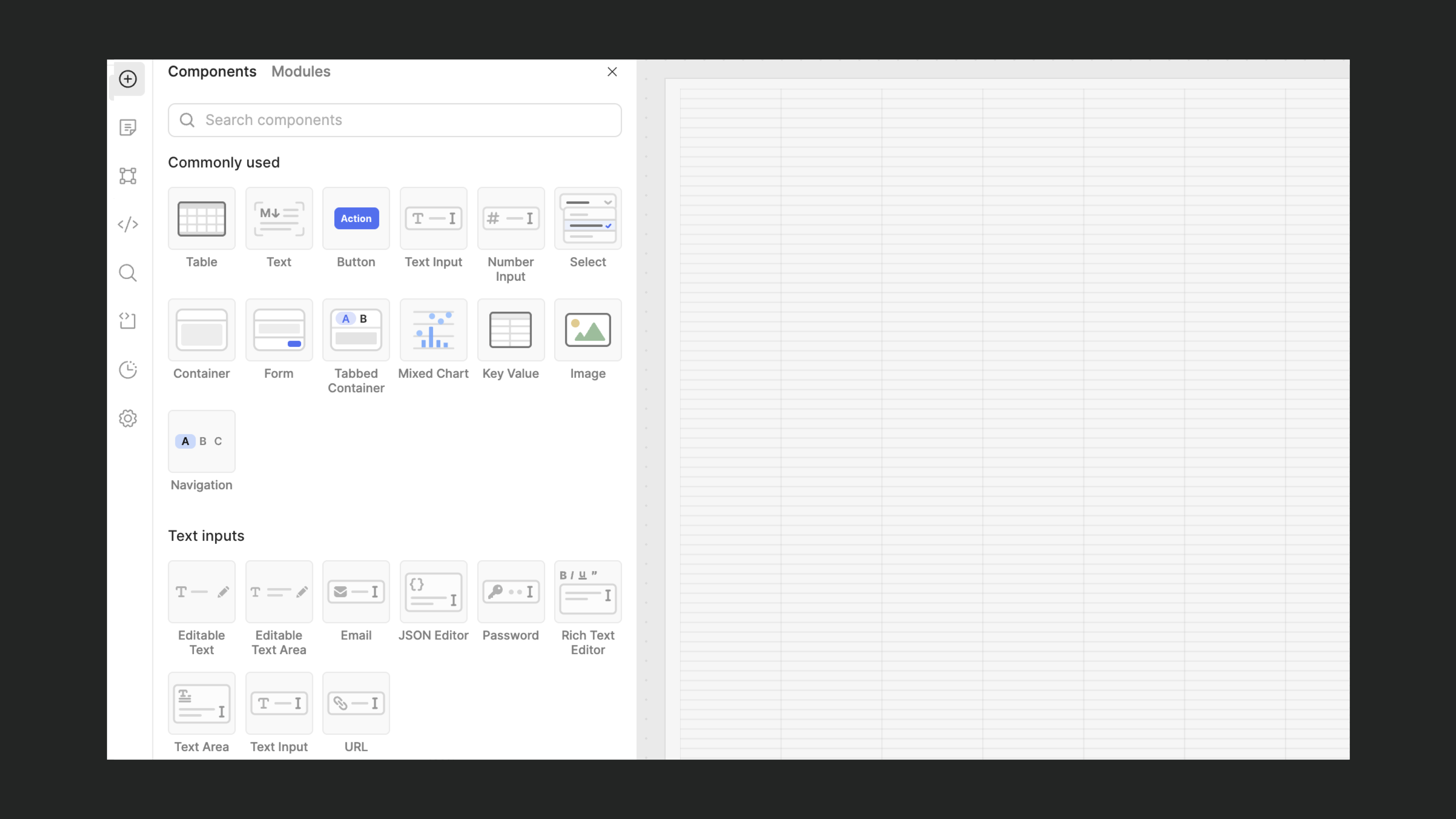
However, its components are standardized and not easily customizable.
Key capabilities:
- Pre-built React components designed for data-heavy apps
- Hybrid editor: drag-and-drop plus SQL, JavaScript and custom React for deeper customization
- Built-in IDE for debugging and coding
Best for:
- Coders who prefer a hybrid approach for building UI: drag-and-drop + custom code
- Organizations that value pre-built, functional components over pixel-perfect design
- Teams who want tight integration of logic and UI in one environment
WeWeb: UI capabilities
WeWeb focuses on flexibility and granular control.
"With WeWeb, we were truly able to achieve a pixel-perfect representation of our complex Figma designs." - Mike Coulbourn, Founder & CEO of SkipMatrix
Key capabilities:
- Pixel-perfect, responsive design with granular control
- AI-assisted generation of layouts, typography, and design systems
- Tailored for both internal tools and external-facing apps (where branding plays a significant role)
Best for:
- Builders creating internal tools and client portals that may eventually evolve into customer-facing apps
- Builders who want pixel-perfect responsive control without coding
- Designers and product teams that value visual customization
AI in action
Both WeWeb and Retool leverage AI, but in different ways and for different purposes.
WeWeb emphasizes design, workflows, and logic, while Retool uses AI to streamline developer productivity and logic scaffolding.
Retool: AI capabilities
Retool’s AI is focused on developer efficiency: speeding up the setup of internal tools and reducing friction.
Key capabilities:
- Natural language scaffolding: describe what you want in plain English and Retool generates basic UI components and query logic
- Code generation & completion: AI helps autocomplete JavaScript, SQL queries, and transform snippets
- Query assistance: Retool AI can suggest optimized SQL queries or API calls based on intent
Best for:
- Developers who want faster scaffolding of data-heavy apps
- Teams who want to reduce repetitive tasks
WeWeb: AI capabilities
WeWeb uses AI as an intelligent partner in app development to help you design, build, and manage key parts of the process while keeping you in full control.
“What sets WeWeb apart is that builders can still inspect, refine, and fully understand what the AI generates.” - Jon Adair, Co-founder & CTO at W4.0
Key capabilities:
- AI-powered UI generation: describe what you want to build, and WeWeb AI generates UIs and design systems
- AI helps generate workflows and formulas visually, no coding required
- It can also generate reusable custom-coded blocks
- Smart context selection: instead of automatically pulling in everything (workflows, formulas, etc.), you can choose exactly which parts you want to include as context
Best for:
- Builders who want to turn prompts into polished UIs
- Designers who want help creating consistent design systems and layouts
- Non-technical users who benefit from AI guidance at every step of app building
Learn how to:
Connecting your data
WeWeb and Retool both support a wide range of data sources and APIs, but they handle integrations differently.
Retool: integration capabilities
Retool is strongest when used as a front-end layer on an existing database, where it excels at basic CRUD operations (create, read, update, delete):
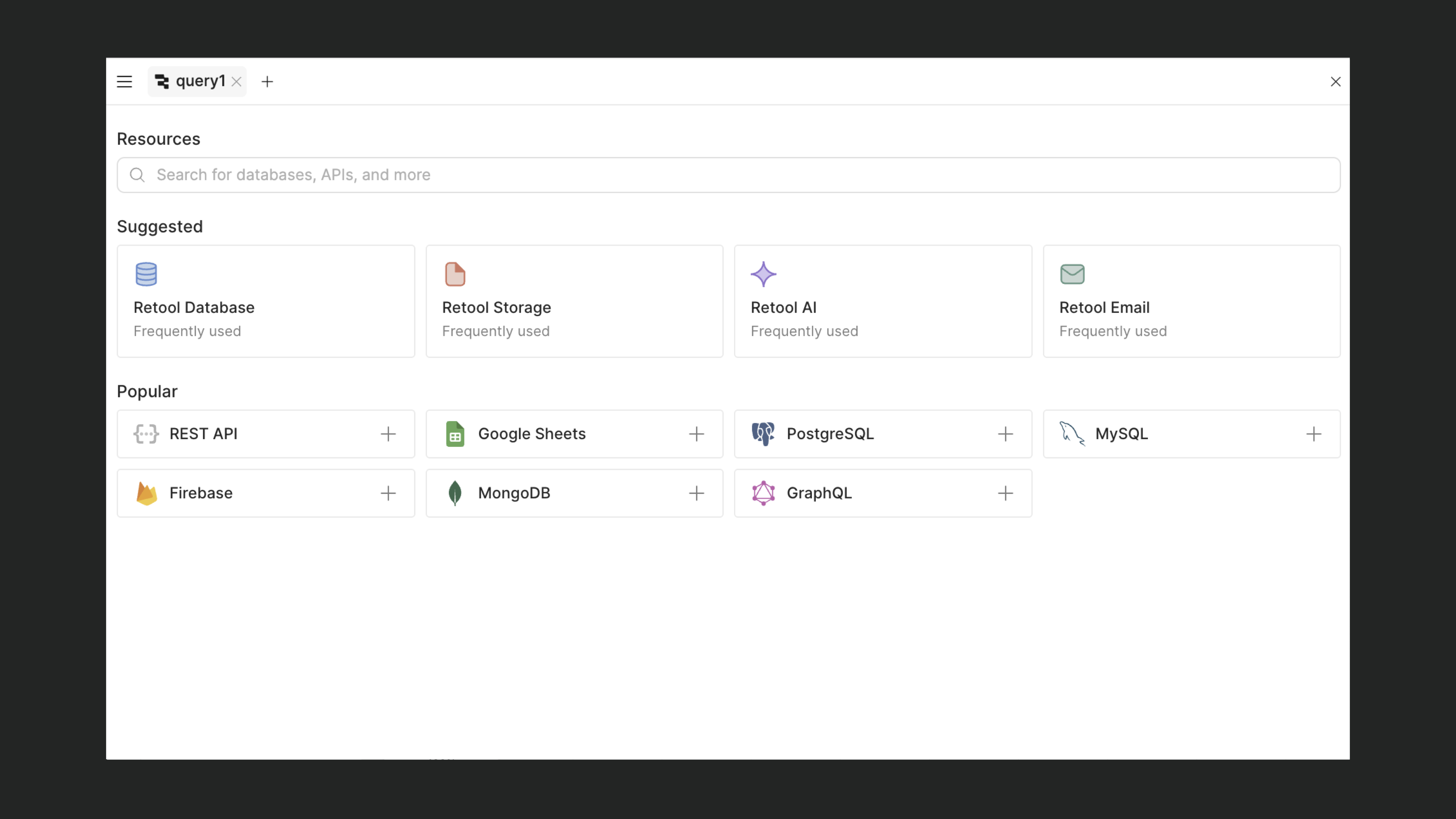
However, its support for backend logic is limited. While you can perform database actions, you can’t natively call Supabase edge functions or Xano APIs, which makes it harder to handle workflows that involve complex business logic.
Key capabilities:
- Fast for CRUD-based internal tools (tables, forms, dashboards)
- Direct connections to production databases, including its own hosted Postgres
- Requires coding for advanced joins and queries
- Strong security features like SSH tunneling
Best for:
- Teams comfortable writing SQL or JavaScript for joins, queries, and custom workflows
- Builders who prefer a “database front-end” rather than full-featured apps
WeWeb: integration capabilities
WeWeb includes a native backend and integrates with scalable platforms like Supabase and Xano, supporting more than CRUD with triggers, notifications, and complex workflows:
Key capabilities:
- Native backend included so you can build, launch, and scale without setting up external infrastructure
- Native integration for Supabase, Xano, Airtable, Google Sheets, and more
- Supports complex backend logic, workflows, and triggers
- CRUD operations, filtering, and workflows can be set up visually
- Security-first: credentials are never exposed in the frontend
Best for:
- Builders who want plug-and-play integrations with popular tools and databases
- Non-technical users who prefer to set up CRUD operations and filtering visually
How each platform scales
Scalability isn’t just about supporting more users: it also involves how projects evolve, how costs scale, and the risk of vendor lock-in.
Retool: scaling
Retool scales well within enterprise environments, but long-term reliance can make it hard and expensive to pivot away.
Its apps are built within a proprietary Retool framework. Even on plans that offer “code export,” the output isn’t standard HTML, CSS, or JavaScript and you can’t edit it outside of Retool’s editor.
Key capabilities & considerations:
- Code dependencies: as complexity grows, customization requires more JavaScript and SQL, effectively shifting Retool into a fully coding tool
- Vendor lock-in: you’re tied to the platform. While self-hosting is possible, apps can still only be edited within the Retool editor
- Pricing becomes costly as teams and usage grow due to per-user pricing
Best for:
- Developer-led teams scaling internal tools within a company
- Organizations that don’t mind being tightly bound to a single vendor
WeWeb: scaling
WeWeb scales effectively while giving you full control over the app infrastructure.
"I kinda expected that I could only build an MVP using no-code, and then switch to developers and a fully-coded solution. But with WeWeb, I think I can scale endlessly." - Kyan Lynch, CEO at Aloe Digital Solutions
Key capabilities & considerations:
- Scales from basic prototypes to apps serving thousands of users
- Code export and self-hosting are available at no extra cost
- Has a scalable native backend + works with platforms like Supabase or Xano
Best for:
- Businesses that want flexible hosting options, from platform-managed to full self-hosting
- Builders looking to minimize vendor lock-in
Authentication and user management
Retool and WeWeb handle authentication and user management in different ways.
Retool: in-house authentication system
Retool uses its own in-house authentication system, and external providers like Supabase Auth or Xano Auth can’t be integrated directly, which limits flexibility.
User roles are also limited and usually restricted to admin, editor, and user, with no native support for more granular permissions such as page-level access or custom role groups (e.g., “operations,” “creators,” “marketing”).
To achieve this level of control, teams often need to create multiple separate apps for different user groups and manually assign users to each one.
Key capabilities:
- Built-in authentication, no external setup needed
- Basic role structure (admin, editor, user)
Best for:
- Use cases where basic, in-house authentication is sufficient
WeWeb: granular roles and permissions
WeWeb includes a native WeWeb auth, with integrations for tools like Supabase and Xano to give you granular control over roles and permissions.
Key capabilities:
- Native WeWeb Auth + support for external auth providers like Supabase and Xano
- Granular, page-level access control
- Scales easily with larger user bases
Best for:
- Teams building client portals or internal apps with larger number of users
- Builders who need fine-grained role and permission management
- Companies that want to avoid per-user pricing limitations
What it costs to build
Pricing plays a major role when selecting the right platform, especially as your project grows and changes.
While Retool and WeWeb both offer free tiers, their pricing structures are different.
Retool: pricing
Retool is accessible for teams starting with small internal tools, but its per-user pricing becomes expensive at scale:
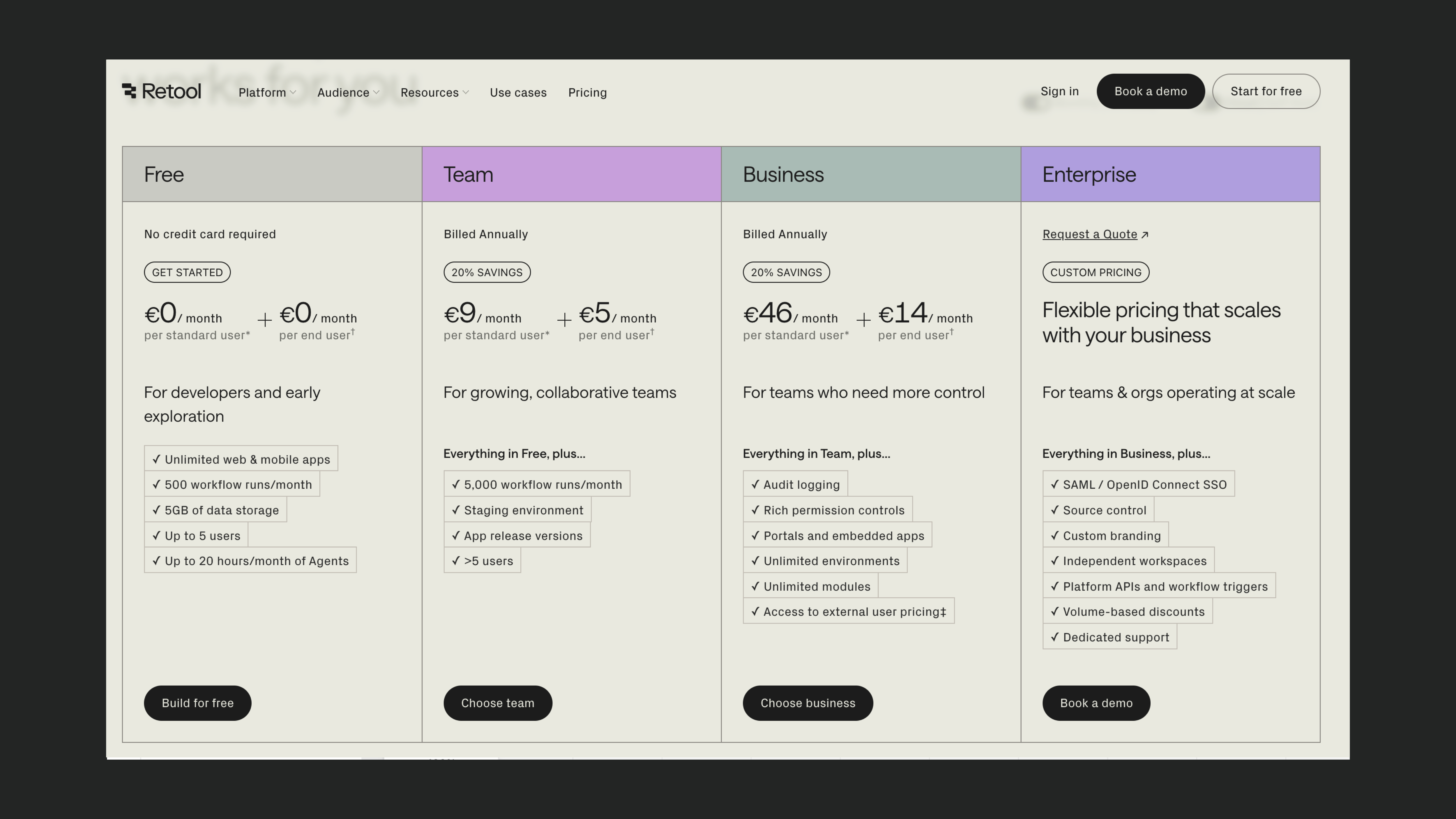
Other considerations:
- Free tier available, paid plans charge per-user
- External apps require Business or Enterprise plans
- Costs increase at scale due to per-user pricing
Best for:
- Teams building internal tools with a small number of developers
- Enterprises that can absorb per-seat pricing models
WeWeb: pricing
WeWeb’s pricing scales predictably without tying costs to developer seats:
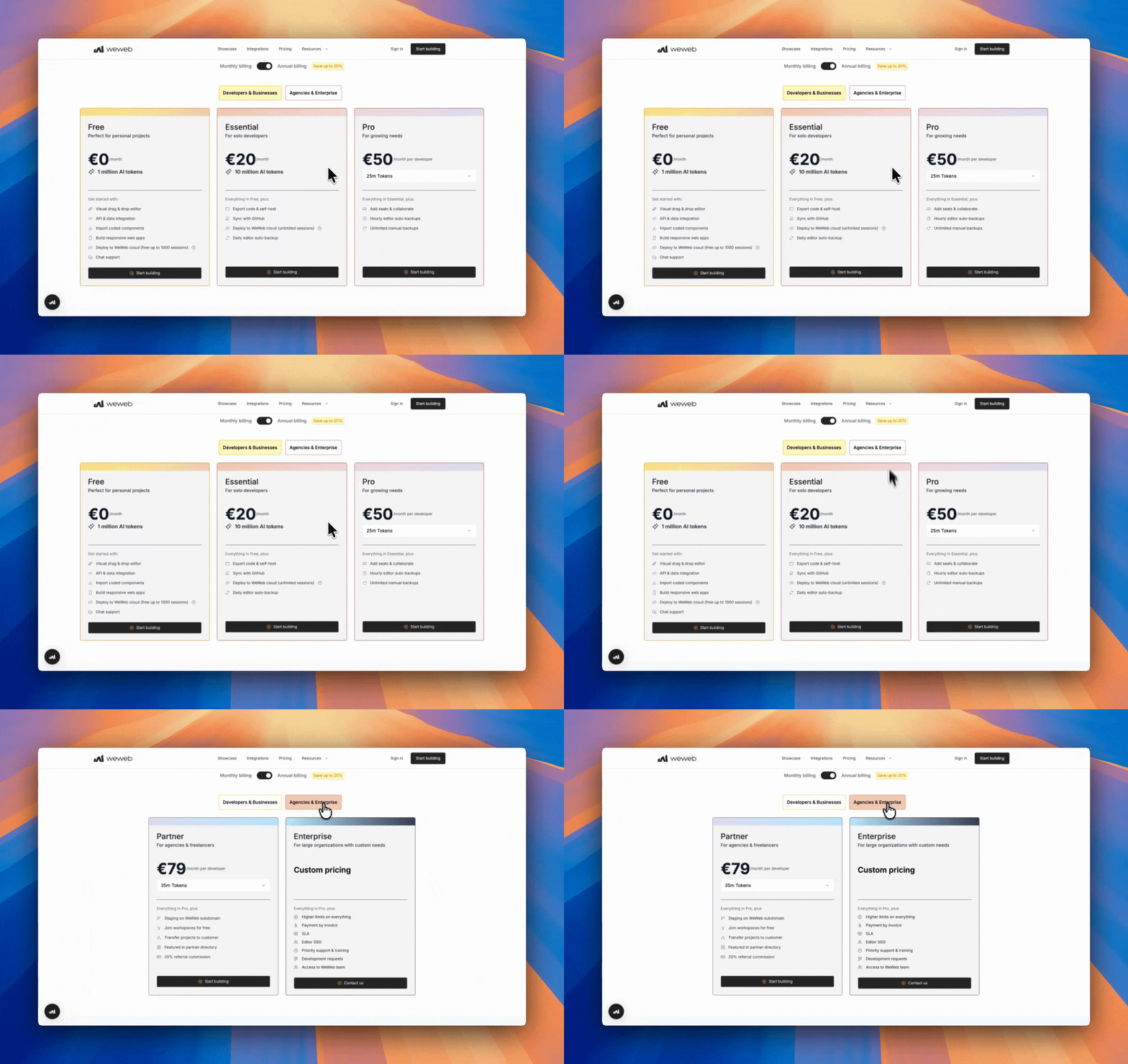
Other considerations:
- Free tier available: paid plans scale by apps and bandwidth, not seats
- Self-hosting and code export are supported without extra cost
- Regional pricing available in select countries
Best for:
- Builders of internal apps and client portals that might scale in the future
- Teams that want predictable pricing
- Businesses seeking cost efficiency as they grow their user base
Retool for coders. WeWeb for builders
Choosing between WeWeb and Retool ultimately depends on your skills and goals.
Retool is a developer-first, low-code platform best for internal tools if you’re comfortable with coding and higher per-user costs.
It involves vendor lock-in, and per-user pricing can drive up costs significantly.
WeWeb is a full-stack no-code platform that is suitable for both technical and non-technical users.
It’s perfect for teams building internal tools or client portals that need a scalable cost model and long-term flexibility. It also offers code export and self-hosting for full ownership.
"Adopting WeWeb’s no-code platform has revolutionized how we approach application development. It’s not just about speed; it’s about empowering our teams to deliver more innovative, secure, and compliant solutions faster and more effectively than ever before." - Matthieu Arzel, Digital Project Manager at PwC France
Frequently asked questions about WeWeb and Retool
What is the main difference between WeWeb and Retool?
The main difference is the type of apps each platform is optimized for. Retool is a developer-first platform for building internal tools, admin panels, and operational dashboards. WeWeb is a visual development platform for building internal tools, client portals, dashboards, and customer-facing web apps with more control over design, backend flexibility, authentication, and deployment.
Is WeWeb a Retool alternative?
Yes. WeWeb is a Retool alternative for those that want to build internal tools, client portals, dashboards, and external apps with visual design control, backend flexibility, user roles, authentication, and scalable deployment. Retool is often a better fit for developer-led internal tools and data-heavy operational workflows.
Which is better for client portals, WeWeb or Retool?
WeWeb is usually a better fit for client portals because it gives you more control over the user interface, responsive design, branding, authentication, permissions, and customer-facing user experiences. Retool is stronger for internal tools and admin panels used by internal teams.
Which is better for internal tools, WeWeb or Retool?
Retool is a strong choice for developer-led internal tools that rely heavily on databases, APIs, SQL, JavaScript, and operational workflows. WeWeb is a strong choice for internal tools that also need pixel-perfect design control, external user access, custom workflows, backend flexibility, and a more visual editing experience.
How does WeWeb pricing compare with Retool?
Retool and WeWeb use different pricing models, so the better option depends on your app structure, user count, and use case. Retool can be a strong fit for internal teams, but pricing may become more important as usage or user seats grow. WeWeb can be a better fit when you need predictable scaling for portals, external users, or customer-facing apps.
Can WeWeb and Retool connect to external databases and APIs?
Yes. Both WeWeb and Retool can connect to external databases, APIs, and backend services. Retool is often used by technical teams to build operational tools on top of internal data. WeWeb can connect to external backends and APIs while also offering visual design control, workflows, authentication, and customer-facing app experiences.