



You can build a complete app without managing infrastructure when the platform runs the backend and the hosting for you: database, server-side logic, sign-in, staging and production, backups and security patches included. This guide lists what infrastructure a business app needs, compares three ways to avoid running it, and shows how it works in WeWeb.
Most guides to building an app without a developer stop at the first working version. The part that costs money and sleep comes after: where the app runs, who patches it, what happens when a change breaks something on a Friday. If you run a business on spreadsheets today, or on an app an agency built and invoices you to change, that is the part you want to avoid.
It can be avoided. It cannot be skipped. Something still has to run the app, and the question is who.
What "Managing Infrastructure" Means for a Complete App
A complete app is more than screens. For a tool your team or your clients depend on every day, nine things have to exist and keep working:
- Somewhere to run. A server or a hosting service, a domain name, an SSL certificate, and enough capacity when more people log in.
- A database. Tables for customers, jobs, invoices or files, with relationships between them.
- Sign-in and roles. Accounts, password resets, and rules for who can see what and who can change what.
- Server-side logic. The calculations and checks that must not run in the browser, where anyone can read them.
- File storage. Quotes, photos, contracts, with private files served only to the right person.
- Scheduled jobs. The reminder sent every morning, the sync with your accounting software every night.
- Staging and production. A place to try a change before your clients see it.
- Backups and rollback. A way back when a change goes wrong or a record is deleted by mistake.
- Security patches and monitoring. Updates to the software underneath, and someone watching for errors.
A tool that leaves you two of these has not removed infrastructure. It has moved it. That is worth remembering when a page says "no code needed": the question to ask is which of the nine you still own.
Who This Is For, and Who It Is Not For
This guide is for you if:
- You run a business on spreadsheets or an agency-built app, and you want an internal tool or a client portal your own team can open and change.
- You are the person inside the company who builds that tool, and you need to tell IT what runs where before they approve it.
- You are a founder launching a B2B product and you want to ship without hiring an engineer, then keep it stable while you iterate.
This guide is not for you if:
- You are building a consumer app, a marketing website or a blog. Those have different needs.
- You need a native mobile app.
- You want to hand-edit the generated code yourself. WeWeb's export is for hosting and ownership, not for editing by hand.
Three Ways to Build a Full-Stack App Without Managing Infrastructure
Each of these can get you to a working app. They differ in how many of the nine items land back on your desk, and in whether you can leave later.
A Coding Agent on Your Own Stack
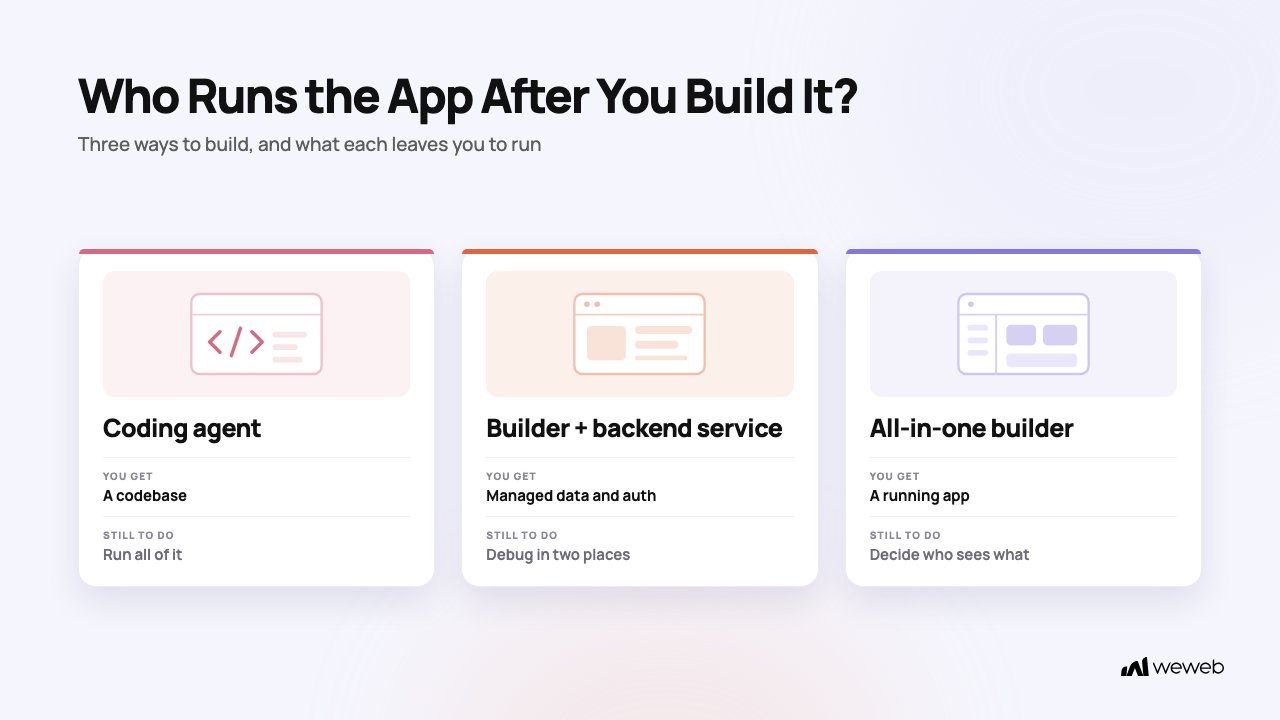
Claude Code, Cursor and similar agents can build anything, fast. What they produce is a codebase, and the codebase needs a home: a hosting account, a database, an auth service, environments, tests, and someone to keep all of it patched. Engineers call this set-up the harness, and with a coding agent the harness is yours to build and maintain.
This is the right choice when you have engineers with time for it, or when you want full control of hand-written code. It is not either/or: those same agents can build inside WeWeb through the WeWeb MCP, where the harness already exists. If your question is "who maintains the hosting, security and environments afterwards", compare WeWeb and Claude Code before you decide.
A Frontend Builder Plus a Backend Service
The second option pairs a visual builder for the screens with a managed backend such as Supabase or Xano for the database, the auth and the server-side logic. The backend service runs its own servers, backups and patches, so you still do not manage infrastructure. The trade-off is that your app lives in two places: the screens in one tool, the data and the rules in another. When something fails, you look in both.
This is a real option, and WeWeb supports it. It is the better choice when you already have a Supabase project, when you run Postgres you want to keep, or when you need realtime features the service provides.
An All-in-One App Builder
The third option is a full-stack app builder that keeps data, logic, screens and hosting in one place. One tool to learn, one place to look when something fails, and no backend vendor to sync with. The question to ask an all-in-one builder is whether you can leave. Bubble and Softr run your app for you and do not let you export it or host it elsewhere. WeWeb runs it for you and lets you export it and host it anywhere, or push it to GitHub, on the Essential plan and above. If export is the deciding factor, see WeWeb vs Bubble on export and hosting.
Choose a coding agent if you have engineers to build and maintain the harness, or you want a hand-written codebase. Choose a frontend builder plus a backend service if your data already lives in Supabase or Xano, or you need what those services do best. Choose an all-in-one builder if you want one place to build and run the app, and make sure it lets you export.
How to Build a Complete App Without Managing Infrastructure in WeWeb: Step by Step
Here is what the all-in-one path looks like for a business app, for example a client portal for a brokerage or a job and quote tracker for a construction company.
Step 1: Describe the App
Describe the tool in plain language, and WeWeb AI builds it inside the editor: tables, views, API endpoints, backend workflows and pages. If you already work in Claude, ChatGPT or Cursor, you can build with your own agent through the WeWeb MCP instead, with your own model and tokens. Either way, everything the AI builds stays visible and editable in the visual editor, so a colleague can open it and change it without prompting.
The data and the logic live in WeWeb's native backend. There is no separate backend service: database, API, auth and storage are included.
Step 2: Add Sign-In and Roles
Turn on WeWeb Auth, create your roles, and set access rules on table views and API endpoints. The rules run on the server, so a user cannot see a record by editing a URL. For an invite-only internal tool, switch on "Prevent sign up" and create accounts yourself. If IT asks for single sign-on, WeWeb Auth supports Google, Microsoft and 30 other providers, and you can use Auth0 or OpenID Connect instead.
Step 3: Connect the Tools the Business Already Uses
Your customers may already live in HubSpot, your price list in Google Sheets, your invoices in Stripe. Connect them as integrations and build on that data without migrating it. On eligible plans, each environment gets its own account for HubSpot, Airtable, Notion, Make, n8n, Twilio and the Google tools, so a test in staging never touches production records.
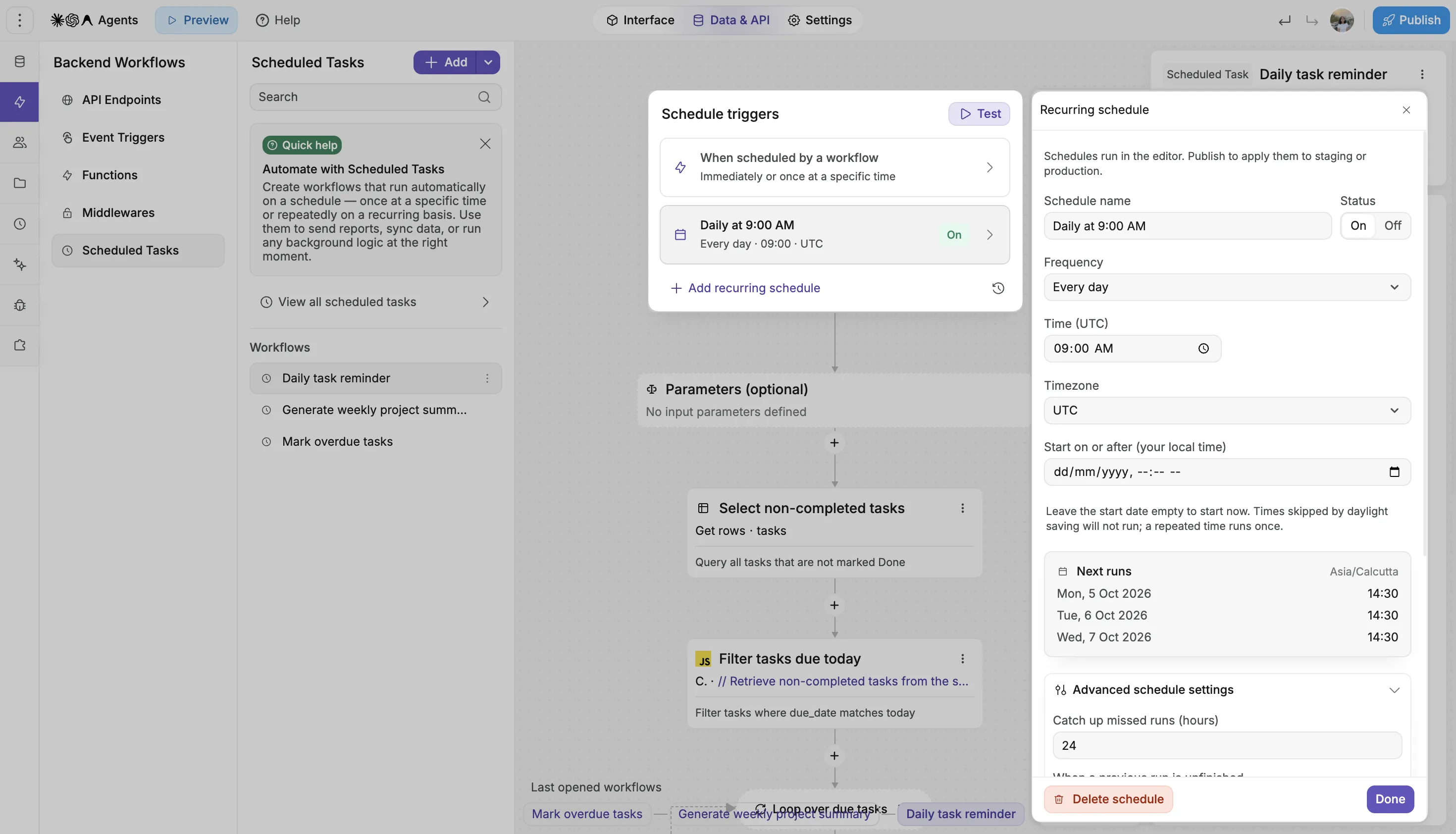
Step 4: Automate the Background Work
The morning reminder, the nightly sync, the monthly report: build them as backend workflows and run them as Scheduled Tasks. A task runs on a recurring schedule, or once at a chosen time, for example one reminder per customer. Each run keeps its inputs, result and logs, retries on failure, and can raise an alert on final failure. Event triggers do the same for things that happen to you, such as a Stripe payment or a WhatsApp message.
Step 5: Publish to Staging, Then Production
Publish from the editor to Staging, check it with your team, then publish to Production. WeWeb hosts the app on AWS behind the CloudFront content delivery network, with SSL on your subdomain. Every publication is recorded with a version, a message, who published it and when, and you can restore a previous version to production. The deployments documentation describes the full flow and which plans include a staging environment.
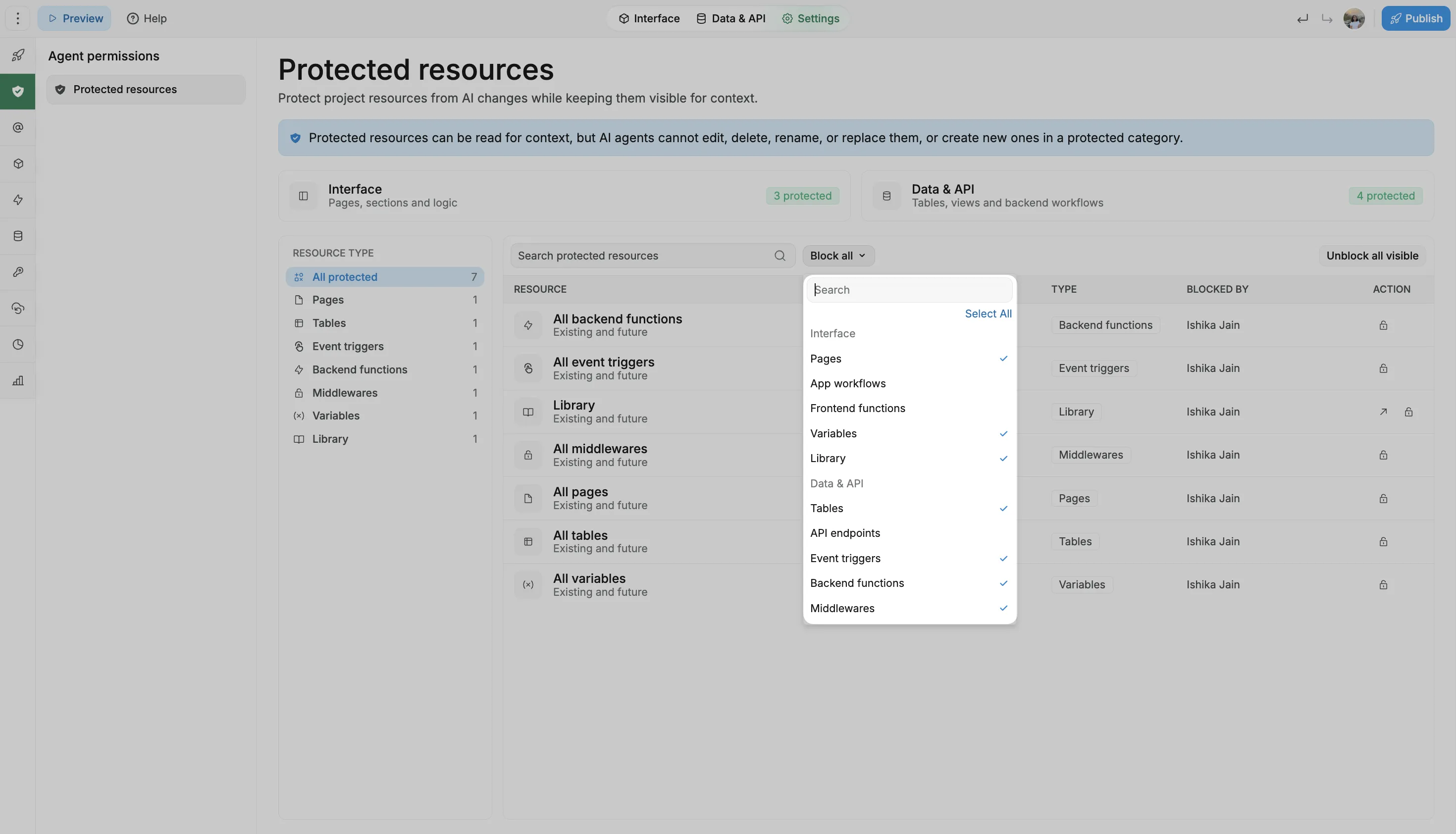
Step 6: Lock What Works
Once the invoice workflow or the client-facing page works, protect it from AI changes. WeWeb AI and MCP agents can still read it for context, so they know what to build around, but they cannot create, edit, rename or delete it. You can protect one item or a whole category, such as all tables or all API endpoints, including items added later. This is a rule enforced by the platform, not a prompt asking the AI to be careful. Available on the Pro and Partner plans, and people can still edit protected items by hand.
Step 7: Let the Platform Keep It Running
From here, the running of the app is WeWeb's job. The editor is backed up once a day on Essential, hourly on Pro and Partner, and on every publish. The database has point-in-time restore. Usage emails warn you at 75% and 90% of your plan, and the project metrics show requests and bandwidth. If a publish fails, WeWeb AI reads the deployment history and explains why.
💡 Want to see a timed build end to end? The tutorial How to Build a Full-Stack App with WeWeb's MCP Server walks through a booking app with database, sign-in, roles and automated email, built from one prompt.
What Is Handled for You, and What You Still Decide
Managed does not mean decided for you. It helps to be exact about the line.
Handled by WeWeb: servers and capacity, the certificate and the CDN, security updates to the software underneath, the Editor, Staging and Production environments, editor and database backups, logs for every backend request, and scaling within your plan.
Still your decision:
- The hosting plan. WeWeb Cloud hosting is an add-on to the editor seat. It has a free tier and paid tiers (Launch, Grow and Scale) that set bandwidth, sessions and domain options. The editor starts at $20 per month on the Essential plan, billed annually. See the pricing page for the hosting tiers.
- Who sees what. Roles, access rules and which colleagues get a seat in the editor.
- Where the data lives. WeWeb Tables, Supabase, Xano, or a mix in one project.
- Whether to run it yourself one day. You can export your app and host it anywhere, or push it to GitHub on every publish, on the Essential plan and above. The export is a complete, deployable app, not source code meant for hand-editing.
What This Looks Like in Production
Cypath, a pathology lab, needed a mission-critical app to archive slides. The agency Appy Makers built it on WeWeb with a Xano backend. It now archives a slide every 2 seconds, 3,000 to 6,000 slides a day, and has freed about three full-time roles. Zero incidents in seven to eight months. The lab keeps ownership of the app and the data, and can maintain it internally or with another partner. Read how a pathology lab replaced manual slide archiving in four months.
The exit works in practice too. Shunpo built a live quiz app for a TF1 prime-time broadcast and wanted full control over hosting, so they exported the app and ran it on their own infrastructure. How Shunpo built a live quiz app for TF1 tells that story. Managed by default, yours when you want it.
Frequently Asked Questions
Can a Non-Technical Operations Manager Really Build an Internal Tool the Company Depends On Every Day?
Yes, when the platform runs the infrastructure and lets you lock what works. In WeWeb, you describe the tool, review what the AI built in the visual editor, set the roles, and publish to staging before production. Once a workflow is right, protect it so AI cannot change it. What goes wrong, in practice, is an unprotected part of the app changing when someone prompts for something new. Protect the parts the business depends on, keep editor backups on, and test changes in staging.
Claude Code vs an AI App Builder for a Company With No Engineers: Who Maintains the Hosting, Security, Environments and Tests Afterwards?
With Claude Code, you do. The agent writes the code; the hosting account, the database, the auth service, the staging environment, the tests and the patches are your harness to build and keep. With WeWeb, the harness is the platform: hosting, environments, backups and patches are handled, and the guardrails are enforced by the platform rather than written into a prompt. You can still use Claude Code as the builder, through the WeWeb MCP.
Our Ops Team Relies on an App an Agency Built. What Are My Options to Rebuild It in Something My Own Team Can Maintain?
Rebuild it on a platform where your team can open the app and change it, and where the hosting is not the agency's responsibility either. In WeWeb, the data model, the workflows and the pages are visible in one editor, so a colleague can adjust a field or a rule without a quote and an invoice. If you want an agency to build the first version, you can still take it over afterwards, as Cypath did.
Can I Self-Host an App Built With a No-Code Tool So the Data Stays on Our Own Servers?
With WeWeb, yes, on the Essential plan and above. Export the app and deploy it on AWS, Google Cloud, Azure, Cloudflare, DigitalOcean, Netlify, Vercel or on-premise, including the backend as a Node.js service with PostgreSQL. The documentation on how to export and self-host your WeWeb apps.
Do I Still Need Supabase or Xano if WeWeb Has a Backend?
No. WeWeb Tables, API endpoints, auth, storage and scheduled tasks cover a client portal, a CRM or a B2B SaaS on their own. Supabase or Xano make sense when your data already lives there, when you need their specific features, or when you want the backend to stay independent of WeWeb. The comparison when to use Xano, Supabase or the WeWeb backend goes through the trade-offs.
What Happens When Something Breaks After Publishing?
You go back. A previous publication can be restored to production from the deployment history. The editor state can be rolled back to a backup, taken daily on Essential, hourly on Pro and Partner, and on every publish. The database supports point-in-time restore to any moment, from five minutes ago to a custom date. And a failed publish comes with an explanation from WeWeb AI, which reads the deployment logs for you.
Conclusion
A complete app needs nine things to keep working: hosting, a database, sign-in and roles, server-side logic, file storage, scheduled jobs, staging and production, backups, and patches. A coding agent gives you all nine to run. A frontend builder plus a backend service splits them across two tools. An all-in-one builder runs them for you, and the one to pick is the one that also lets you leave.
In WeWeb, you describe the app, set who sees what, publish to staging and then production, and lock what works. The infrastructure is handled. The control, and the export, stay with you.