


A request comes in by email. Someone copies the details into a spreadsheet. A manager approves it over Slack. Then someone else updates the status and notifies the next team.
Sound familiar?
Business processes often stretch across multiple people, tools, and manual handoffs. Even when everyone knows their responsibilities, work can get stuck waiting for information, approvals, or follow-ups.
And that time adds up. Asana's 2024 State of Work Innovation report, based on a survey of more than 13,000 knowledge workers, found that 53% of their time was spent on busywork, including communicating about tasks, searching for information, and chasing updates.
No-code business process automation helps reduce this manual coordination. You can connect existing tools, automate repetitive tasks, and build custom applications that manage work from start to finish, without writing code for every step.
In this guide, you'll learn what business processes you can automate, how no-code automation works, and how to build workflows that your team can actually use.
What is no-code business process automation?
No-code business process automation (BPA) means using visual tools to automate the steps involved in completing a business process, without having to write traditional code.
Instead of manually moving information between systems, sending reminders, or assigning tasks, you define rules that tell the software what should happen and when.
For example, consider a purchase approval process:
- An employee submits a purchase request through a form.
- The system routes it to the appropriate manager based on the amount.
- The manager reviews and approves or rejects the request.
- If approved, the system updates the request and notifies finance.
- Finance processes the purchase, and the requester can track its status.
The process still involves people, but the repetitive work around their decisions happens automatically.
Business process automation vs. workflow automation
These terms are closely related, but they describe different scopes of work.
Think of workflow automation as one part of business process automation.
A workflow might send an approval notification. The larger business process also needs to track the request, capture decisions, handle exceptions, and confirm that the purchase is complete.
Three ways to automate a business process
Not every process requires a new application. The right approach depends on what you're trying to achieve.
1. Automate a repetitive task
Start with a single action that happens regularly.
For example, automatically send a weekly report, remind customers about upcoming renewals, or notify a manager when a request is overdue.
2. Connect multiple systems
When a process involves several tools, automate how information moves between them.
For example, a new lead captured through a form could trigger the creation of a CRM record and a follow-up task for the sales team.
3. Automate an end-to-end process
Some processes need more than actions running behind the scenes. They also need interfaces where people can submit requests, review information, make decisions, and track progress.
For example, an employee onboarding application could manage new hire details, equipment requests, approval workflows, and onboarding progress in one place.
With WeWeb, you can handle all three approaches in the same platform. Build visual workflows, run scheduled automations, connect external systems through native integrations and APIs, and create custom applications with their own database, interfaces, and permissions.
You can start with a simple automation and expand it into a complete application as your requirements grow. Separate automation platforms such as Zapier or n8n can still be connected when useful, but they aren't required for supported workflows.
What business processes can you automate?
Almost any repeatable process with defined inputs, steps, and outcomes is a potential candidate for automation.
The best opportunities often involve repetitive data entry, frequent handoffs, multiple systems, or work that regularly gets delayed waiting for someone to act.
Here are some examples across different industries.
Manufacturing and production
Production teams need to coordinate jobs, materials, quality checks, and approvals.
With an automated workflow, an operator can flag a quality issue, triggering a notification to the supervisor and a follow-up task for the quality team. The affected job can remain on hold until the issue is reviewed.
A custom manufacturing application can give operators, planners, and supervisors different views of the same production records.
What gets automated: Issue routing, status updates, notifications, and follow-up tasks.
Inventory and purchasing
Inventory processes often require information to move between warehouse staff, purchasing teams, and suppliers.
For example, when stock falls below a defined threshold, a workflow can flag the item for replenishment or create a purchase request. After approval, the purchasing team can place the order and track its status.
When deliveries arrive, warehouse staff can record received quantities and identify partial shipments.
What gets automated: Replenishment requests, approvals, record updates, and notifications.
Use this Inventory Management template as a starting point, then adapt it to how your team tracks stock and manages purchasing.
Real estate and property management
Maintenance requests are a common source of manual coordination.
A tenant submits a request with a description and photos. The system creates a record, routes it to the property manager, and helps assign the appropriate contractor.
The contractor can update the job status, while the tenant tracks progress without repeatedly contacting the property manager.
What gets automated: Request routing, assignments, status notifications, and follow-ups.
Use this Service Request Form template as a starting point, then adapt it to your properties, team, and contractors.
Field and multi-site operations
Businesses with employees across several locations often need to collect reports, review submissions, and coordinate work between field and office teams.
For example, PT. MOW, an Indonesian organization managing gas operations, uses a WeWeb application to connect field reporting, multi-team approvals, and administrative workflows.
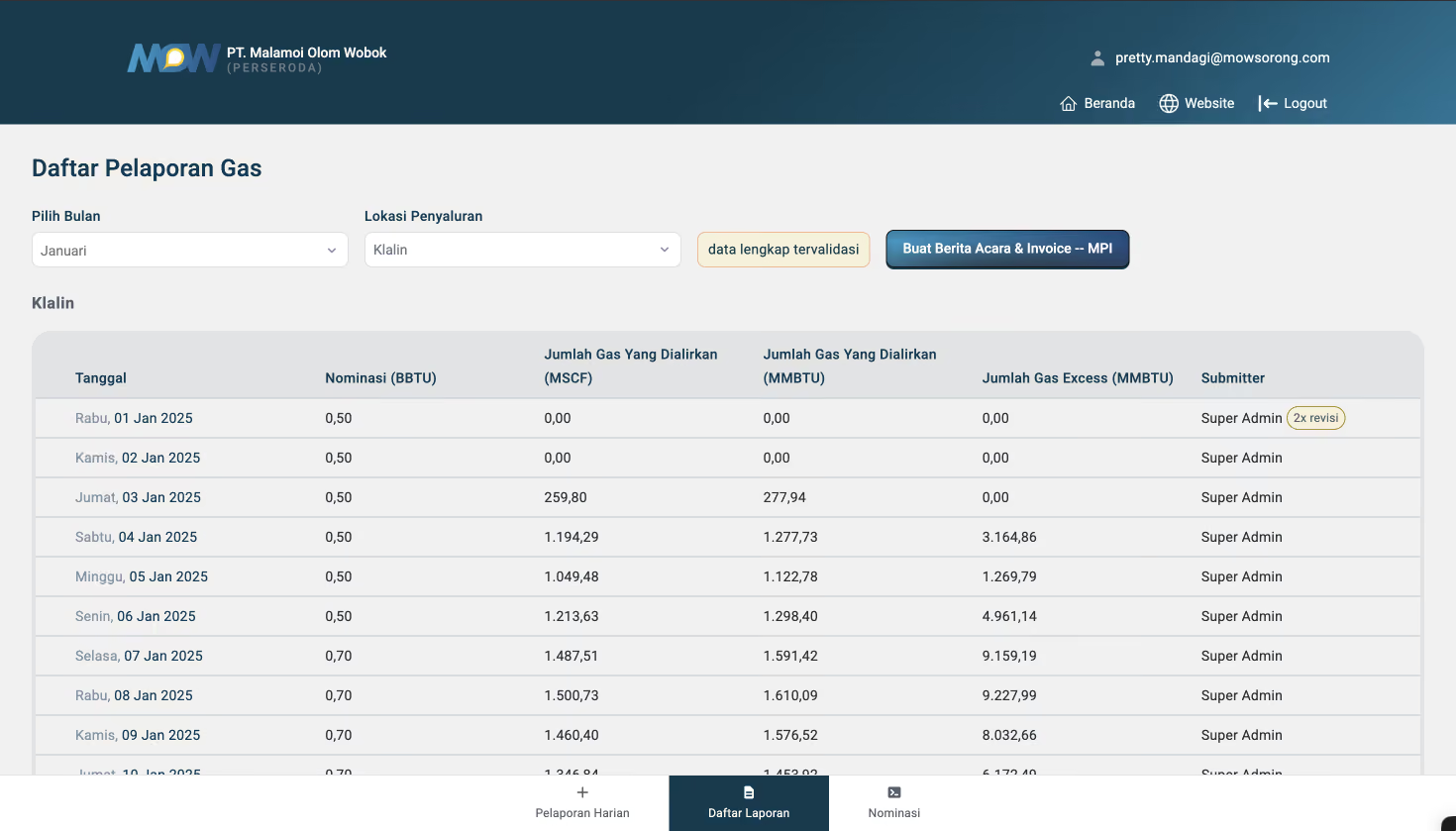
Its application supports real-time gas reports, approval and escalation flows, and automatic generation of invoices and operational documents.
This illustrates how multiple operational activities can be managed through a shared application instead of separate manual handoffs.
Healthcare and laboratory operations
Automation can also improve processes involving physical items, records, and traceability.
At Cypath, a pathology laboratory, a WeWeb application developed by Appy Makers supports the archiving and retrieval of diagnostic slides.
Staff scan slides and storage locations, creating records that help locate the slides later. The solution connects physical handling with digital record management.
These examples show that automation isn't limited to sending messages between applications. It can also connect the people, physical activities, and records involved in day-to-day operations.
Why automate business processes with no-code tools?
The biggest benefit isn't simply making individual tasks run faster. It's reducing the manual work and delays between them.
Reduce repetitive work
Copying customer details between systems, sending the same reminders, and updating multiple spreadsheets can consume hours every week.
Automation lets you capture information once and reuse it throughout the process.
For example, instead of manually preparing a report every Friday, a scheduled workflow can collect the relevant data, generate a summary, and send it to the appropriate team.
Reduce errors from manual handoffs
Every time information is re-entered or passed between people, there's an opportunity for mistakes.
In a 2026 Zapier survey of 508 US small-business owners and operators, 27% said a manual process error had cost their business time or money in the previous year.
Automating routine data transfers and validation can help reduce these errors.
For example, a purchase request can carry the same supplier, amount, and reference number from submission to approval instead of requiring those details to be entered repeatedly.
Keep work moving between teams
A process often slows down not because the work itself is difficult, but because someone is waiting for information or a decision.
Automated routing, notifications, and follow-ups can help requests reach the right person sooner.
A manager can see pending approvals in one place instead of searching through email threads. A scheduled workflow can identify overdue work and notify the responsible owner.
Adapt processes without rebuilding everything
Business requirements change. You might need an additional approval step, a new data field, or a different way to assign work.
Visual workflow builders make it possible to inspect and update many of these rules without rewriting the application from scratch.
Build around how your team actually works
Off-the-shelf software doesn't always match a company's internal processes.
A custom application lets you create the specific forms, screens, approval rules, and workflows your team needs rather than forcing everyone to follow a generic process.
With WeWeb, those interfaces can share the same data and backend workflows that power the automation.
How to choose a process worth automating
Before building anything, identify a process where automation can make a measurable difference.
There's still plenty of opportunity. In Zapier's 2026 survey, 55% of respondents said their businesses had repetitive tasks or processes they'd considered automating but hadn't yet.
But not every manual task is worth automating.
A task performed once a year may not justify the setup and maintenance required. A process that changes every week may be difficult to automate reliably.
Start by asking five questions:
- How often does it happen? Frequent tasks usually offer more opportunities to save time.
- How much manual effort does it require? Look for repeated data entry, checking, copying, and follow-ups.
- Are the rules reasonably clear? Processes with predictable inputs and decisions are easier to automate.
- Where does work get stuck? Identify delays caused by missing information, approvals, or system handoffs.
- Can you measure the improvement? Choose a process with a clear completion condition and measurable baseline.
Map the current process before automating it
Write down what starts the process, who is involved, which systems they use, and what must happen before the work is considered complete.
For a maintenance request, that could look like:
Request submitted → Request reviewed → Technician assigned → Work completed → Request closed
Then identify where automation would help.
Perhaps requests spend too long waiting to be assigned. Maybe employees repeatedly ask for status updates. Or perhaps completed work isn't consistently recorded.
Those are specific problems you can address.
Also consider whether the process could be simplified before automating it. A clearer form might eliminate missing information. Removing an unnecessary approval might save more time than automatically sending approval reminders.
The goal isn't to automate every existing step. It's to improve how the work gets done.
How to automate a business process without coding
Most business automations follow the same basic pattern: something triggers a workflow, the system processes information, and a series of actions moves the work forward.
Visual workflow builders let you configure these steps without writing code. Depending on the process, you might automate a single task, connect several applications, or build a custom interface where people can manage the work.
Here's how to set up an automation using WeWeb.
1. Choose what triggers the automation
Every automation starts with a trigger: an event or condition that tells the workflow when to run.
Common triggers include:
- User actions: Someone submits a form, clicks a button, or updates a record.
- External events: Another application sends information through an API or webhook.
- Scheduled events: A workflow runs at a specific time or on a recurring schedule.
In WeWeb, you can create frontend workflows triggered by user interactions, expose backend workflows through API endpoints, and run backend automations using scheduled tasks.
For example, submitting a maintenance request could trigger a workflow that creates a record and notifies the facilities team. A separate workflow could run every Monday to prepare and send a weekly operations report.
The trigger determines when the automation starts. The next steps determine what it does.
2. Connect the data your workflow needs
Most business processes involve reading, creating, or updating information.
A purchase approval workflow needs request amounts and approver details. A sales workflow needs customer records. An inventory workflow needs product quantities and stock locations.
Before building the automation, identify where that information lives and which records the workflow needs to access or update.
With WeWeb, you can store information in its native PostgreSQL database or connect an existing data source. You can create tables, manage records visually, and use backend workflows to read and update data.
For example, a maintenance-request application might store each request's location, description, priority, assigned technician, and status.
Keeping these details in a shared database means everyone works with the same records as the process progresses.
3. Define the actions and decision rules
Once a workflow starts, what should happen next?
Actions are the individual tasks the automation performs, such as creating a record, updating its status, sending a notification, or calling an external service.
Conditions determine which actions should run based on the information available.
For example:
- If a purchase request exceeds a certain amount, send it for manager approval.
- If a customer submits a high-priority support ticket, assign it to the appropriate team.
- If inventory falls below a minimum threshold, create a replenishment request.
In WeWeb's visual workflow builder, you can connect actions, add conditional branches, and configure how information passes between steps. Backend workflows handle operations that need to run securely on the server.
You can also combine multiple actions into a single workflow. A new request might be validated, saved to the database, assigned to a team, and followed by a confirmation email.
4. Connect the other tools involved
Business processes rarely happen inside a single system. Your team might use a CRM for customer information, Slack for communication, and separate software for accounting or inventory.
Rather than manually transferring information between these tools, you can connect them through integrations and APIs.
WeWeb supports native integrations, HTTP requests, and webhooks, allowing workflows to exchange information with external systems and trigger supported actions.
For example, a workflow could create a contact in HubSpot, send a Slack notification, or retrieve information from an external database.
You can configure these actions directly within WeWeb's workflows, without needing a separate automation platform like Zapier or n8n for supported operations. If you already use those tools, you can also connect them to WeWeb.
Before connecting systems, check which operations each integration supports and decide where information should be stored and updated.
5. Add human approvals and custom interfaces when needed
Not every part of a business process should happen automatically.
Some actions require judgment, additional context, or approval from the person responsible.
For example, an automation might collect purchase requests and route them to the appropriate manager, but the manager still needs to decide whether to approve the expense.
A useful workflow brings the information to the right person, captures their decision, and automatically handles what happens next.
With WeWeb, you can build custom interfaces for these interactions, including request forms, approval screens, dashboards, and task lists.
You can also configure authentication, roles, and permissions so people access the records and actions relevant to their responsibilities. Sensitive operations should be checked in the backend, not just controlled by which buttons are visible.
These interfaces become particularly valuable when a process involves multiple people who need to review information, update records, or track progress.
6. Schedule recurring tasks and follow-ups
Some automations need to run at a specific time rather than in response to an immediate action.
You might want to:
- Send a weekly sales report every Monday.
- Check for overdue invoices each morning.
- Notify employees before a subscription expires.
- Escalate requests that haven't progressed by their due date.
With WeWeb's Scheduled Tasks, you can run backend workflows at defined times or on recurring schedules using cron expressions.
You can also schedule tasks for individual records or users. For example, when a customer starts a subscription, a workflow could schedule a reminder email three days before their renewal date.
This lets your automation handle both immediate actions and work that needs to happen later, without requiring someone to manually start the workflow.
Where AI fits into business process automation
AI can help with business process automation in two distinct ways: building the application and performing tasks within it.
Use AI to help build the automation
Instead of configuring everything from scratch, you can describe what you want to build in natural language.
For example:
"Build a maintenance-request application where employees can report issues, supervisors can approve requests, and technicians can update assigned jobs. Include a database for requests, role-based access, and a workflow to notify supervisors about high-priority issues."
WeWeb AI can help generate an application with its interface, database, and logic.
You can then inspect and refine the generated components and workflows in the visual editor, including adding custom logic where necessary.
Before launch, review the generated data structure, permissions, integrations, and workflows.
Use AI inside the automation
AI can also perform specific tasks within a workflow.
For example, an incoming maintenance request could be analyzed to suggest its category or summarize a long description before a supervisor reviews it.
Other possibilities include:
- Classifying incoming customer support requests.
- Extracting information from documents.
- Summarizing operational reports.
- Drafting responses for employee review.
In WeWeb, AI Gateway allows backend workflows to use AI capabilities within applications built on the WeWeb backend.
For decisions with financial, operational, or other significant consequences, define clear rules and appropriate human oversight.
Don't just add AI to an inefficient process
AI is most valuable when it helps improve how work gets done, not simply when it's added to an existing series of manual steps.
McKinsey's 2026 State of AI report found that nearly three-quarters of organizations classified as AI high performers reported fundamentally redesigning workflows, compared with around one-quarter of other respondents.
The finding doesn't prove that redesign alone caused better performance, but it reinforces an important principle: improving the underlying process matters.
Before adding AI, decide which steps should be automated through predictable rules, which tasks could benefit from AI, and where people still need to make decisions.
How to test and launch an automated business process
Before rolling it out, test the complete process with the people who will use it.
Test the normal process and its exceptions
Start with a straightforward request and follow it from submission to completion.
Then test cases that could interrupt the process:
- A required field is missing.
- Someone submits the same request twice.
- The assigned approver is unavailable.
- An external service fails.
- Two people attempt to update the same record.
- A scheduled task runs when there are no records to process.
- A notification succeeds, but the underlying record isn't updated.
For each case, identify what happens, who can see the problem, and how the work can continue.
Also verify that backend permissions prevent unauthorized access or updates, even if someone attempts an action outside the normal interface.
Launch with a small group
Start with the people who submit requests, review them, and complete the work.
Watch how they use the application.
Do they understand what happens after submitting a form? Can they find the information they need? Does a supervisor have enough context to make a decision?
Small usability problems can create new manual work, even when the automation itself functions correctly.
Fix those issues before expanding the rollout.
Assign an owner
Every automated process needs someone responsible for keeping it working.
Document the important workflows, integrations, access rules, and exception paths.
Make sure another team member can understand how the system works and update it when requirements change.
Automation should reduce dependence on manual work, not create a new dependency on the person who originally built it.
How to measure the ROI of business process automation
The real measure of success isn't how many workflows you've created. It's how much you've improved the process.
Start by recording how the process performs before automation.
Useful metrics include:
Calculate the potential time savings
Here's a simple way to estimate the value of automating a repetitive task.
Monthly time saved = Number of tasks × Minutes saved per task ÷ 60
Suppose your team processes 200 requests per month, and automation saves six minutes of manual handling per request.
That's:
200 × 6 ÷ 60 = 20 hours saved per month
If the relevant labor cost is $25 per hour, those hours represent $500 in potential monthly labor value.
You should also account for the cost of building, operating, and maintaining the automation.
Measure the outcome, not just the activity
Imagine your new workflow sends approval notifications instantly, but managers still take three days to respond.
The automation is technically working. The business problem remains.
Similarly, generating a weekly report automatically provides limited value if someone still has to manually rebuild it in another format.
Look beyond workflow execution logs.
Ask whether requests are completed sooner, errors have decreased, and people spend less time coordinating the process.
Then improve the areas that still create friction.
Frequently asked questions
What is the main goal of no-code business process automation?
The goal is to reduce repetitive work, improve coordination, and help business processes run more consistently using visual tools instead of traditional programming.
Rather than only automating individual tasks, BPA focuses on helping work move from start to completion.
What are examples of business process automation?
Common examples include employee onboarding, purchase approvals, inventory replenishment, maintenance requests, customer support routing, invoice processing, and recurring operational reports.
These can range from simple scheduled workflows to applications involving multiple users, systems, and approval steps.
Do I need coding skills to automate a business process?
Not necessarily. No-code platforms let you create forms, configure workflows, manage data, and connect supported services visually.
Complex integrations, unusual business rules, or specialized requirements may still benefit from technical expertise or custom code.
Can no-code tools handle complex workflows?
Yes, depending on the platform and requirements.
Many no-code tools support conditional logic, multi-step workflows, database operations, integrations, scheduling, and approvals.
Evaluate whether a platform supports the specific operations, permissions, volume, and reliability your process needs.
Do I need Zapier or n8n to automate workflows in WeWeb?
No. WeWeb has its own visual backend workflows, scheduled tasks, native integrations, and API capabilities.
You can build and run many automations directly within WeWeb, including workflows that communicate with external systems.
Zapier and n8n can still be connected if you have an existing automation stack or a particular use case that benefits from them.
Is no-code business process automation secure?
Security depends on how the application and workflows are configured.
Look for authentication, appropriate permissions, secure handling of credentials, and backend checks for sensitive operations.
Configure authentication, roles, and access rules in WeWeb, then test which records and actions each user role can access.
What's the best way to start?
Choose a repetitive process with clear rules and a measurable outcome.
Map its existing steps, identify the biggest bottleneck, and automate a manageable part of the process first.
Test the result with the people doing the work before expanding it.
Start automating your business processes with WeWeb
You don't have to automate an entire department on day one.
Start with one process that currently depends on manual data entry, repeated follow-ups, or disconnected systems.
With WeWeb, you can build the workflows that automate those steps, connect the tools you already use, and create custom interfaces and databases when your process needs them.
Describe what you want to build to WeWeb AI, then refine the application, data, and workflows in the visual editor.