WeWeb vs Bubble: Which no-code AI app builder is better?
Updated on
November 12, 2026
Both Bubble and WeWeb let you build full-stack apps, complete with an interface, database, logic and hosting, without writing code.
AI is changing how teams build software. Small teams can now build and maintain more apps, making the platform they build on, and the control they retain as they grow, more important than ever.
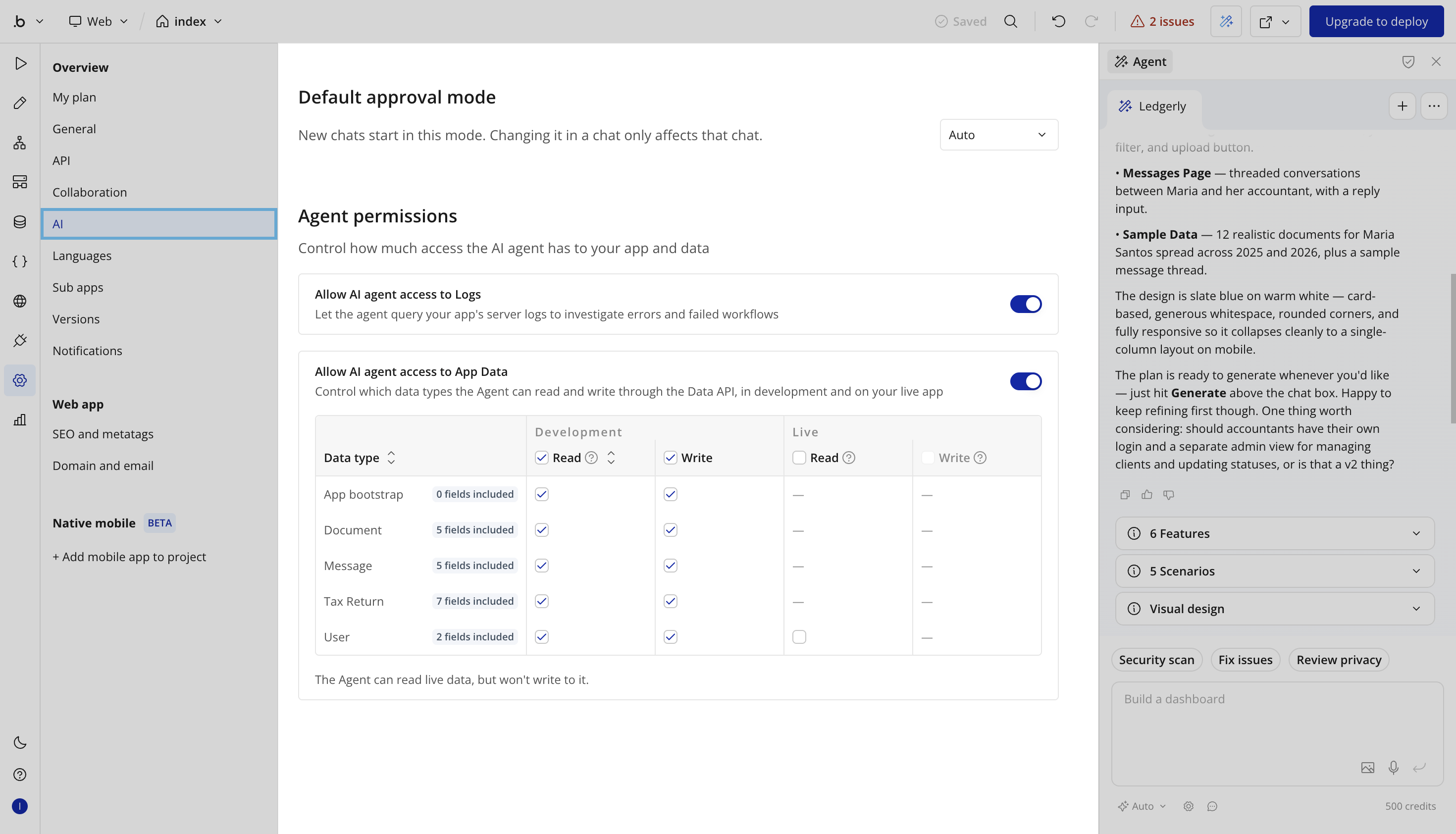
Bubble combines AI assistance with its traditional no-code approach. AI can help build parts of your app, but complex workflows still require manual configuration. Your interface, database and logic remain tightly tied to Bubble's proprietary ecosystem, with no option to export your app's code or host it elsewhere.
WeWeb puts AI at the center of how you build. Describe what you need and WeWeb AI creates the pages, data and workflows, while the visual editor lets you inspect, change and protect the result. Use WeWeb’s backend or connect your own, then host with WeWeb or export the app and self-host.
Choose WeWeb if you want AI to do more of the building, plan to grow your team or app portfolio, or need control over your data and hosting.
Choose Bubble if you need to build and publish a native mobile app to the App Store or Google Play.
Here’s why teams are switching from Bubble to WeWeb.
Vibe code complex apps with AI, without losing control
Both platforms have AI, but the scope differs. WeWeb AI builds across the app: pages, database, workflows, formulas and integrations, while keeping the result editable in the no-code editor. Bubble AI is geared toward smaller tasks. Bubble’s own documentation recommends simpler prompts and says it declines very complex workflows, which you then build manually.
Describe a business process, review the plan, and let WeWeb AI build the design system, database, pages and workflows it needs. Then ask it to click through the app in preview, find broken interactions and fix what it can. You can work with WeWeb AI, with tokens included in each seat, or connect Claude, ChatGPT or Cursor through MCP using your own tokens.
As the app takes shape, protect the parts that must not change: specific pages, workflows, tables or your design system. Those protections apply to WeWeb AI and MCP agents. Both work with editor data rather than production customer records.
Bubble does not offer equivalent resource-level AI locks. Its AI works within a collaborator’s app-wide edit permissions, while MCP agents can access production records under configured data permissions. Bubble allows restrictions on which data types agents read and requires approval for supported changes.
Full stack like Bubble, minus the no-code limits
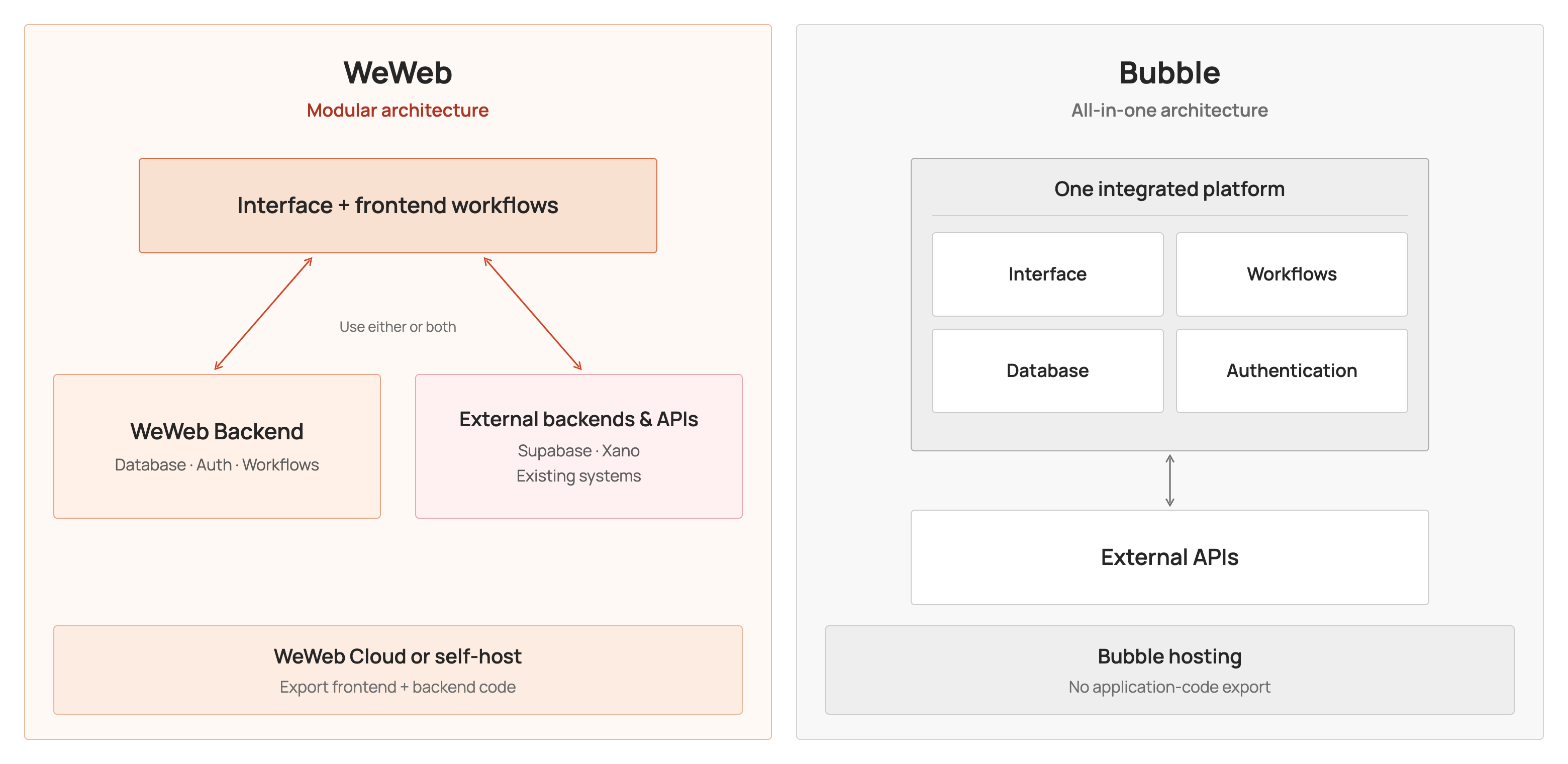
WeWeb isn't just a frontend builder anymore. Like Bubble, it's a full-stack app builder, with interface, data, workflows and integrations in one editor. The difference is how those pieces work together.
In Bubble, everything is tightly coupled within its proprietary platform. Pages, workflows and privacy rules are built around Bubble's own data types and infrastructure. Connecting external systems means importing data or configuring API calls and plugins, and you can't export your app's code to host it elsewhere.
In WeWeb, the stack is modular. Its Vue.js frontend and PostgreSQL backend work together out of the box, but you're not locked into either. Use WeWeb Tables or connect Supabase, Xano or any API. And when no-code isn't enough, extend your app with JavaScript, CSS, SQL or custom components, all while working in a powerful visual editor.
Build full-stack apps without code, without being limited by our no-code editor.
Here's how each part goes further.
Design exactly the interface you picture, with built-in elements
Most business apps rely on a few hardworking screens: an editable table, calendar, kanban board or form.
WeWeb includes 50+ native elements, including a data grid with sorting, filters and inline editing, a draggable calendar and kanban boards with workflow triggers. Bubble has fewer than 30 core elements. Its table needs additional workflow setup for sorting or editing, while calendars and kanban boards typically require plugins.
WeWeb's Add element panel
In WeWeb, you can build a design system once and reuse it across all your apps. Import colors, typography, spacing and shadows from Figma, or have WeWeb AI create your design system. Then share components through your workspace library to keep every app consistent. Bubble's Figma converter imports page layouts rather than a reusable design system, and its reusable elements stay within one app unless copied to another.
You also have more control over how every element looks and behaves. WeWeb's visual editor lets you customize CSS properties, classes and states, add custom CSS at the element, page or project level, and bind properties to data with formulas or JavaScript.
WeWeb's no-code frontend editor
Bubble supports custom CSS and JavaScript too, but typically through HTML elements, page headers or plugins rather than the element's own styling controls.
Bubble's no-code frontend editor
And when the native library doesn't have what you need, WeWeb AI can extend an existing element or create a custom component from scratch. You can also import components from GitHub. In Bubble, extending the element library means building or installing a plugin.
Manage data visually, with the power of SQL when you need it
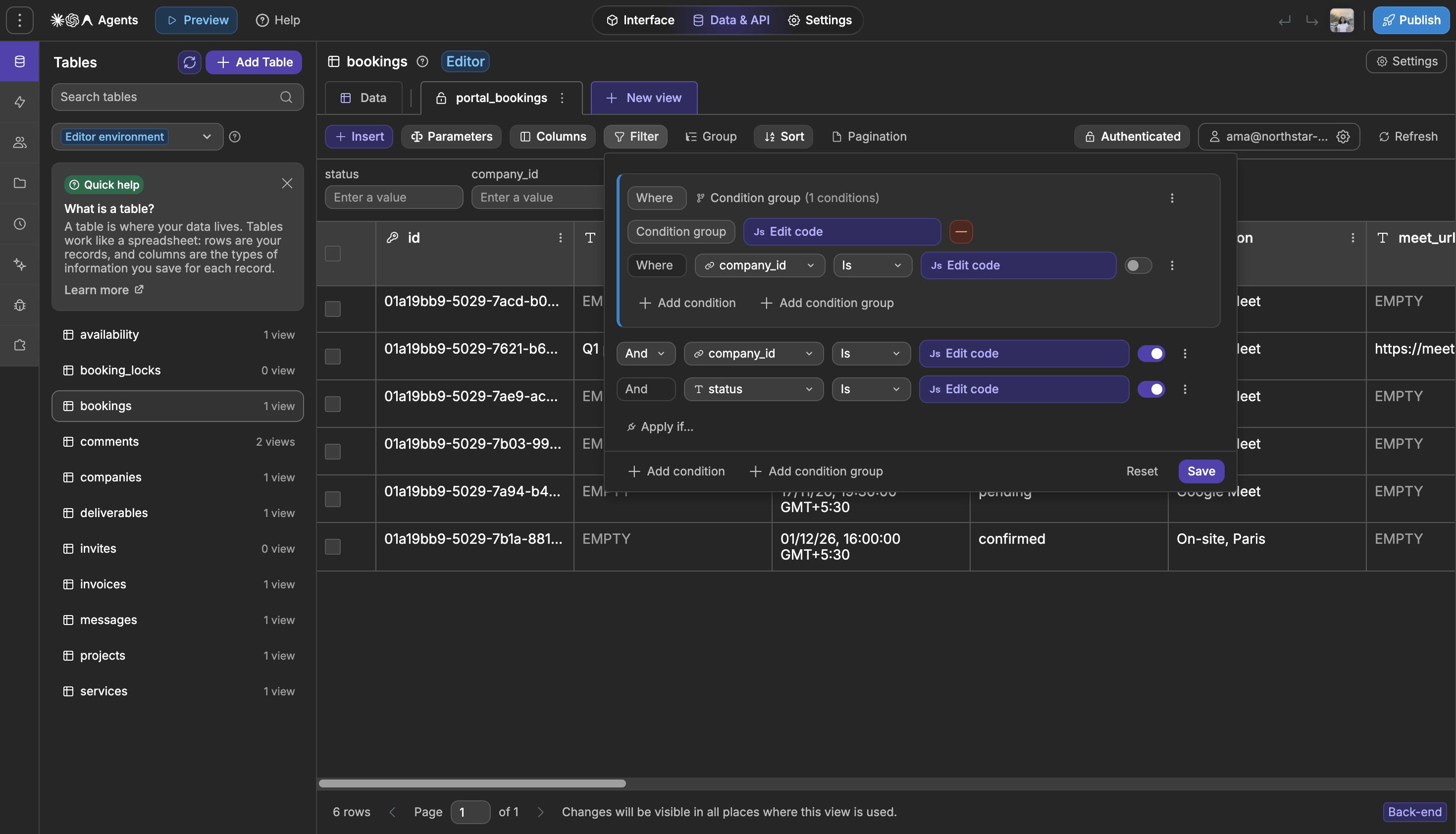
Both tools store your data in PostgreSQL. What changes is how close you get to it. Bubble acts as a layer over SQL, with its own terminology: you work with data types, things and searches, never the tables underneath, so you can only do what that layer exposes. WeWeb gives you direct access to PostgreSQL tables, which you can manage in a spreadsheet-style editor or query with SQL whenever you need to.
Suppose the same filtered customer data appears in ten screens. In WeWeb, define the filters, sorting, relationships and visible fields once in a reusable view, then use it across pages and workflows.
Bubble typically defines constraints within individual searches, so repeated queries need to be maintained wherever they appear.
Need a weighted deal value or the number of days an invoice is overdue? Create a calculated column in WeWeb and use its result in lists, filters and workflows. Bubble can calculate values through expressions or workflows, but does not offer an equivalent database-level formula field.
For more complex reporting across tables, run parameterized SQL in a WeWeb backend workflow. Bubble does not allow SQL queries inside the app; its Enterprise dedicated-server offering provides read-only SQL access.
Build complex workflows visually, with the power of JS when you need it
Behind every app is the logic that runs your business: approving requests, updating records, syncing with your other tools and following up on time. It's the most valuable part of your app, and the part that has to keep up as your business changes.
WeWeb lays it out as a visual flow: branch on multiple outcomes, loop through records, connect native integration actions, and insert JavaScript for rules that are easier to express in code.
Bubble workflows use sequences of actions with "Only when" conditions; its if/else and loop features are in alpha, so a rule with three outcomes means repeating the same check on every action. And running JavaScript means the Toolbox community plugin or building your own.
You can design what happens when a workflow fails. WeWeb supports try/catch, custom errors and workflow-level error paths, so you can handle a failed payment or API response within the flow. In Bubble, a failed step generally stops the workflow, with no built-in way to catch the error and recover within the same flow.
Schedule reminders, nightly syncs and individual follow-ups in WeWeb, from minute-level recurring jobs to one-off tasks for a customer. Failed tasks retry automatically, and you can inspect execution history or rerun them.
Bubble also supports scheduled backend workflows, but its recurring options and per-record limits are more restrictive, with troubleshooting primarily through server logs.
Bring the stack you already use without workarounds or migration
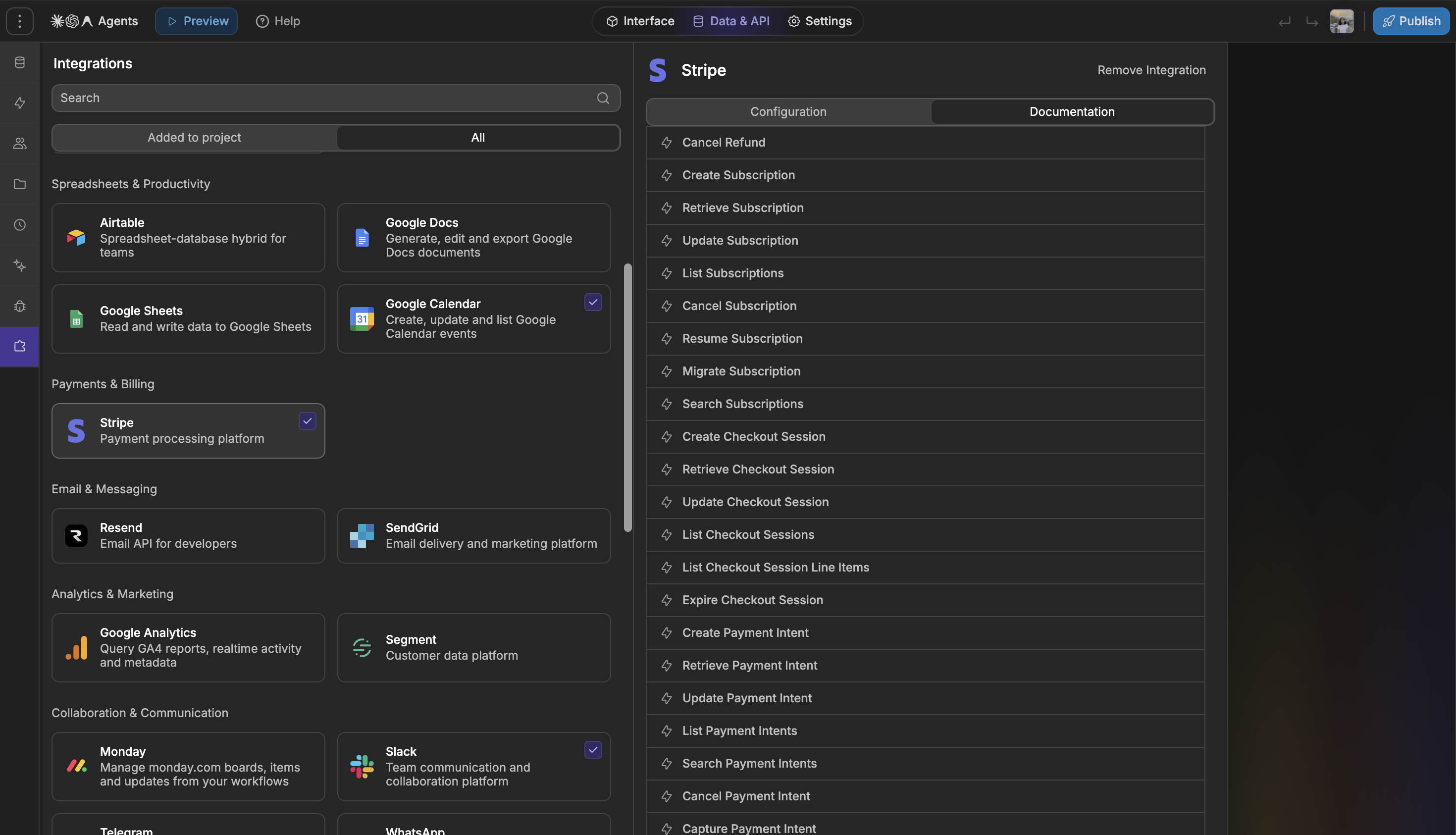
Most teams already have data spread across tools like HubSpot, Stripe, Airtable, Notion, Supabase or Xano. WeWeb lets you build on the systems you already use, with native integrations that handle the connection for you. Many also expose data as tables you can filter, sort and use directly in your app.
Bubble can connect to these tools too, but typically through manually configured API calls or marketplace plugins. The difference is how much work it takes to connect and maintain them.
Take a simple task: update a contact’s job title in HubSpot. WeWeb provides an Update Contact action; Bubble requires configuring and initializing an API call before using it in a workflow. Here is the setup side by side:
Step
WeWeb
Bubble
Get a HubSpot key
Create a service key in HubSpot with contact read and write access
Same: create a HubSpot key with contact read and write access
Connect HubSpot
Add the HubSpot integration and paste the key, once for each environment
Install the API Connector, create a HubSpot collection and set
authentication to Private key in header, with Authorization as the
key name and Bearer plus your key as the value
Set up the call
Nothing to set up: Update Contact is a ready-made action
Add a call, set it to Action, choose PATCH, enter the contacts URL
with a contact ID parameter, and write the JSON body with a job
title parameter
Initialize
Not needed
Run the call once with real test values so Bubble can read the
response. This sends a real update to HubSpot
Use it in a workflow
Add Update Contact, then fill in the contact ID and the job title
Add your call from API Connections, then fill in the contact ID
and the job title
The same flexibility extends to authentication and files. Use WeWeb Auth or connect OpenID Connect, Auth0, Supabase or Xano. Store files with WeWeb, AWS S3 or Cloudflare R2. Share supported connections across workspace projects with permissions for teams and builders. Bubble stores app files on its own infrastructure, and API connections are typically configured separately for each app.
Maintenance matters after launch. WeWeb maintains its native integrations. Bubble’s marketplace offers far more plugins, but third-party plugins depend on their respective maintainers. When an external API changes, that difference can affect who is responsible for fixing the connection.
Own your app's code and run it anywhere
Where your app runs determines how much control you have over your data, infrastructure and future options. In Bubble, much of that is decided for you. Apps run only on Bubble's servers, with shared infrastructure in the US on most plans, and no code to export if you want to move elsewhere.
In WeWeb, it's your call. Export your WeWeb frontend and backend code as a ZIP or push to GitHub, and host it anywhere: on your own cloud (like Cloudflare, AWS, or Vercel) or on-premise infrastructures, even inside a private network with no internet access.
A self-hosted app doesn't need WeWeb's servers to run: its backend, login and integrations all run on your own infrastructure. Each time you publish, WeWeb can also sync code to your repositories and call a deployment hook, so updates move through your CI/CD process. Self-hosting costs nothing in WeWeb hosting fees.
Want managed hosting instead? Use WeWeb Cloud and choose a backend region in the US, EU (Frankfurt) or Asia-Pacific (Singapore), including on the Free plan. Bubble only offers dedicated-server region selection on Enterprise.
Meet your compliance rules on infrastructure you trust
Security and compliance requirements often come down to three questions: where your data lives, who can access it, and how it's protected.
Bubble offers SOC 2 Type II certification, with its report available on Enterprise, and a healthcare BAA as an add-on to Dedicated Enterprise.
WeWeb gives you more control over how you meet those requirements. While WeWeb isn't SOC 2 certified or a BAA signatory, you can choose where your data lives, self-host on infrastructure your organization already trusts, and control access to your apps and data, without needing an Enterprise plan for all these capabilities.
Decide where your data lives. Run WeWeb's backend in the EU, the US or Asia-Pacific, self-host it on infrastructure your auditors already approved, or keep your data in Supabase or Xano, both SOC 2 Type II and able to sign a BAA.
Control who can reach your app and who can change it. Give each role access to only the pages, tables and APIs it needs, restrict sign-in to your team's or your clients' accounts, and manage your builders with workspace roles and single sign-on.
Keep sensitive data away from AI. WeWeb AI and your own agents only work on editor data, so they never read or change your production data.
Keep a record of every change. Review changes on staging before they reach production, and every publish keeps its version, message and author. Push each publish to your own GitHub repositories to add your own reviews and approvals.
For health data, keep it off WeWeb's servers. Self-host on HIPAA-eligible infrastructure, use providers with the required agreements, and keep patient records out of the editor. Whether your deployment requires a BAA with a particular vendor depends on the actual data flows and vendor roles.
Teams in regulated industries already build this way:
Healthcare:Kyan built Aloe, tools for medical educators, on WeWeb and Xano, with the option for hospitals to self-host.
Professional services:PwC self-hosts its Supabase backend to fit its own security protocols.
Public services:La Poste chose WeWeb in part because it fits EU data standards.
Have a specific review to pass? Talk to our team about your setup.
Pay less as your team and apps grow
In Bubble, you pay per app. In WeWeb, you pay per builder, and you choose how each app is hosted.
$190 a month in WeWeb vs $698 in Bubble, for 3 builders on 2 live apps. WeWeb: Pro for 3 builders (3 × $50 = $150) + hosting with WeWeb's backend for each app (2 × $20 = $40) = $190 Bubble: Team plan for each app, the cheapest plan that fits 3 editors (2 × $349) = $698 Billed annually, before usage overages. Each side uses the cheapest plans that team needs.
Each live Bubble app needs its own plan, and each plan caps how many people can edit it: 1 on Starter, 2 on Growth, 5 on Team. So your team's cost repeats on every app: with 3 builders, each app needs the Team plan. Usage is metered on top, in workload units spent on every search, workflow and API call, so your bill depends on how the app runs once it's live.
In WeWeb, one plan covers your builders across all your apps. Each app you host on WeWeb Cloud adds its own hosting plan, and you choose how much database, storage and bandwidth it gets. Apps you host yourself add nothing.
"With WeWeb, it's easier to estimate costs upfront and explain them to clients."~ Himanshu Sharma, NocodeAssistant, an agency that moved its client apps from Bubble to WeWeb
Which tool wins by use case?
Use case
Our pick
Why
WeWeb
Give every department one place to work, on the same data. Connect WeWeb Tables, Airtable, Sheets or HubSpot, and route requests between teams by amount, owner or status
What you need
WeWeb
Bubble
Unify data across departments
Store your data natively in WeWeb Tables, or bring in data from the tools each department already uses, like Airtable, Google Sheets, Notion, monday.com or HubSpot
Move data into Bubble's database, or connect each tool through a community plugin or the API Connector (Airtable has a Bubble-made plugin)
Customize views for every department
Show each team only the data that matters to them: hide sensitive columns, and add the filters, sorting and calculated columns each department needs, in a spreadsheet-like interface they can edit in place
Each search sets its own filters, and privacy rules hide fields per user. No calculated columns, and Bubble's table element has no built-in sorting, filters or inline editing
Restrict access by department
Give each department access to only the pages and data it needs. Staff sign in with their Google or Microsoft work account, and only your company's email domain gets in
Data access is set with privacy rules on each data type. Pages can only be hidden with a redirect, which Bubble's own manual calls "obfuscation, not security". Limiting sign-in to your company's domain is something you build yourself
Custom routing logic
Check several conditions at once and send each request down the right path, with a fallback when none match, plus loops and error handling. Add a JavaScript step whenever a rule is easier to write as code
Each action carries its own condition, so routing to several paths means repeating checks or chaining custom events, and if/else and loops are still in alpha. Custom code goes through the Toolbox community plugin or your own plugin
Build, iterate and maintain the tool with AI
WeWeb AI builds the tables, views and workflows your process needs, keeps up as the process gets more complex, and tests and fixes its own work
Bubble's AI handles simpler workflows: its own docs say it declines very complex ones, and it can't test what it builds
Add AI to your workflows
Add AI steps to any workflow to summarize requests, sort tickets or draft replies. AI is built in, or use your own OpenAI, Anthropic or Gemini account
Set up each AI provider yourself through the API Connector, with your own account
Scheduled reminders and alerts
Run reminders and syncs every few minutes, daily or on a custom schedule, or one per person from any workflow, and send them by Slack, SMS or WhatsApp
Recurring workflows run daily to yearly, with 1 to 20 per record depending on the plan. Slack through a Bubble-made plugin; SMS and WhatsApp through community plugins or the API Connector
Keep improving the tool without breaking what works
Put pages, workflows and tables off-limits to AI while it builds, and AI never sees your production data
AI follows each person's app-wide edit permissions, and your own agents via MCP can read production records
Field staff working from their phones
Staff open the app in their phone's browser. Ask WeWeb AI to build components for the camera, photos and location
Publish native iOS and Android apps (beta), with the camera, photos and location built in
Choose WeWeb when several departments share data and hand work to each other, in WeWeb Tables or the tools they already use, and your processes change every few weeks.
Choose Bubble when your team needs to download the tool from the App Store or Google Play.
Built with WeWeb
PT MOW runs multi-team approval flows, invoicing and reporting for a government-owned gas operator in Indonesia.
WeWeb
Bring every client's files, notes and messages into one place. Pull documents from Google Drive and Notion, and log WhatsApp messages the moment they arrive, so you and your client always see the same up-to-date view
What you need
WeWeb
Bubble
Bring every client's information into one place
Store it in WeWeb Tables, or pull in files from Google Drive, notes from Notion, deals from HubSpot, invoices from Stripe, emails and more
Bubble's database and a Bubble-made Stripe plugin. Google Drive, Notion and HubSpot through community plugins or the API Connector
Give each client a private space
Only clients you invite get an account. Make any page private in its page settings, so only signed-in clients or chosen roles can open it, and each client sees only their own records
You build account creation yourself, and pages can only be hidden with a redirect, which Bubble's own manual calls "obfuscation, not security"
Share PDFs, images, videos and photos
Clients upload and view files in their space, each one private to that client. Store them in WeWeb Storage or your own AWS S3 or Cloudflare R2 storage, and play videos right in the portal
Files go to Bubble's own storage, kept private with privacy rules
Keep every client conversation in one place
Talk to clients inside the portal with a built-in chat, send updates by email, SMS, WhatsApp or Slack, and SMS and WhatsApp replies are saved to the client's record as they arrive
Build a chat yourself from lists and inputs. Email is built in, Slack comes through a Bubble-made plugin, and SMS and WhatsApp through community plugins or the API Connector
Handle client requests and approvals
Clients submit a request through a form with built-in checks. Check several conditions at once and send each request down the right path, with a fallback when none match. Your team handles requests from its own admin view, on a kanban board or an editable table, while each client follows the status of theirs in the portal
Routing to several people means repeating the same check on every action, and if/else and loops are still in alpha. Kanban boards need a plugin, and Bubble's table has no built-in sorting, filters or inline editing
Build, iterate and maintain the portal with AI
WeWeb AI builds the pages, tables and workflows your portal needs, keeps up as it grows, and tests and fixes its own work
Bubble's AI handles simpler workflows: its own docs say it declines very complex ones, and it can't test what it builds
Add AI to the portal
Summarize a client's history, draft updates or answer common questions with AI steps. AI is built in, or use your own OpenAI, Anthropic or Gemini account
Set up each AI provider yourself through the API Connector, with your own account
Send reminders automatically
Remind clients about renewals, due dates or missing documents on any schedule, or one per client
Recurring workflows run daily to yearly, with 1 to 20 per record depending on the plan
Keep improving the portal without exposing client data
Put client pages and access rules off-limits to AI while it builds, and client data never reaches AI
AI follows each person's app-wide edit permissions, and your own agents via MCP can read production records
Clients on their phones
Clients open the portal in their phone's browser
Publish native iOS and Android apps (beta)
Choose WeWeb when your team keeps client files, notes and conversations across Google Drive, Notion and WhatsApp, and wants every client to see one up-to-date view.
Choose Bubble when your clients expect to download the portal from the App Store or Google Play.
Built with WeWeb
Cargolo lets businesses book and track transport worldwide, download their documents and manage recurring pickups from one portal.
WeWeb
Ship faster than your competitors and grow your customer base without growing your hosting bill at the same rate. WeWeb AI builds complex workflows across your data sources, and hosting comes in set tiers instead of Bubble-style workload units
What you need
WeWeb
Bubble
Build, iterate and maintain your product with AI
WeWeb AI builds the pages, tables and workflows each feature needs, keeps up as your product gets more complex, and tests and fixes its own work
Bubble's AI handles simpler workflows: its own docs say it declines very complex ones, and it can't add payment steps or test what it builds
Bring your data, wherever it lives
Store data in WeWeb Tables, or connect Supabase, Xano, a SQL database or any API, and use all of it the same way across your product
Bubble's database. Supabase and Xano through the API Connector or community plugins; SQL databases through a Bubble-made connector
Complex business logic
Check several conditions at once, loop through records and handle errors, and add a JavaScript step whenever a rule is easier to write as code
Routing to several paths means repeating the same check on every action, and if/else and loops are still in alpha. Custom code goes through a community plugin or your own plugin
AI features for your customers
Add AI steps that summarize, classify or draft for your users. AI is built in, or use your own OpenAI, Anthropic or Gemini account
Set up each AI provider yourself through the API Connector, with your own account
Hosting cost as your customer base grows
Each hosting plan includes a set amount of resources, so your bill doesn't rise with every action your customers take
Every search, workflow and API call uses workload units, and anything over your plan is billed automatically
Subscriptions and billing
Native Stripe subscriptions, invoices and refunds, with workflows that start when a payment succeeds or fails
Bubble-made Stripe plugin for charges, subscriptions and Checkout
A separate account for each customer company
Each customer gets its own admins and members, and sees only its own data, with roles set without code
You build the account structure yourself, with user fields and privacy rules
Keep improving the product without breaking customers' accounts
Put billing, access rules or any page off-limits to AI while it builds, and customer data never reaches AI
AI follows each person's app-wide edit permissions, and your own agents via MCP can read production records
Own the product you're building
Export your frontend and backend code anytime, and keep it in GitHub
No code export
Customers on their phones
Customers open the app in their phone's browser
Publish native iOS and Android apps (beta)
Choose WeWeb when you need to ship complex features quickly and keep hosting costs in line as your customer base grows.
Choose Bubble when your product needs a companion app in the App Store or Google Play.
Built with WeWeb
W4.0's founder ships new features in about 90 minutes: "It used to take a frontend developer, a backend developer, and a project manager… I just get it done between meetings."
WeWeb
Build custom, AI-powered workflows for your marketplace. Let AI screen listings and score matches, book calls straight into Google Calendar, and follow up by email, SMS or WhatsApp, all built in
For marketplaces that charge for listings, plans or access, like job, talent and service marketplaces, not a cut of every sale.
What you need
WeWeb
Bubble
Screen and approve listings by your own rules
AI checks each new listing or application against your terms and conditions, and your rules approve it or send it down the right path, with a fallback when none match. Edge cases go to your team on a kanban board in its own admin view. AI is built in, or use your own OpenAI, Anthropic or Gemini account
Set up an AI provider yourself through the API Connector. Routing to several paths means repeating the same check on every action, and if/else and loops are still in alpha. Kanban boards need a plugin
Match each side with your own rules
Score and rank matches by any criteria, with SQL when you need it, and add a JavaScript step whenever a rule is easier to write as code
Matches come from searches and conditions, with no SQL in the app. Custom code goes through a community plugin or your own plugin
Book calls and interviews
Calls land straight in Google Calendar, through a native integration
The API Connector or community plugins (Bubble's Google plugin covers sign-in only)
Keep both sides talking
A built-in chat inside the marketplace, plus email, SMS and WhatsApp updates, with SMS and WhatsApp replies saved as they arrive
Build a chat yourself from lists and inputs. SMS and WhatsApp through community plugins or the API Connector
Share PDFs, images, videos and documents
Each side uploads files that stay private to them, stored in WeWeb Storage or your own AWS S3 or Cloudflare R2, and videos play right in the marketplace. Contracts are generated from Google Docs templates
Files go to Bubble's own storage. Contracts through the Bubble-made SelectPDF plugin
A separate space for each side
Make any page private to buyers, sellers or admins in its page settings, and each one sees only their own records
Pages can only be hidden with a redirect, which Bubble's own manual calls "obfuscation, not security"
Build, iterate and maintain your marketplace with AI
WeWeb AI builds the pages, tables and workflows your marketplace needs, keeps up as it grows, and tests and fixes its own work
Bubble's AI handles simpler workflows: its own docs say it declines very complex ones, and it can't test what it builds
Keep improving without breaking what works
Put matching rules, payments or any page off-limits to AI while it builds, and buyer and seller data never reaches AI
AI follows each person's app-wide edit permissions, and your own agents via MCP can read production records
Both sides on their phones
Buyers and sellers open the marketplace in their phone's browser
Publish native iOS and Android apps (beta)
Choose WeWeb when your marketplace earns from listings or plans, and runs on matching, reviews and conversations with both sides.
Choose Bubble when both sides expect to download your marketplace from the App Store or Google Play.
Built with WeWeb
Hello Generalist, a two-person startup, built its marketplace for freelance operators in three months.
Bubble
Bubble publishes native iOS and Android apps (beta). WeWeb builds web apps your users install from the browser
What you need
WeWeb
Bubble
Your app in the App Store and Google Play
Not available yet: users open the app in their phone's browser
Publish native iOS and Android apps (beta)
Camera, photos and location
Ask WeWeb AI to build components for them
Built into native apps
Notifications
Shown while the app is open
Push notifications, even when the app is closed
Payments inside the app
Stripe payments and subscriptions
Subscriptions through Apple and Google billing (one-time purchases not supported yet)
Choose WeWeb when your mobile users can open the app in their phone's browser, like field staff, clients or partners, and you want the rest of the app built on WeWeb.
Choose Bubble when your app has to live in the App Store or Google Play.
Every feature compared: WeWeb vs Bubble
Feature
WeWeb
Bubble
Feature
WeWeb
Bubble
Build and edit apps with AI
Yes: WeWeb AI builds pages, design system, visual workflows, formulas, tables and APIs you can edit
Yes: the Bubble AI Agent builds pages, data types, workflows, styles and API calls
Generate a whole app from a prompt
Yes: describe the app when you create a project, and WeWeb AI builds it
Yes: the Agent asks questions, plans features and user scenarios, then builds (no AI credits used)
Review a plan before building
Yes: Plan mode drafts a build plan; nothing is built until you approve
Yes: the Agent shows a plan you approve or cancel before changes
AI writes custom coded components
Yes: WeWeb AI writes and edits coded components, including outside libraries like Highcharts
No: the Agent adds and uses existing plugins, but doesn't write new plugin code
AI tests your app like a user
Yes: WeWeb AI clicks through your app in preview, reports problems and fixes them
Partly: MCP agents can write test-case descriptions, but don't run them
AI fixes flagged app issues
Not available yet: no issue checker. WeWeb AI tests your app and reports problems it finds
Yes: the Agent reads the first 100 issue-checker issues and fixes supported ones
Build with your own agent (MCP)
Yes: WeWeb MCP, unlimited on Pro and up, no WeWeb tokens used (14-day trial below Pro)
Yes, in beta: Bubble MCP on every plan, no Bubble AI credits used
Keep parts of the app off-limits
Yes: lock pages, workflows, tables, tokens or whole categories from WeWeb AI and MCP agents (Pro and up)
Not per page or workflow: the Agent follows each collaborator's app-wide permissions
AI access to production data
Never: WeWeb AI and MCP agents build on editor data, on every plan
The Agent uses development data only; MCP agents can read live data and write to development
Agents can't push changes live
Yes: agents never publish; you press Publish and approve database changes
Yes: MCP agents can't deploy; you deploy changes yourself
Feature
WeWeb
Bubble
Drag-and-drop visual editor
Yes: visual editor with CSS-level styling and a layout tree
Yes: visual editor with element tree and property editor
Custom CSS
Yes: add custom CSS on an element, a page or the whole project
Through custom code: HTML element or page and app HTML headers
Design tokens: colors, fonts, spacing
Yes: library colors, typographies, spacings, radius, shadows, borders; Google or uploaded fonts
Yes: color and font variables plus styles; Google fonts or uploaded font files
Reusable components
Yes: components update every instance; share across projects via workspace libraries
Yes: reusable elements across one app; copy to another app, no shared library
Not built in: table has no grid controls; build sorting and filters with workflows
Chat interfaces
Yes: Chat element and AI Chat element with streaming replies and attachments
Not built in: build one from a repeating group and an input, or add a marketplace plugin
Native mobile UI elements
Not available yet: the same elements work in web apps and installable PWAs
Yes (beta): views, tab bar, app bar, sheets, swipe actions, native inputs
Feature
WeWeb
Bubble
If/else branches in workflows
Yes: true/false and multi-option splits, in the browser and on the server
Not yet: 'Only when' conditions on each action, browser and server. Branching is in alpha
Loops in workflows
Yes: loop through a list, or repeat while a condition holds, in the browser and on the server
Not yet: schedule a server workflow on a list, or chain recursive workflows. Loops are in alpha
Handle errors inside a workflow
Yes: try/catch and throw error in the browser and on the server, plus an On error path per workflow
Partial: catch errors with element and page error events, in the browser
Logic that runs on the server
Yes: visual API endpoints, functions, event triggers and scheduled tasks
Yes: backend workflows, custom events and database triggers (limited scheduling on Free)
Run logic when database records change
Not available yet: event triggers cover sign-in events and failed scheduled tasks, not table changes
Yes: database trigger events run on the server when a record is created, changed or deleted
Run on a timer or condition change
Partly: Scheduled Tasks run backend workflows on a timer (paid plans). On a page, a page-load workflow can check a condition, and a loop with a time delay can repeat the check
Yes: 'Do every X seconds' and 'Do when condition is true' page events
Scheduled and recurring jobs
Yes: schedule a task for a set time or on any repeat, down to every minute or a custom cron (paid plans)
Yes: schedule a backend workflow for a set time, or repeat it daily to yearly per record (1 per record on Free and Starter, 5 on Growth, 20 on Team)
Feature
WeWeb
Bubble
Built-in database
Yes: spreadsheet-like tables on PostgreSQL
Yes: data types and fields in the Data tab, on PostgreSQL (200 records on Free)
Relationships between tables
Yes: link to another record or a user; views pull in linked fields several levels deep
Yes: use any data type as a field; Bubble joins the data for you
Required, unique and default values
Yes: mark columns required or unique, set defaults like the current user or current time
Not built in: fields have no required or unique setting. Enforce these rules with conditions in your workflows
Calculated (formula) columns
Yes: formula columns calculated in the database, usable in filters and sorting
No formula field type: calculate values in expressions where you show them
Query with SQL
Yes: run SQL with named parameters in backend workflows
No SQL in the app; read-only SQL access on Enterprise dedicated servers
Live updates without a refresh
With Supabase or Xano Realtime, set up with a JavaScript snippet
Yes, by default: lists on the page update as the database changes
Import a CSV into the database
Yes: match columns, add missing ones and preview rows before importing
Yes: map columns, validate, then upload in the background (paid plans, beta)
Export your database
Yes: export data as a CSV (Download CSV action)
Yes: export any data type as CSV, JSON or NDJSON (paid plans)
Feature
WeWeb
Bubble
Integration catalog
25 native integrations, plus PostgreSQL, MySQL, SQL Server, Postmark and Customer.io. Any other API via HTTP request
7,600+ marketplace plugins (about 40 made by Bubble). Any other API via the API Connector
Call any REST API
Yes: HTTP request action, from the browser or the server, with retries and timeouts
Yes: the API Connector, as an action or a data source
Supabase
Native: tables, sign-in, file storage, edge and Postgres functions; browser-direct or through WeWeb's server
Through the API Connector or community plugins; no Bubble-made plugin
Xano
Native: tables on Xano endpoints, sign-in, file uploads and streaming; browser-direct or through WeWeb's server
Through the API Connector or community plugins; no Bubble-made plugin
Stripe payments and subscriptions
Native: Checkout, payment forms, subscriptions, invoices and refunds; Stripe data as tables; payment-event triggers
Bubble-made plugin: card charges, subscriptions and Checkout, with Strong Customer Authentication
Your own API endpoints
Yes: API endpoints with your own paths, methods and access rules
Yes: Data API and Workflow API (Starter and up)
Ready-made API for your database
Yes: each table can auto-generate API endpoints to read, create, update and delete records
Yes: the Data API reads and edits any data type you expose (Starter and up)
Custom elements in code
Coded components, written by WeWeb AI or imported from GitHub, on every plan
Build a plugin element in Bubble's plugin editor (JavaScript for web, React Native for mobile)
Reuse a connection across projects
Yes: workspace connections; choose projects, members or groups, and who edits credentials
Not built in: keys are entered in each app; a private plugin can package API calls for chosen apps
Feature
WeWeb
Bubble
Email and password login
Yes: built-in email and password sign-up and sign-in, with optional email verification (WeWeb Auth)
Yes: built-in sign-up and login with email and password, plus email confirmation
Social login
Yes: 32 providers built in, including Google, Apple, Microsoft, GitHub, Slack and LinkedIn; no plugins
Via plugin: Bubble-made plugins for Google, Facebook, LinkedIn and others; Sign in with Apple built in
Two-factor login for your users
Build it with Twilio Verify and the code input element
Yes: built in, with authenticator apps (Growth and up)
User roles
Yes: create roles, give users several, and enforce them on pages, data and APIs
Build it: store roles as user fields or option sets and use them in privacy rules
Restrict data by user or role
Yes: choose who can read each table view and call each API (public, signed-in or roles), without code
Yes: privacy rules on each data type, based on the current user
SSO for your app's users
Yes: OpenID Connect (Okta, Microsoft Entra ID, Keycloak and others) or Auth0
Via plugin: Bubble-made WorkOS plugins for SAML or OIDC sign-in and directory sync
Apps only your company can open
Yes: internal apps with employee SSO sign-in and separate staging and production access
Not built in: one shared username and password, or build SSO with WorkOS
Feature
WeWeb
Bubble
Security scanner
Not available yet
Yes: security dashboard with 20+ checks, scheduled or on every deploy (advanced checks Growth and up)
Keep API keys secret
Yes: secure environment variables stay on the server, with separate editor, staging and production values
Yes: mark API Connector keys Private so they stay on Bubble's server
SOC 2 certification
Not SOC 2 certified. Host on your own certified infrastructure, or use a certified backend like Supabase or Xano
Yes: SOC 2 Type II; report shared on Enterprise
Health data (HIPAA and BAA)
No BAA. Self-host the app, with a backend and login provider that sign a BAA
BAA as an add-on to Dedicated Enterprise
GDPR Data Processing Agreement
Yes: Data Processing Agreement on every plan, including Free
Yes: Data Processing Agreement on every plan
Choose where your data is stored
Yes: pick the US, EU (Frankfurt) or Asia-Pacific (Singapore) when you set up WeWeb's backend, or self-host
25 regions, on Enterprise with a dedicated server; other plans run on shared servers in the US
Feature
WeWeb
Bubble
Custom domain
Yes, on a subdomain like www; redirect the root domain at your registrar. Free SSL (paid WeWeb Cloud plan)
Yes, including root domains like mydomain.com; free SSL (Starter and up)
SEO settings
Page metadata, structured data, auto sitemap, robots.txt, llms.txt, pre-rendered public pages
Page metadata (including dynamic pages), auto sitemap, robots.txt, canonical URL (Starter and up)
Multilingual apps
Yes: translations, a language switcher and language-specific URLs
Yes: translate app texts per language, with CSV import and export
Installable web app (PWA)
Yes: app manifest, icon and an Install PWA action
Not built in: add a web app manifest and service worker yourself, with custom code or a plugin
Native iOS and Android apps
Not available yet: WeWeb builds web apps; install them as a PWA
Yes (beta): native apps published to the App Store and Google Play, on a paid mobile plan
In-app purchases in mobile apps
Not available yet: no native mobile apps
Yes: subscriptions through Apple and Google billing; one-time purchases not supported yet
Feature
WeWeb
Bubble
Separate test and live data
Yes: the editor and live app each keep their own data
Yes: separate development and live databases (live app from Starter)
Staging environment
Yes: a published staging copy to review before production (Scale+, Partner, Enterprise, or add-on)
No separate staging: branches share the development database
Roll back the live app
Yes: restore an earlier version to production in a click (plan-dependent)
Restore a branch to a savepoint, then deploy it again
Branches and merging
Coming soon (branching)
Yes: custom branches with merge and conflict review (Growth and up)
Server logs
Yes: backend logs of requests, responses and errors per environment; retention not published
Yes: searchable server logs, kept 6 hours (Free) to 20 days (Team)
Error alerts in production
Via an outside service: connect an error tracker like Sentry
Yes: custom alerts (Team and up)
Feature
WeWeb
Bubble
Managed hosting
Yes: WeWeb Cloud on AWS, billed per live app
Yes: Bubble hosting on AWS, included in each app plan
Uptime and SLA
Public status page; SLA on Enterprise
Public status page and a stated 99.93% uptime record; uptime SLA on Enterprise
Export your app's code
Yes: frontend and backend code, as often as you like (Essential and up)
No: an AI agent can recreate the app in code through Bubble MCP (beta)
Self-host on your own servers
Yes: any cloud or on-premise server, even with no internet access
No: apps run only on Bubble's servers
Sync code to GitHub
Yes: push interface and server code to your GitHub repositories (Essential and up)
No: there is no app code to export
Bring in an app from another tool
Not available yet: rebuild in WeWeb, with a Bubble-to-WeWeb migration guide
Yes (beta, rolling out): import a codebase from Lovable, v0, Base44, Replit or Claude
Feature
WeWeb
Bubble
Multiple builders
Yes, on Pro and up: each builder seat covers every project in the workspace
Per app: 1 editor on Starter, 2 on Growth, 5 on Team
Builder roles and permissions
Yes: custom roles with granular permissions, like publishing to staging but not production
Yes: per collaborator, admin, view or edit, and development-only (Growth and up)
SSO for builders
Yes: Google Workspace or Microsoft Entra ID sign-in (Enterprise)
Yes: any SAML or OIDC provider (Enterprise)
Change history and audit log
Not available yet: no workspace audit log; publication history and editor backups show who published or saved
Partly: changelog of who changed what, 14 days (Growth) to 1 year (Enterprise dedicated)
Comments inside the editor
Not available yet
Yes: comment on elements, workflows, actions, data types, privacy rules and styles
Feature
WeWeb
Bubble
Free plan
Yes: a live app on a WeWeb subdomain (1,000 sessions in total) and 1M AI tokens a month
Yes: build and test only, no live app; 500 AI credits a month
How you pay
One workspace plan for all projects, plus WeWeb Cloud hosting for each live app
One plan per app (project), covering hosting and editors
Adding builders
$50 per developer/mo on Pro (billed annually); one seat covers every project
Per app: 2 editors on Growth, 5 on Team; a third editor means Team ($349/mo billed annually)
Usage-based billing
Each WeWeb Cloud tier includes set resources (bandwidth, database, functions, files), with limits or overages
Workload units for every search, workflow and API call; $0.30 per 1,000 over your plan
How to move from Bubble to WeWeb
Your Bubble app can become the blueprint for your rebuild. Connect Bubble MCP and WeWeb MCP to the same AI agent, give it the Bubble-to-WeWeb migration guide, and ask it to map what needs to be recreated, moved separately or checked by hand.
Once you approve the plan, the agent can rebuild the app in WeWeb step by step. Migrate data and files separately, then verify key workflows and user permissions before switching traffic. The migration guide covers the process in detail.
In conclusion: Choose WeWeb to scale with AI, without scaling your costs
Bubble helped make full-stack app development accessible without code. Now that AI can handle much of the building, the question is no longer whether you can build an app without code.
Today, building an app is only the beginning. The real test is how confidently you can take it to production, maintain it as it evolves, and scale without losing control.
That's where WeWeb stands apart:
AI builds and maintains your production apps, and you can see and change everything it builds in a visual editor.
More apps don't mean paying for your team again, because you pay per builder, not per app.
Your app stays yours, with the freedom to use your own data sources, export your code and host it anywhere.
If you’re building web apps with AI and want control over how they work, scale and run, WeWeb is the stronger choice. Bubble remains the option here for native app-store publishing. Start building with WeWeb, or talk to the team about your project.
Frequently asked questions
What is WeWeb?
WeWeb is an AI app builder that builds and maintains full-stack apps, with a no-code editor where you can see and change everything AI builds. Use WeWeb's backend, with its tables, workflows, auth and storage, or connect the tools and data sources you already use, and export your code whenever you want. Teams use it to build internal tools, client portals, B2B SaaS products and marketplaces.
What's the main difference between WeWeb and Bubble?
The main difference is how much of the building AI does, and how open the platform is. In WeWeb, AI drives the building process: it builds the pages, tables and workflows each feature needs, and you stay in control in the visual editor. In Bubble, AI is more of an assistant for smaller tasks. Bubble also keeps its interface, data and logic tightly coupled on its own servers, while WeWeb lets you bring your own tools, export your code and host it anywhere.
How much does WeWeb cost?
WeWeb has a free plan, and paid plans start at 50 per builder a month), plus a hosting plan for each app you run on WeWeb Cloud, from 20 with WeWeb's backend. Apps you export and host yourself have no WeWeb hosting fees. Prices are billed annually; see WeWeb pricing.
Is WeWeb cheaper than Bubble?
As your team and apps grow, yes. Bubble charges per app, and each app's plan caps how many people can edit it, so your team's cost repeats on every app. WeWeb charges per builder, plus hosting for each app. For example, 3 builders on 2 live apps cost 698 in Bubble, billed annually. For one builder on one app, Bubble costs slightly less: 40.
Which is better for scalable apps, WeWeb or Bubble?
WeWeb is the better fit when scaling means more apps, more builders and more of your own systems. Each app gets its own hosting tier with set resources, with autoscaling on the higher tiers, or you can export the app and run it on your own infrastructure with no WeWeb limits. Bubble apps run only on Bubble's servers, with usage measured in workload units and dedicated servers on Enterprise.
What's the best alternative to Bubble?
For teams that want AI to build and maintain production web apps on their own data sources, with code they can export, WeWeb is the strongest alternative to Bubble. If you're building a website rather than an app, a website builder like Webflow is the better fit (see Webflow vs Bubble). If your app has to be in the App Store or Google Play, Bubble is still the better choice.
When is Bubble a better choice than WeWeb?
Choose Bubble when your app has to be published in the App Store or Google Play. Bubble builds native iOS and Android apps (in beta), with push notifications and camera access built in, while WeWeb builds web apps your users open in their phone's browser. Bubble can also cost less if you're one builder working on one app.
How do I move my Bubble app to WeWeb?
Use your Bubble app as the blueprint. Connect Bubble MCP and WeWeb MCP to the same AI agent, give it our migration guide, and have it plan the rebuild, then rebuild your app in WeWeb one part at a time. Your data and uploaded files move separately, through Bubble's Data API, so test your key workflows and user permissions before you switch over.