



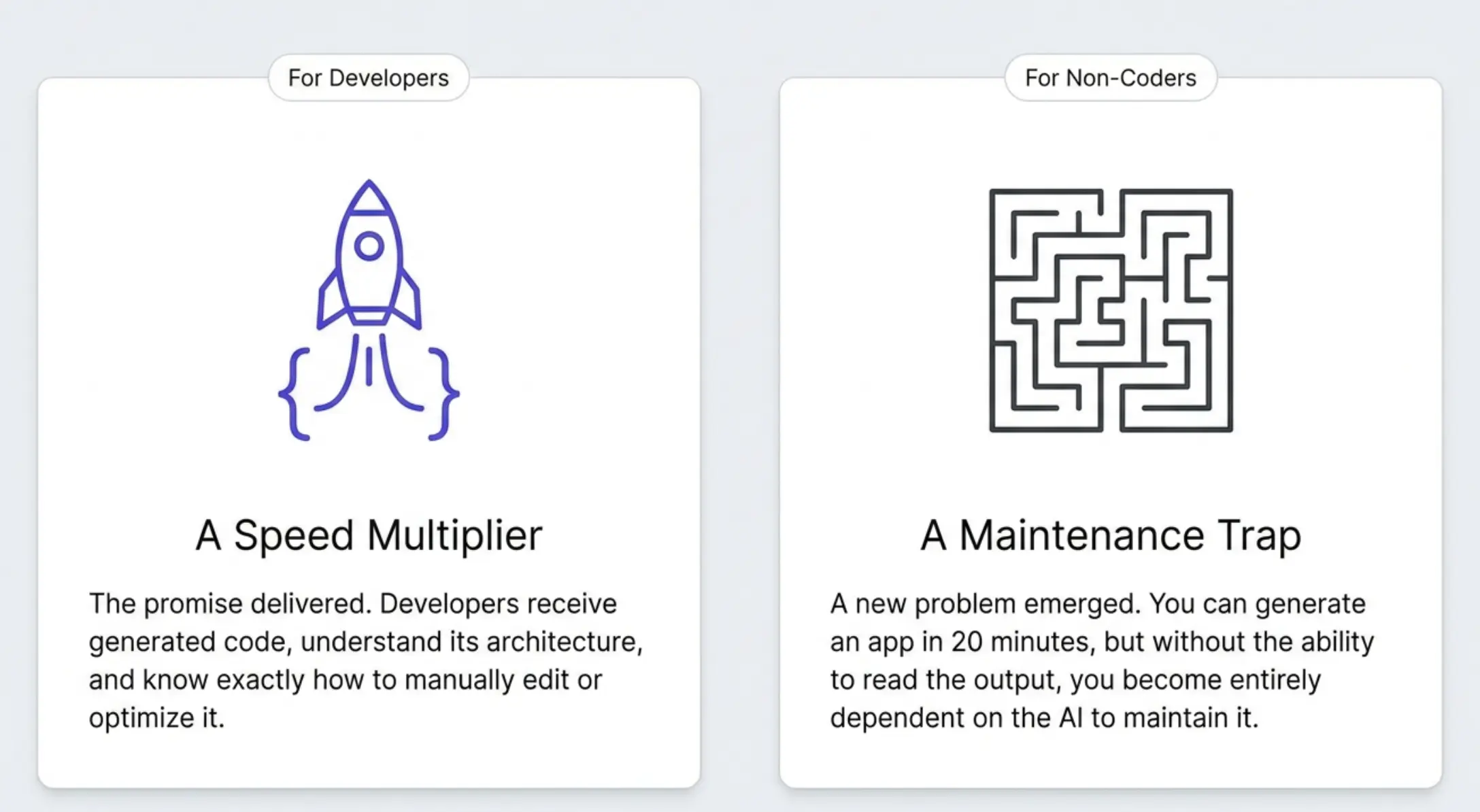
Vibe coding promised to let anyone build apps just by describing them. For developers, that promise delivered. They get the generated code, understand it, and know how to change it.
For non-coders, most vibe coding tools created a new problem: you can generate something in 20 minutes, but you can't maintain it without a developer.
The best vibe coding tools for non-coders are not the same as the best vibe coding tools for developers. This guide explains why, gives you a clear framework for evaluating your options, and ranks the tools that actually work when you don't write code.
What Is Vibe Coding?
Vibe coding means describing what you want in natural language and having AI build it. You type something like "build me a dashboard with a list of customers and a filter by status" and the AI generates a working app.
Anthropic researcher Andrej Karpathy coined the term in early 2025. The idea spread quickly. Tools like Lovable, Bolt, and Replit made it concrete: millions of people tried building apps without writing a single line of code.
The results were mixed. For developers, vibe coding was a speed multiplier. For non-coders, the experience often looked like this:
- Generate something exciting in 20 minutes
- Spend two weeks trying to tweak it through the AI
- Get stuck in a loop where fixing one thing breaks another
- Give up or hire a developer anyway
That loop has a name: prompt purgatory. And it's the defining problem for non-coders using vibe coding tools. Visual AI development solves this, but most vibe coding tools are not built that way.
The Problem with Most Vibe Coding Tools for Non-Coders
What Prompt Purgatory Actually Is
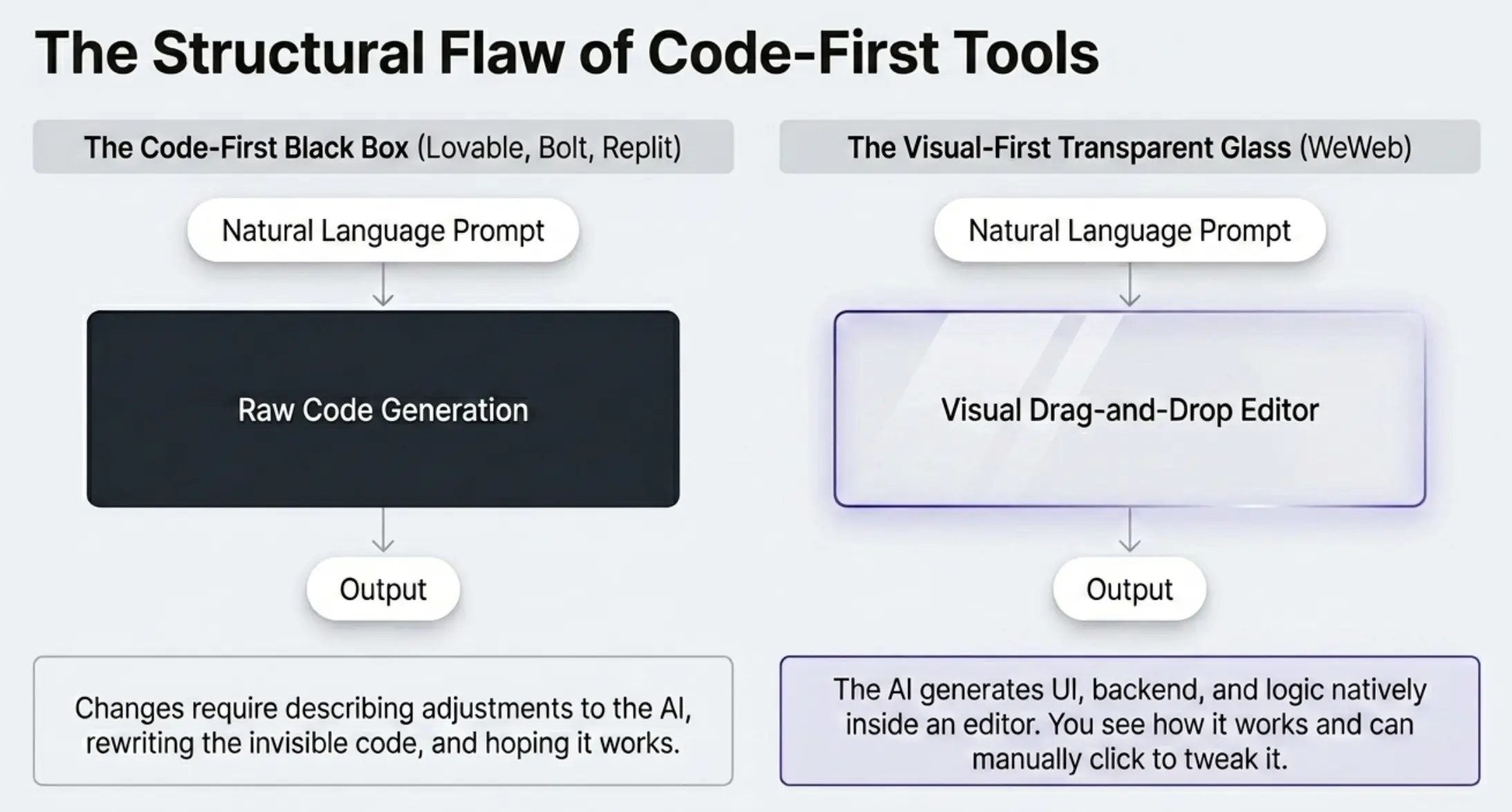
Code-first vibe coding tools generate code. That's the output. When you want to change something, you have to describe the change to the AI, the AI rewrites the code. Sometimes it works, sometimes it doesn't. The AI changes something unrelated, breaks what was working, or misunderstands what you wanted.
For a developer, this is annoying but manageable. They can open the code, see what changed, and fix it directly.
For a non-coder, there's no fallback. You can't read the code. You can't fix it manually. You're entirely dependent on the AI understanding you.
That's prompt purgatory.
The Maintenance Wall
Prompt purgatory is a build-time problem. The maintenance wall is what happens after launch.
Your app is live. A user finds a bug. A business rule changes. You want to add a new field to a form. In a code-first vibe tool, every one of those changes requires prompting the AI, consuming tokens, hoping it gets it right, and testing the result.
Over time, this becomes unworkable. Most non-coders end up needing a developer to maintain what they built. The independence they signed up for disappears.
The Backend Complexity Spike
Many vibe coding tools generate a frontend. The backend is either separate or minimal. When you need real user authentication, role-based access control, or data isolation between customers, you quickly discover you need more than what the tool provides out of the box.
This is especially common for SaaS products and client portals. The initial generation works fine. But the moment you need "user A should not see user B's data," things get complicated.
What Non-Coders Should Look for in a Vibe Coding Tool
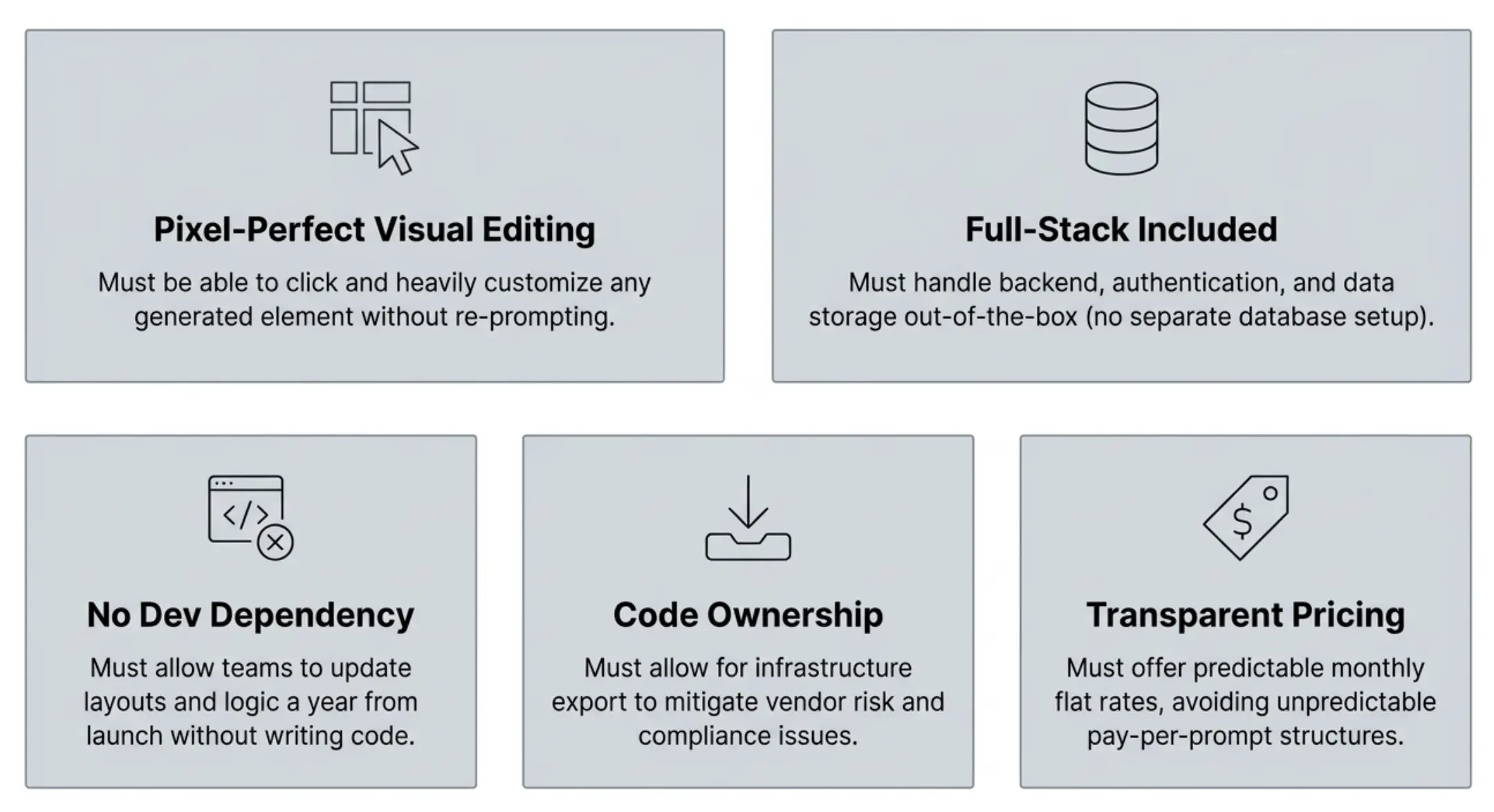
Before looking at specific tools, here are the five criteria that matter for non-coders specifically.
1. Pixel-perfect visual editing. Can you click on any element in the generated app and customize it heavily without re-prompting? Or are you limited to a few style properties? If the answer is the latter, you will hit prompt purgatory.
2. Full-stack included. Does the tool handle the backend, authentication, and data storage out of the box? You should not need to set up a separate database or authentication service to get a working app.
3. No developer dependency for ongoing maintenance. Can your team update the app a year from now without a developer? Test this before committing. Generate an app, then try to make a small change to the layout. If it requires code or complex prompting, that's your future.
4. Code ownership. Can you export the generated code and host it yourself? This matters for two reasons: vendor risk (what if the platform changes pricing?) and compliance (some industries require you to own your infrastructure).
5. Transparent, predictable pricing. Avoid tools that charge per prompt or per AI "checkpoint." These become expensive and unpredictable as you build. Look for flat monthly pricing.
The 5 Best Vibe Coding Tools for Non-Coders in 2026
1. WeWeb: Best for Non-Coders Who Need Visual Control After Generation
We are an AI-powered full-stack visual development platform. You describe your app, our AI generates the full-stack foundation (UI, backend, auth, workflows), and you customize everything with a pixel-perfect drag-and-drop editor. No re-prompting required.
This is the core difference between us and every code-first tool: everything our AI builds is editable in the visual editor: UI elements, database tables, business logic. You can clearly see how things work, understand what the AI built and tweak it manually. As a result, you're never stuck waiting for the AI to understand your intent.
How it works for non-coders:
- Describe your app in natural language
- Our AI generates UI, backend, auth, and workflows together
- You see the result visually and edit anything directly
- Deploy with one click or export the Vue.js code
Full-stack out of the box: Our built-in Postgres backend, WeWeb Tables, includes auto-generated APIs, authentication with 30+ SSO providers, file storage, and backend workflows. You don't need a separate Supabase account or any external services to build a complete, production-ready app.
But if you already have a backend (Supabase, Xano, a REST API), you can connect it as well, and even mix multiple data sources in the same project.
Why non-coders choose us:
- Visual editing means no code black box or prompting purgatory
- The full-stack backend removes setup complexity
- Role-based access control for multi-user apps is built in (and visual, so you can clearly see who has access to what)
- No per-user pricing: from $20/month, with unlimited app users
- Code export (Vue.js SPA) for future flexibility
The honest catch: We won't sugarcoat it: there is a learning curve. Our visual editor is powerful, and with power comes complexity. Most non-coders get productive in a few sessions, but it can take. The trade-off is that what you build is maintainable in the long run.
Best for: Non-technical founders, operators, and teams who need to run their app long-term without a developer. Especially good for SaaS products, client portals, and internal tools with user roles.
Pricing: From $20/month. No per-user fees. Free tier available.
2. Lovable: Best for Fast Prototyping (If You Plan to Bring in a Developer)
Lovable is a chat-based AI builder that generates React code with a Supabase backend. You describe your app, Lovable builds it, and you can deploy immediately.
It is genuinely fast. Impressive demos come out of 20-minute sessions. The product has a large user base and an active community. For rapid idea validation, it is hard to beat.
The honest picture for non-coders: Lovable's visual editing is limited. Most changes require re-prompting the AI. The more you build on top of the initial generation, the more likely you are to generate bugs and dead code.
Lovable's native backend is Lovable Cloud (powered by Supabase). This works well for simple apps. For complex access control or multiple data sources, you will quickly feel the limits if you don't know how to code.
Maintenance long-term requires developer involvement or constant AI assistance. Non-coders who need to run customer-facing products independently can struggle.
Best for: Developers or technically-comfortable founders who want to validate an idea fast and plan to bring in a developer to build the production version. Not recommended as a long-term platform for non-coders who need long-term independence.
Pricing: Starting around $20/month. Usage-based credits for AI generation.
3. Bolt.new: Best for Quick Experiments
Bolt.new is an in-browser AI app builder from StackBlitz. Describe an app, get a live preview in seconds. No signup required to start.
The instant gratification is real. It is one of the fastest ways to go from idea to something that looks like a working app.
The honest picture for non-coders: Bolt outputs code. The interface shows you a code editor alongside the preview. Making changes means editing the code or re-prompting. There is no visual layer between you and the generated code.
For non-coders, this means Bolt is primarily a demo tool, not a build tool. You can use it to show an idea, get feedback, or understand what your app should look like. You should not expect to maintain a production app in Bolt without developer support.
Best for: Quickly generating ideas to show stakeholders or validate concepts. Not for production apps non-coders need to maintain.
Pricing: Pay-as-you-go tokens. Can become expensive for extended use.
4. Replit: Best for Developers Who Want AI Assistance
Replit is a browser-based IDE. It supports 50+ programming languages. Its AI features help you write code faster, explain code, and debug.
It appears on many "vibe coding" lists because you can generate apps through natural language prompts. The output is code that runs in Replit's environment.
The honest picture for non-coders: Replit is a code editor. If you do not write code, Replit is not for you. Everything is in a text editor. Changes require editing code directly or re-prompting.
Pricing is effort-based and can quickly become unpredictable.
Best for: Developers who want AI assistance while coding. Not appropriate for non-coders.
Pricing: Effort-based pricing, unpredictable for non-coders. Starter plans available.
5. Base44: Best for Simple CRUD Apps with Minimal Setup
Base44 is an AI-powered no-code builder focused on business apps. It has a more visual output than Bolt or Replit, making it more accessible to non-coders. It handles simple data management use cases well.
The honest picture for non-coders: Base44 works for simple apps: basic CRMs, internal trackers, lightweight dashboards. When you need complex workflows, role-based access control, or custom UI, you will hit its limits quickly.
Best for: Simple internal tools or data management apps where customization needs are low.
Pricing: Varies by plan.
Comparison Table
The Vibe Coding Workflow That Works Well for Non-Coders
Picking the right tool is step one. Using it well is step two. Here is the workflow that produces best results for most non-coders.
Step 1: Write a detailed prompt. Vague prompts produce vague apps. Before you start, write down your app's key screens, the main actions users will take, and who the different user types are (admin vs regular user, for example). The more specific your initial prompt, the less re-prompting you will need.
Step 2: Review the generated result visually. Do not start tweaking immediately. Look at what was generated first. Understand the structure. Identify the three or four things that are most wrong, and fix those first.
Step 3: Use visual editing, not re-prompting, for fine-tuning. This is where a tool like WeWeb has the advantage. Once the overall structure is right, use the visual editor to handle details. Click on an element, change the color, adjust the layout, modify the copy. Look at the authentication workflow, understand how it works, control who has access to what. This is faster and more reliable than describing changes to the AI and having to trust the output (especially when it comes to security).
Step 4: Test real user flows. Before you invite anyone else in, walk through the app as your users would. Sign up as a new user. Try to access data as someone who should not have access. Submit a form and see what happens. Real user flows reveal issues that look-at-a-preview reviews miss.
Step 5: Iterate visually. After launch, changes should go through the visual editor first. The AI is best used for adding new features or sections. For existing functionality, direct editing is faster and less risky.
Frequently Asked Questions
Is vibe coding good for non-coders? With the right tool, yes. With code-first tools like Replit, Bolt, or Lovable, the experience works well for initial generation but breaks down when you need ongoing maintenance. Tools that combine AI generation with visual editing, like WeWeb, work much better for non-coders over the long run.
What is the difference between Lovable and WeWeb for non-coders? Lovable is faster to generate a first version. We give you visual control after generation, so you can edit, maintain, and run your app without a developer. Lovable's native backend is limited to Lovable Cloud. We include a full-stack backend with auth, storage, and user management built in, and you can also connect external backends like Supabase, Xano, Airtable, Google Sheets or mix multiple data sources in the same project.
What is prompt purgatory? Prompt purgatory is the loop of re-prompting an AI builder to fix one thing, which breaks something else, which requires another prompt, and so on. It happens with code-first tools because there is no way to make changes directly. Visual editing is the solution, and it's what makes WeWeb different.
Can I really build a real app without coding? Yes, if you use a tool that generates a visually editable app with a full-stack backend included. We built WeWeb specifically for this. Building a no-code SaaS product is genuinely achievable without developer skills when the right tool is in place.
What happens when I need advanced features? We let you add custom JavaScript when visual tools are not enough. You can also export the complete Vue.js source code and continue building with a developer at any point. You do not lose what you built. Coming soon: MCP server and CLI to push coded components from Claude Code directly into WeWeb.
Conclusion
The best vibe coding tool for non-coders is the one you can maintain.
Fast generation is table stakes in 2026. Every tool on this list can give you a working prototype in an hour. The real question is: what happens in month three, when you need to add a feature or fix a bug, and you still do not have a developer?
If you need to run your product independently, use a tool with a full visual editor, a built-in backend, and no developer dependency for maintenance. That is why non-coders who want to build something they can actually run choose our visual AI development platform.
Ready to try it? Start building with WeWeb free.