




Speed wins in 2026. Markets shift fast, buyers expect polished experiences, and teams are lean. A SaaS development platform is a toolset that lets teams design, build, connect, and deploy web apps using visual building blocks, reusable components, and automation. It helps you turn concepts into working software without waiting on long handoffs or big engineering backlogs, compressing time to market and letting non developers collaborate with developers in one shared canvas.
This guide explores when to use a SaaS development platform for an MVP, how to pick the right fit, and how to plan for security and scale. You will also find a simple roadmap from idea to launch.
What Is a SaaS Development Platform?
A SaaS development platform blends UI creation, data integrations, logic, and deployment in one place.
Key capabilities to look for:
- Visual editor for pages, components, and logic
- Data connectors for databases, APIs, and authentication
- Role based access and environments for dev, staging, and production
- Hosting choices and deployment controls
- Extensibility through custom code and components
The best SaaS development platform gives designers, founders, and engineers a shared workflow that reduces handoffs while still allowing code when needed.
Why Use a Platform for Your MVP
An MVP is about learning quickly with minimal waste. A SaaS development platform reduces the time from idea to user feedback so you can iterate faster.
Benefits for MVP teams:
- Faster build loops and fewer context switches
- Built in patterns for auth, CRUD, and permissions
- Easier collaboration across product, design, and engineering
- Lower upfront costs compared to assembling a full custom stack
When speed and iteration are top priorities, using a SaaS development platform for MVP lets you test value before committing to large engineering investments.
Build Methodologies, No code vs Low code vs Programming
Choosing a methodology is not either or. Modern teams mix approaches based on task complexity.
- No code, use drag and drop and configuration for layout, forms, workflows, and simple data connections
- Low code, add snippets and expressions for custom logic, edge cases, and performance tweaks
- Programming, import or write full components for complex experiences, unique integrations, or domain specific algorithms
A flexible SaaS development platform supports all three, so non technical makers can ship while developers extend and harden the app.
How to Choose the Right Platform, Selection Criteria
Before you compare vendors, write a short scorecard and weigh what matters most for your use case. Consider these criteria.
Product fit and editing control
- Can you visually edit everything the AI generates
- Are components reusable and versioned
- Does the platform support your design system
Data and backend freedom
- Does it connect to your preferred database or headless services
- Can you bring your own backend and keep data where it lives
- Are self hosting options available for sensitive workloads
Extensibility and code friendliness
- Can you import and edit custom coded components
- Is there a plugin system or marketplace
- Are environment variables, secrets, and dev tooling robust
Collaboration and workflow
- Role based permissions for makers and reviewers
- Branching or environments for safe releases
- Audit trails and change history
When evaluating a SaaS development platform, score how it handles these areas for your current needs and your next stage of growth. Your SaaS development platform should not box you in as your user base and feature set expand.
Quick facts about WeWeb that map to the criteria
- WeWeb combines AI assist with a complete visual editor so teams can edit AI output without writing code
- Users can import and edit custom coded Vue.js components inside WeWeb
- WeWeb offers backend freedom, you can use WeWeb's native backend or connect to your own databases and APIs
- Self hosting options are available for teams with strict data residency or control needs
- WeWeb is used by enterprises and brands such as PwC, Decathlon, La Poste, and large banks
- Innovation teams, web agencies, freelancers, and startup founders use WeWeb worldwide
- WeWeb positions itself at the intersection of vibe coding and no code to balance speed and control
- You can build production grade web apps like customer portals and full SaaS products with WeWeb
Curious how this looks in practice, learn more.
Top 5 SaaS Development Platform Options for 2026
Moving from idea to revenue now hinges on picking a platform that trades bespoke effort for smart defaults. This section compares five popular paths, spanning no-code builders, opinionated starter kits, and modern JavaScript stacks, grouped because they all tackle the same goal: ship a reliable SaaS faster with a smaller team. Use this overview to align your skills, customization needs, and runway with the approach that shortens time-to-market without boxing you in later.
1) WeWeb
WeWeb is an AI-powered visual builder for shipping production-grade SaaS apps, client portals, and internal tools fast, without trading away scale, code export, or self-hosting options down the line.
Why teams pick it
- Visual builder with reusable components, libraries, templates, and first-class Vue 3 coded components for when you need to drop to code.
- AI that generates pages, layouts, formulas, and workflows, edits coded components, and even full-stack apps.
- Backend freedom: native integrations for Supabase and Xano, REST and GraphQL support, plus WeWeb's own native backend if you want to keep everything in one place.
- Deep extensibility: import NPM packages, connect GitHub, version and publish custom components, and compose complex UIs without custom scaffolding.
- Host on WeWeb's CDN or export compiled builds for self-hosting.
Fit, pricing, and deployment
- Best for full SaaS products, customer and partner portals, and internal tools where AI-assisted iteration and pixel-level design control matter. Suited to solo founders through product teams, with a visual-first approach and a gentle ramp to pro-code.
- Seat-based editor plans with optional hosting tiers and AI tokens per seat; export available from the Essential plan.
- Deploy on WeWeb's CDN or self-host the compiled bundle.
Choose WeWeb if you want a no‑code UI that doesn’t dead‑end: AI accelerates the build, Vue components unlock depth, and export keeps you in control.
2) Bubble
Bubble is a no‑code full‑stack platform, now extending to native iOS/Android in public beta, that combines visual UI, database, workflows, and AI generation/editing on managed AWS hosting to compress time to launch and empower teams to scale.
Why teams pick it
- End‑to‑end builder: responsive editor, reusable components, Dev/Live environments, and version control with branches, hotfixes, guided merges, and savepoints.
- AI scaffolds apps from prompts and edits pages, data, and workflows; the Bubble AI Agent (beta) performs in‑editor changes, including for native mobile builds.
- Backend options: built‑in database with privacy rules, Data and Workflow APIs, streaming responses, API Connector for external REST/GraphQL, plus a SQL connector.
- Extend with custom plugins and Node actions to reach beyond the visual layer.
Fit, pricing, and deployment
- Best for MVPs through full SaaS (subscriptions, portals, marketplaces, dashboards, internal tools) with native mobile in public beta alongside web.
- Great for solo builders, agencies, and product/innovation teams; non‑developers can ship, while branches and guided merges support multi‑stream collaboration.
- Pricing: Free tier; paid Starter, Growth, and Team plans priced by Workload Units with overages and add‑ons; Enterprise is custom.
- SaaS deployment only; export unavailable and HIPAA unsupported.
Choose Bubble if you want the fastest path to a full‑stack app and can trade exportability for velocity, collaboration, and managed scale.
3) Python/Django: SaaS Pegasus
SaaS Pegasus is a pro‑code Django boilerplate that ships production‑ready auth, teams/multi‑tenancy, subscriptions, APIs, AI features, and deployment recipes, letting small teams launch faster without giving up backend control, scalability, or long‑term ownership.
Why teams pick it
- Complete SaaS spine: email/password and social login (django‑allauth), 2FA, impersonation, role‑based teams, organizations, and multi‑tenancy helpers.
- Monetization out of the box: Stripe via dj‑stripe with per‑seat pricing, embedded pricing tables, customer portal, webhooks, plus a one‑time payments store.
- API‑first by default: Django REST Framework endpoints, OpenAPI 3 schema, generated TypeScript client, optional headless allauth, and user‑scoped API keys.
- AI‑native patterns: chat UI across LLM providers via LiteLLM, agent/tooling examples, and IDE‑friendly rules files for coding assistants.
Fit, pricing, and deployment
- Best for B2B/B2C SaaS and customer portals needing teams, multi‑tenancy, billing, real‑time UI, and robust APIs from MVP to scale.
- Ideal for Python/Django‑savvy founders, agencies, and product teams; excellent docs and examples, but solidly a pro‑code stack.
- One‑time pricing: Starter $249, Professional $449, Unlimited $999; use forever with one year of updates and community/support tiers.
- Self‑host anywhere (no platform lock‑in); you own infra, security posture, and SLAs.
Choose SaaS Pegasus if you want Django’s maturity with the boring‑but‑essential SaaS pieces already wired and tested.
4) Ruby on Rails: Bullettrain
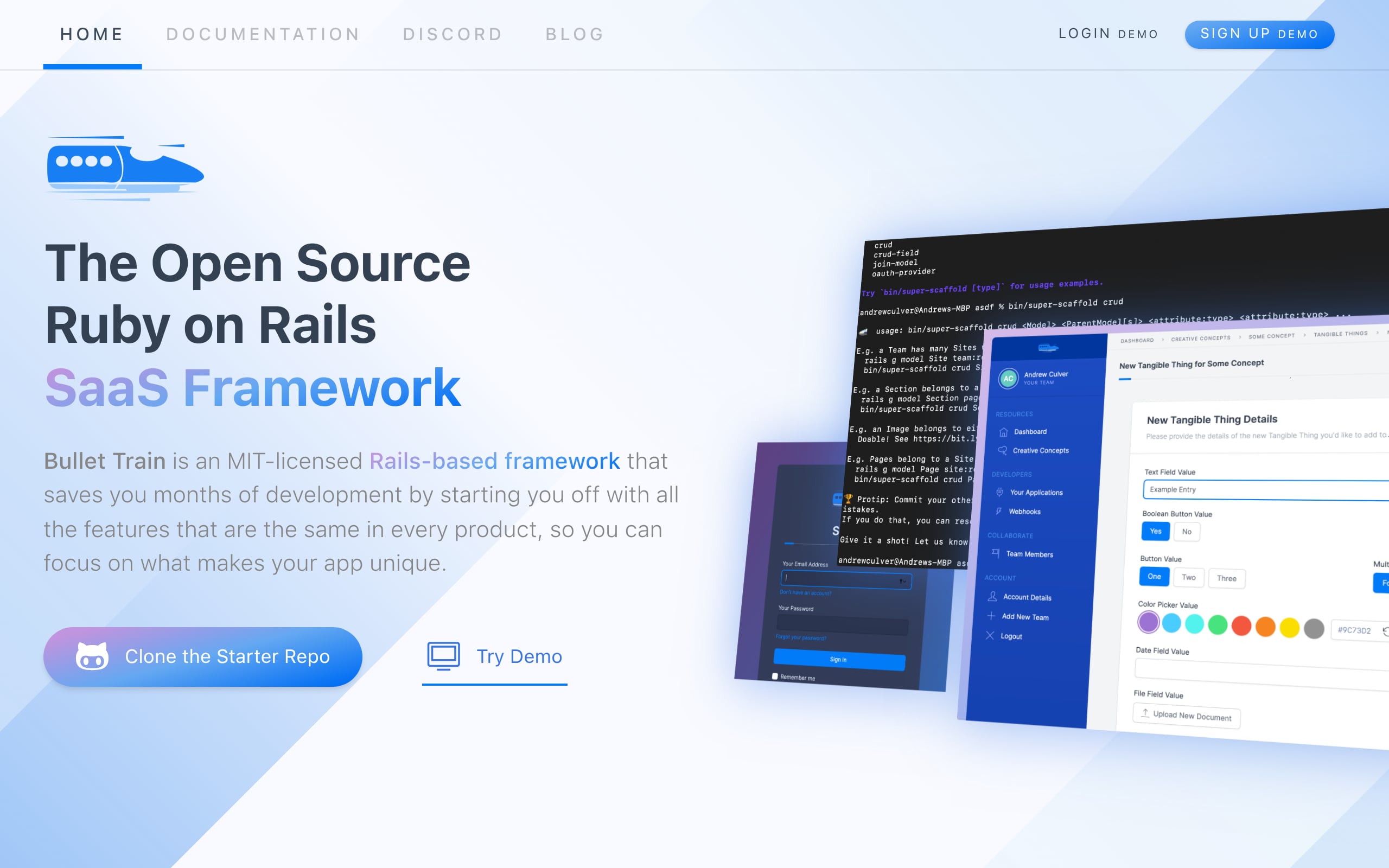
Bullettrain is an MIT‑licensed, pro‑code Rails SaaS framework that packages teams, auth, roles, APIs, billing, and real‑time UI, so you launch faster, scale on SQL, and stay self‑hosted without lock‑in.
Why teams pick it
- Super Scaffolding that generates CRUD screens, navigation, locales, permissions, REST endpoints, serializers, and OpenAPI docs, with room to evolve as you add fields and actions.
- SaaS primitives ready to go: Devise auth with optional 2FA, team invitations, CanCanCan permissions, higher‑level Roles, and a polished Tailwind UI (dark mode included).
- API‑first: versioned REST controllers, OAuth2 via Doorkeeper, OpenAPI 3.1 specs, and robust inbound/outbound webhooks with a delivery, retries, and debugging UI.
Fit, pricing, and deployment
- Best for multi‑tenant B2B/B2C SaaS, customer portals, and internal tools that need first‑class APIs and webhooks from day one.
- Tailored to solo makers and Rails shops using standard Rails patterns (ActiveRecord, CanCanCan, Jbuilder); minimal DSL, low lock‑in, fast onboarding.
- Pricing: MIT open source with no per‑seat or runtime fees; pay only for hosting (e.g., Heroku or Render from roughly $22 to $30/month).
- Self‑host by default; you control uptime, security, and SLAs.
Choose Bullettrain if you want Rails velocity with a modern SaaS skeleton and the freedom to own every line of code.
5) Next.js: Shipfast
Shipfast is a pro‑code Next.js SaaS boilerplate designed to pair with AI code editors, bundling auth, subscriptions, emails, SEO, and deployment patterns, so teams ship production apps quickly while owning the entire stack.
Why teams pick it
- Opinionated Next.js codebase (JS/TS) with both App Router and Pages Router; prebuilt landing, blog/SEO, dashboard, and API patterns get you from idea to scaffold fast.
- Plays nicely with AI tools like Cursor, Copilot, and Claude thanks to consistent structure and naming, speeding accurate generation and edits.
- Core SaaS building blocks: Auth.js/NextAuth, Google OAuth, magic links; Stripe or Lemon Squeezy subscriptions; Resend or Mailgun emails; MongoDB or Supabase defaults (swappable to Postgres/SendGrid).
Fit, pricing, and deployment
- Best for MVPs, subscription SaaS, and AI tools aiming for fastest path to first revenue.
- Ideal for indie founders, agencies, and small product teams fluent in React/Next.js.
- One‑time pricing (January 2026): Starter $199; All‑in $249; optional bundle $299; lifetime updates and unlimited projects.
- Deploy on Vercel or any Node host; fully self‑hostable; SLAs inherited from your providers.
- Limitations: opinionated stack; SSO/SAML and complex multi‑tenant RBAC require custom work.
Choose Shipfast if you want Next.js speed, AI‑augmented development, and total code ownership from day one.
Security, Compliance, and Governance Essentials
Security is a first class requirement, not an add on. Your SaaS development platform must support the controls your customers and regulators expect.
Core practices to verify
- Authentication and authorization patterns that support SSO, OAuth, and granular roles
- Secure secrets management and environment isolation
- Audit logs for data access and configuration changes
- Transport encryption and clear guidance on data at rest
- Options for self hosting or private networking when needed
- Documentation that helps you map to frameworks like SOC 2, ISO 27001, and GDPR
If customers operate in regulated industries, ask for a shared responsibility model that clarifies what the platform handles and what your team must own, and review the vendor’s Data Processing Agreement.
Planning for Scale and Future Proofing
A great launch is only the start. Plan for growth from day one.
What to look for
- Modular architecture so you can split features into separate components and services
- Caching and pagination patterns to keep UI responsive as data volumes increase
- Rate limit handling and retries for third party APIs
- Observability hooks for logs, metrics, and error tracking
- Clear upgrade paths so you can adopt new platform features without breaking changes
A SaaS development platform with strong extensibility and deployment controls will let you scale without rewrites.
Implementation Roadmap: From Idea to MVP Launch
Use this path to move fast while staying in control.
1. Define value, audience, and scope
Write one page covering three things: who the user is, the specific job they're trying to get done, and the smallest feature set that proves your core value. Resist scope creep at this stage. If you can't explain the value in one sentence, the product isn't ready to build yet.
2. Choose a platform and connect data
Pick a SaaS development platform that meets your scorecard across design freedom, backend flexibility, and extensibility. Once chosen, connect your data sources and configure auth. With WeWeb, you can connect Supabase, Xano, or any REST and GraphQL API, or use WeWeb's native backend to keep everything in one place.
3. Build the core flows
Design the screens and workflows that cover your critical user journey, nothing else. Use prebuilt patterns for lists, detail views, and permissions to move fast. WeWeb's AI can generate pages, layouts, and workflows from a prompt, so you're not starting from a blank canvas.
4. Extend with custom components
Once the core flows are solid, identify where you need to differentiate. Import NPM packages, build Vue 3 coded components, or pull in custom components from the marketplace to cover functionality the visual builder doesn't handle out of the box.
5. Ship to staging and test
Push to a staging environment and invite early users. WeWeb supports separate editor, staging, and production environments so you can test safely before going live. Capture feedback, identify friction points, and fix fast. If you need build support, browse our agency directory.
6. Launch and measure
Promote to production. From day one, track activation rate, retention, and time to value. Set a weekly iteration rhythm: review metrics, ship one improvement, repeat. The teams that grow fastest are the ones that treat launch as the beginning of the build, not the end.
Conclusion, Choosing the Right Platform Accelerates MVP and Growth
The right SaaS development platform balances speed, control, and scale. It should let non technical teammates ship confidently while giving developers full escape hatches for custom work.
WeWeb focuses on this balance with AI assistance, a powerful visual editor, custom component support, and different deployment options for startups and enterprises. Get started with WeWeb.
FAQs
What is a SaaS development platform and how is it different from a website builder?
A SaaS development platform focuses on data driven web apps, roles, permissions, and workflows. Website builders focus on marketing pages and content. Platforms like WeWeb combine visual editing with data connections and logic so you can ship production apps.
Which SaaS development platform is best for an MVP in 2026?
The best choice depends on your data sources, team skills, and compliance needs. If you want a visual editor with AI assist, backend freedom, custom Vue components, and optional self hosting, try WeWeb.
Can a SaaS development platform handle enterprise security and compliance?
Yes, if it supports strong auth, audit logs, environment isolation, and flexible hosting. WeWeb is used by enterprises and offers options that help teams meet standards.
How does WeWeb compare to other options?
Compared to vibe coding tools like Lovable, Replit, and Bolt, WeWeb adds a full visual editor to refine AI output. Compared to no-code tools like Bubble, Softr, and FlutterFlow, WeWeb targets professional web apps with backend freedom, self hosting choices, and code friendly extensibility. See WeWeb alternatives for a deeper comparison.
Will I outgrow a platform as my product scales?
Not if you choose one that supports custom components, modular builds, and bring your own backend. A platform like WeWeb keeps speed early and control later.
Can non developers maintain apps built on a platform?
Yes. Visual editors and clear workflows make it easier for product and operations teams to iterate safely. Developers can still extend with code where needed.