The Auth0 integration gives you a complete authentication layer for your WeWeb app:
You can handle user signup and login, manage roles, restrict page access while staying in control of routing, permissions, and UI inside WeWeb:
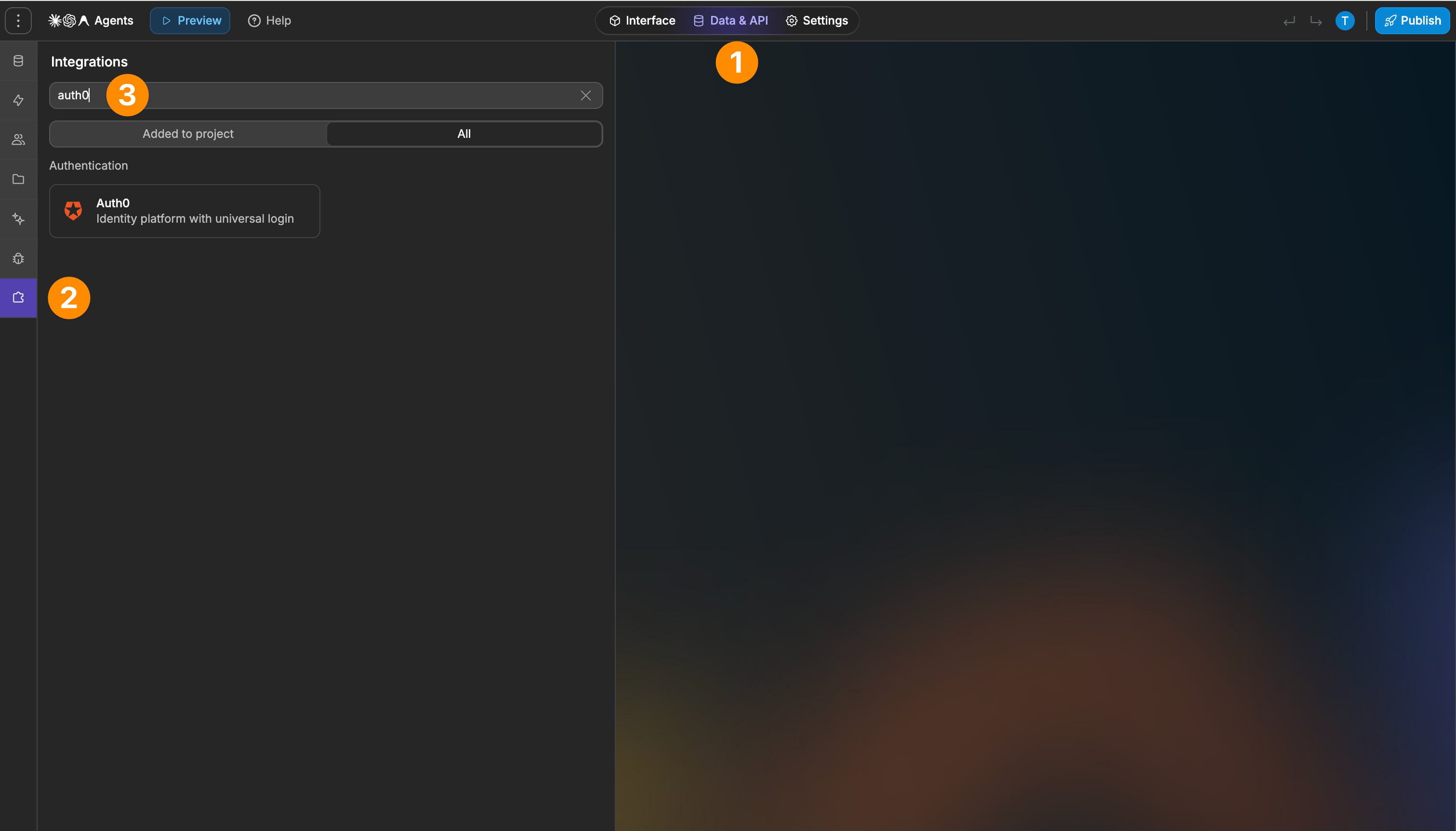
Connect your Auth0 tenant to WeWeb with domain, token, and app name
Trigger signup and login flows using Auth0 actions
Redirect users after login or logout
Manage roles in Auth0 and sync them into WeWeb
Create user groups in WeWeb based on roles
Support both authenticated-only sections and role-gated pages
Customize the Auth0 universal login UI
What WeWeb supports natively
Category
Feature
What it does
Setup
Auth0 configuration
Connects a WeWeb project to Auth0 using domain, management API token, and default SPA application name.
Setup
Automatic app creation in Auth0
Automatically creates a Machine-to-Machine app and a Single Page Application in Auth0 after configuration.
Setup
Custom Auth0 domain support
Lets you set a custom Auth0 domain in the WeWeb Editor and republish, without extra steps in Auth0.
Redirects
Login redirect page
Defines which page users land on after a successful Auth0 login in both preview and production.
Redirects
Logout redirect page
Defines which page users are sent to after logging out, matching Allowed Logout URLs in Auth0.
Redirects
Callback & web origin handling
Surfaces the URLs that must be added to Allowed Callback URLs, Allowed Logout URLs, and Allowed Web Origins in Auth0 so the flows work from the editor and the live app.
UI elements
Auth0 login button/flow
Provides a login action/element that triggers the Auth0 hosted login, then returns the user to the configured redirect page.
UI elements
Auth0 signup flow
Provides a signup action/element wired to Auth0 so new accounts are created and users are redirected into the app.
UI elements
Auth0 logout action
Adds a logout action that clears the session and sends the user to the defined logout page.
UI elements
Profile / current user info
Allows displaying the authenticated user’s profile data (email, name, etc.) pulled from Auth0 within WeWeb pages.
Auth state
Current user context
Exposes the “current user” object to WeWeb so you can show/hide components and personalize the UI based on whether a user is logged in.
Roles & permissions
Sync Auth0 roles into WeWeb
Automatically imports user roles defined in Auth0 so they can be referenced on the WeWeb side.
Roles & permissions
User groups in WeWeb
Lets you define user groups in WeWeb that map to one or more Auth0 roles.
Roles & permissions
Page-level access control
Allows restricting access to pages based on user groups/roles, effectively gating content and admin areas.
Security
Machine-to-Machine app handling
Uses an Auth0 Machine-to-Machine application (API Explorer Application) so WeWeb can securely query roles and management data.
Multi-env
Editor + live URL support
Supports adding both editor URLs and production URLs to Auth0 so login flows work inside the editor and on the published domain.
Why use WeWeb with Auth0
Auth0 handles the identity infrastructure while WeWeb gives you control over how authentication shapes your app’s navigation, content, and permissions.
You can define exactly how users move through your app after logging in, what they see, and which actions are allowed based on their role:
Gate pages or sections based on user roles synced directly from Auth0
Personalize onboarding and routing through workflows
Keep your app secure while maintaining a custom user experience
Perfect for:
Member-only dashboards and client portals
Multi-role applications such as admin panels or internal tools
SaaS products that require secure authentication with personalized redirects
Public landing pages with private, authenticated sections
Always test both preview URLs and live URLs in Auth0’s allowed lists
Use a dedicated public redirect page before sending users to private areas
Keep roles organized in Auth0 so user groups in WeWeb remain clear
For multi-role apps, create separate user groups for clean permissions
Test flows regularly via Auth0’s user list and activity logs
Limitations
Auth0 requires precise URL configuration: a missing callback or logout URL can break flows
Multi-role groups in WeWeb use logical AND, not OR
Customization of Auth0’s login UI is limited to what the Branding section supports
FAQs
1. How do I connect Auth0 to a WeWeb project?
Add Auth0 to WeWeb, then paste your Auth0 domain and management API token into the settings along with a default SPA application name.
Auth0 will then automatically create a Machine‑to‑Machine application and an SPA that WeWeb uses for authentication.
2. What authentication flows does Auth0 support natively?
You can add login, signup, logout, and profile actions/elements to your UI without writing custom OAuth code.
3. How do redirects and callback URLs work with Auth0 and WeWeb?
In the settings you define login and logout redirect pages, and WeWeb surfaces the URLs that must be added as Allowed Callback URLs, Allowed Logout URLs, and Allowed Web Origins in Auth0. You should include both editor URLs and your production domain in these lists so auth works in preview and after publishing.
4. Can I use a custom Auth0 domain with WeWeb?
Yes, you can set your custom Auth0 domain directly in the Auth0 plugin configuration and republish the project. The underlying Management API app can still use the standard Auth0 domain while your users authenticate through the custom domain.
5. How does WeWeb handle roles and permissions from Auth0?
You define roles and permissions in Auth0 first, then WeWeb can import those roles and expose them as user groups you can target in the Editor. Page settings let you restrict access based on these groups, so only users with certain Auth0 roles can access specific pages.
6. How do I gate pages or content using Auth0 in WeWeb?
After enabling Auth0, you create user groups mapped to Auth0 roles and then, in page settings, mark pages as private and restricted to specific groups. Unauthenticated users or users without the required group are redirected to the page defined in the configuration.
7. How can I access the current authenticated user’s data in WeWeb?
The configuration exposes a “current user” context so you can display profile information like email or name and conditionally show components based on whether the user is logged in. This context is also used to drive logic such as showing “Log in” vs “Log out” buttons or personalizing dashboards.
8. How do I use Auth0 with a backend like Xano or Supabase from WeWeb?
Auth0 authenticates the user and issues a token, and WeWeb then passes that token to your backend when calling secured APIs or fetching protected collections. Your backend must validate JWTs and enforce row‑level security so only data for the current user (or role) is returned.
9. What are common Auth0–WeWeb configuration issues?
Frequent problems include callback URL mismatch errors, misconfigured Allowed Web Origins, and login flows breaking in the editor because editor URLs were not added in Auth0. Another recurring issue is roles/permissions not appearing in WeWeb because RBAC and “add permissions in the access token” weren’t properly enabled in Auth0.
10. When should I consider WeWeb’s native auth instead of Auth0?
Auth0 is best when you need enterprise‑grade SSO, social logins, and centralized identity, while WeWeb’s native auth is aimed at simpler use cases. For complex multi‑tenant or organization features like org invitations, you usually keep Auth0 as the identity provider and implement the org logic in your backend and UI.