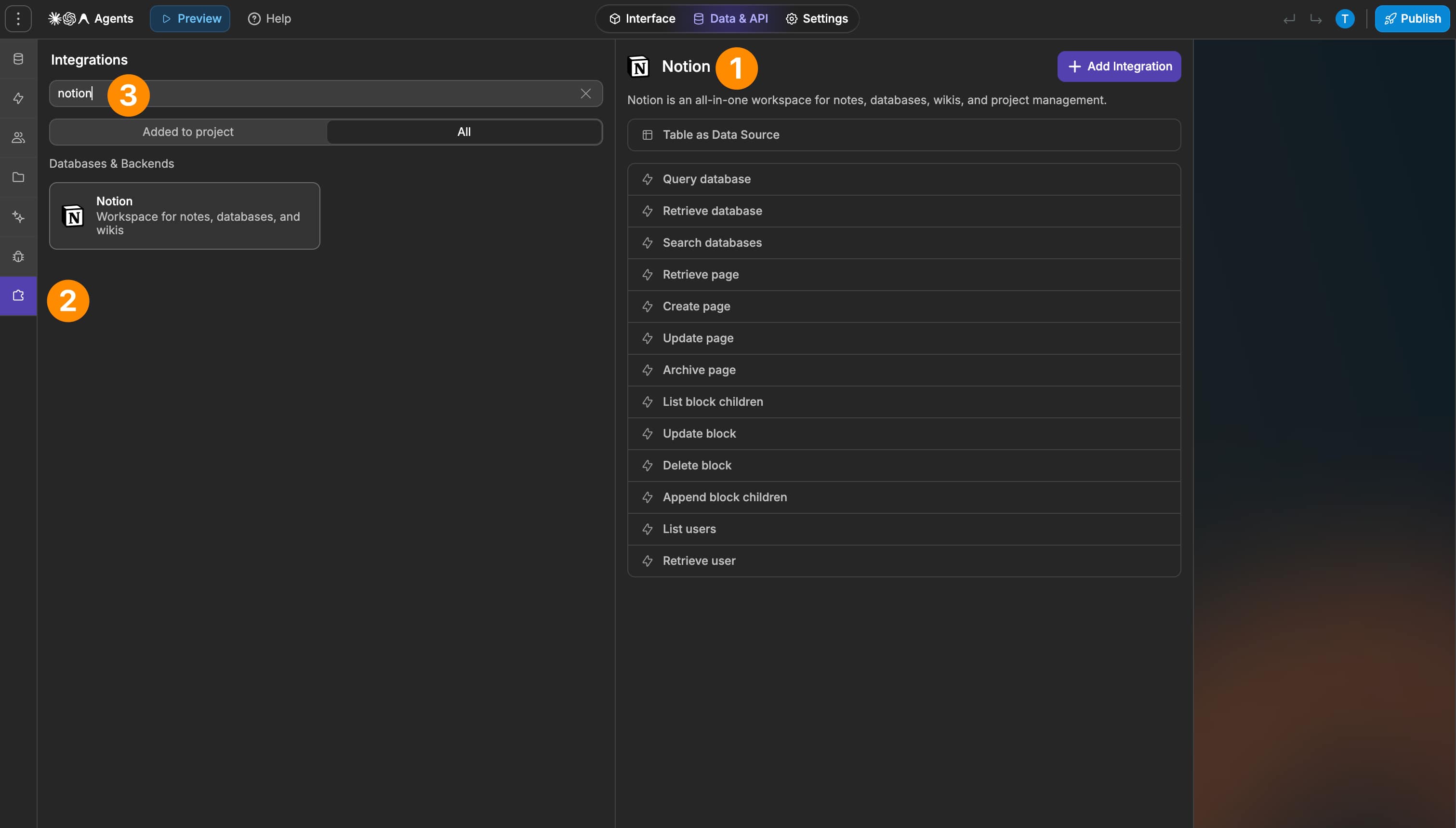
The Notion integration gives you different ways to work with Notion from WeWeb:
Use Notion as a data source to access database data
Query, retrieve, and search Notion databases
Create, retrieve, update, and archive pages
Retrieve, append, update, and delete blocks
Retrieve users from your Notion workspace
Use Notion data and content as part of your backend workflows
What WeWeb supports natively
Category
Feature
What it does
Data
Notion data source
Connect to Notion and access database data in WeWeb
Databases
Query database
Query records from a Notion database
Databases
Retrieve database
Retrieve details for a specific Notion database
Databases
Search databases
Search for databases available through the connected Notion account
Pages
Retrieve page
Retrieve the details of a specific Notion page
Pages
Create page
Create a new page in Notion
Pages
Update page
Update an existing Notion page
Pages
Archive page
Archive an existing Notion page
Blocks
List block children
Retrieve the child blocks contained within a page or block
Blocks
Append block children
Add new blocks to an existing Notion page or block
Blocks
Update block
Update an existing Notion block
Blocks
Delete block
Delete an existing Notion block
Users
List users
Retrieve users available in the connected Notion workspace
Users
Retrieve user
Retrieve details for a specific Notion user
Authentication
Notion connection
Connect your Notion account using an API access token
Why use WeWeb with Notion
Notion gives teams a flexible place to manage structured information and content. WeWeb lets you turn that information into custom app experiences and connect it to your backend workflows.
Perfect for:
Building apps powered by content stored in Notion
Displaying Notion database data in custom interfaces
Using Notion as a lightweight CMS
Building internal tools around existing Notion data
Creating or updating Notion pages from app workflows
Adding content to Notion pages programmatically
Syncing app actions with Notion content
Building workflows around Notion databases, pages, and users
And more…
Integrating Notion with WeWeb
Integrating Notion with WeWeb is straightforward:
Get your Notion API access token from your Notion connection settings
Add Notion as an integration in WeWeb and create a connection using the token
Add Notion as a data source when you want to access database data in your app
Create or open a backend workflow when you want to interact with Notion through actions
Choose the database, page, block, or user action you need
Provide the relevant Notion resource IDs and data required by the action
Best practices
Use the Notion data source when you primarily need to retrieve and display database data in your app
Use backend workflow actions when you need to create, update, archive, or otherwise interact with Notion resources
Keep the database, page, and block IDs you need accessible when configuring workflows
Use Retrieve page for page-level information and List block children for the content contained within the page
Keep your Notion database structure consistent when relying on it as an application data source
Test create and update operations with representative Notion content before using them in production workflows
Make sure the Notion connection has access to the resources your WeWeb app needs to interact with
Limitations
Actions that target specific Notion resources require the relevant database, page, block, or user identifiers
Retrieving a page does not by itself return all of the content contained inside it; use List block children to access its blocks
Data source view configuration is currently exposed as JSON rather than through a dedicated visual configuration interface
FAQs
What can I do with the Notion integration?
You can use Notion as a WeWeb data source and interact with Notion databases, pages, blocks, and users from backend workflows.
This includes querying databases, creating and updating pages, managing page blocks, and retrieving workspace users.
What do I need to connect Notion to WeWeb?
You need a Notion API access token, which you can get from your Notion connection settings.
Use this token when creating your Notion connection in WeWeb.
Can I use Notion as a data source in WeWeb?
Yes. Notion can be added as a data source so you can access database data from your WeWeb app.
Can I use Notion in backend workflows?
Yes. The integration includes backend workflow actions for working with databases, pages, blocks, and users.
Can I query Notion databases?
Yes. The integration includes Query database, Retrieve database, and Search databases actions.
Can I create and update Notion pages from WeWeb?
Yes. You can create new pages, retrieve existing pages, update them, and archive pages from backend workflows.
Can I manage the content inside a Notion page?
Yes. Notion page content is represented as blocks.
You can list block children, append new blocks, update existing blocks, and delete blocks from WeWeb backend workflows.
Can I retrieve Notion workspace users?
Yes. Use List users to retrieve workspace users or Retrieve user to get details for a specific user.
Do I need Notion resource IDs when using workflow actions?
Actions that target a specific database, page, block, or user require the relevant Notion identifier.
Can I configure Notion data source views visually?
The current view configuration is exposed as JSON objects rather than through a dedicated visual configuration interface.